Last Updated: September 27, 2026
StarTech.com makes docks mostly for business and IT deployments, and its TB4CDOCK is a Thunderbolt 4 dock that prioritises expansion. Instead of dedicated HDMI or DisplayPort outputs, it offers three downstream Thunderbolt 4/USB4 ports, four USB-A ports, an SD reader, Gigabit Ethernet and 96W of host charging. It is a flexible option for users who connect Thunderbolt monitors, fast drives or additional docks. This review covers its specifications, display handling and fit for different users.
📄 In This Review
Key specifications
| Feature | StarTech TB4CDOCK (per StarTech datasheet) |
|---|---|
| Connection | Thunderbolt 4 host port, front-facing |
| Host charging | Up to 96W |
| Power adapter | 135W external |
| Downstream Thunderbolt 4/USB4 | 3 ports, 15W each |
| USB-A | 4 ports, one with BC 1.2 charging (7.5W) |
| Video | Via Thunderbolt ports: dual 4K60 or single 5K/6K/8K |
| Networking | Gigabit Ethernet |
| Other | SD card reader, audio, security slots |
| Cable | 0.8m Thunderbolt 4 cable included |
Check StarTech’s current product page for updates to compatibility and specifications.
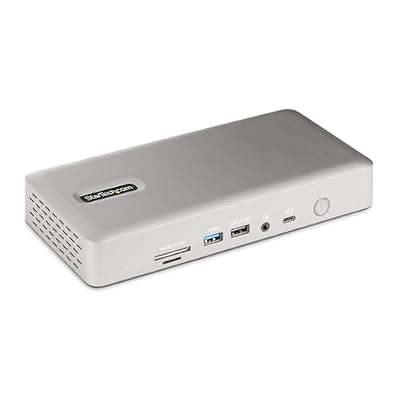
StarTech Thunderbolt 4 Dock, Quad 4K Win, Dual 4K Mac, 16-Port 40Gbps, 100W
Included for 'StarTech Thunderbolt Dock review' because the listing specifies Quad 4K Win and Dual 4K Mac, details this guide uses to compare options.
View on Amazon
StarTech Thunderbolt 5 USB4 Dock, Dual 8K 60Hz, Triple 4K, 140W, 2.5GbE
Included for 'StarTech Thunderbolt Dock review' because the listing specifies Dual 8K 60Hz and Triple 4K, details this guide uses to compare options.
View on Amazon
StarTech Driverless Thunderbolt 3 Dual 4K 60Hz HDMI Mini Dock with GbE
Included for 'StarTech Thunderbolt Dock review' as a relevant option in this category; details come from the product listing.
View on Amazon
StarTech Thunderbolt 5 Universal Docking Station, Quad Monitor, 140W PD
Included for 'StarTech Thunderbolt Dock review' because the listing specifies Quad Monitor and 140W PD, details this guide uses to compare options.
View on AmazonDesign
See also: 1440p vs 4K Monitor for Gaming: Which Resolution Fits Your GPU, Desk and Budget • Best Monitor for MacBook Air: Two USB-C 4K Screens and Six Adapter-Dependent Alternatives
The TB4CDOCK is a compact, business-style dock with the host port on the front and most other ports at the rear. Security slots allow it to be locked to a desk in shared offices. StarTech includes Connectivity Tools software for features such as MAC address pass-through, Wi-Fi auto switching and USB event monitoring, which IT teams find useful.
Display support
All video goes through the three downstream Thunderbolt 4 ports. You can connect Thunderbolt or USB-C monitors directly, or use USB-C to DisplayPort or HDMI cables. StarTech lists dual 4K 60Hz or a single 5K, 6K or 8K display, depending on the host. Current listings indicate dual displays on Pro and Max MacBooks and single displays on base M-series models, following Apple’s limits. Windows Thunderbolt 4 laptops typically support dual 4K.
The lack of HDMI or DisplayPort outputs means budgeting for the right cables; the upside is flexibility and support for high-resolution USB-C monitors without adapters.
Performance
Charging
96W host charging covers most ultrabooks, 14-inch laptops and many 15 to 16-inch business laptops. Downstream Thunderbolt ports supply 15W each for bus-powered drives.
Expansion
Three downstream Thunderbolt 4 ports is generous at this tier, allowing fast external SSDs, a Thunderbolt display and another hub or dock. StarTech notes up to five devices can be daisy-chained from the Thunderbolt ports.
Networking and USB
Gigabit Ethernet and four USB-A ports cover keyboards, mice, webcams and headsets.
Strengths and weaknesses
Strengths
Three downstream Thunderbolt 4 ports, 96W charging, business management software, security slots, broad Thunderbolt/USB4 compatibility and a compact footprint.
Weaknesses
No native HDMI or DisplayPort, so cables or adapters are needed for most monitors. Gigabit rather than 2.5GbE. The host port on the front can make cable routing untidy on some desks.
Who should buy it
The TB4CDOCK suits business users and IT deployments that value management features, and power users with USB-C or Thunderbolt monitors and fast drives. Users with HDMI monitors who want plug-and-play dual displays may prefer the Belkin Connect Pro or Dell WD22TB4.
Deployment tips
For IT teams rolling out several docks, standardise the display cables at the same time: a USB-C to DisplayPort cable per monitor avoids support calls about adapters. Install StarTech Connectivity Tools where MAC address pass-through or Wi-Fi auto-switching are required by network policy. Use the security slots in shared hot-desk areas. On standing desks, mount the dock under the front edge of the desktop so the front-facing host port is close to the laptop and the 0.8m cable is not strained at full height. Test sleep and wake behaviour with your standard laptop image, and keep firmware and the laptop’s Thunderbolt drivers updated, as users have reported occasional display wake issues that reconnecting the cable resolves.
FAQ
Does the StarTech TB4CDOCK work with Mac?
Current listings indicate macOS compatibility with Thunderbolt Macs, with display support following each Mac’s native limits. Older listings described Windows-focused compatibility, so check StarTech’s current page.
What cables do I need for my monitors?
USB-C to DisplayPort or USB-C to HDMI cables for standard monitors, or a USB-C/Thunderbolt cable for monitors with USB-C input.
Bottom line
The StarTech TB4CDOCK is a flexible Thunderbolt 4 dock with three downstream Thunderbolt ports, 96W charging and business-friendly software. Plan on buying display cables, and check StarTech’s current spec sheet and compatibility list before buying.
Related Reviews & Guides
5 Best Monitor Arms for Beginners (2026)
Canon Imageformula R40II Review: Pros, Cons and Who It’s For