Last Updated: October 4, 2026
The Canon imageFORMULA R40II is a sensible choice for small offices and home offices that want a reliable desktop document scanner with duplex scanning and a sheet feeder, without stepping into departmental-scanner pricing. It is built to turn stacks of invoices, receipts, contracts and records into searchable digital files with minimal fuss, and it can send scans to cloud storage. It typically sells around $200–$260.
Choose it if you scan batches of paperwork every week and want both sides of each page captured in one pass. Skip it if you mainly scan photos, books or fragile originals, which are better on a flatbed, or if you need a scanner that works on its own over Wi-Fi without a computer. For everyday paper-to-PDF work in a small business, the R40II covers the core jobs well.
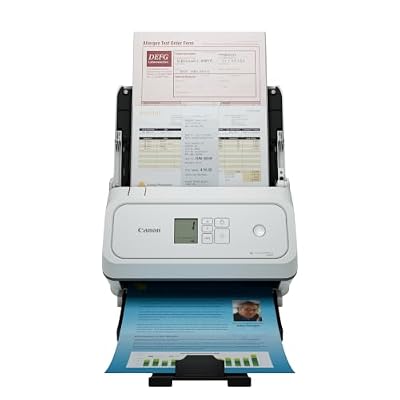
Canon imageFORMULA R40II Office Document Scanner - Duplex Scanning, Easy Setup, Scans a Wide Variety of Documents, Scans to Cloud
Included for 'Canon Imageformula R40II Review: Pros, Cons and Who It's For' as a representative home product in this roundup; selection reflects the product set returned for this topic.
View on Amazon📄 In This Review
Who Should Buy the R40II
- Small businesses and freelancers digitizing invoices, receipts and client paperwork for bookkeeping.
- Home offices going paperless with tax records, medical bills and household documents.
- Front desks scanning intake forms, ID copies and signed agreements throughout the day.
- Anyone upgrading from a slow all-in-one printer scanner that only scans one side at a time.
Who should look elsewhere
- Photographers and families scanning prints or albums.
- Users who need to scan bound books or thick originals.
- Teams that want a standalone network scanner with a touchscreen and no PC connection.
Key Specs and Context
See also: Best Monitor for MacBook Air: Two USB-C 4K Screens and Six Adapter-Dependent Alternatives • Best Monitor for MacBook Pro: Eight Listings Sorted by Cable, Sharpness and Scaling
Canon’s R-series is the successor to its long-running entry-level office scanners. The original R40, the model this one replaces, was rated at 40 pages per minute (80 images per minute in duplex) with a 60-sheet automatic document feeder. Canon positions the R40II in the same class, so plan around similar throughput, but confirm the final numbers on the current spec sheet.
| Spec | Canon imageFORMULA R40II | Original R40 (for reference) |
|---|---|---|
| Scanner type | Desktop sheet-fed office scanner | Desktop sheet-fed office scanner |
| Duplex scanning | Yes | Yes |
| Rated speed | Same entry-office class; check spec sheet | 40 ppm / 80 ipm |
| Feeder capacity | Check spec sheet | 60 sheets |
| Scan to cloud | Yes | Via software |
| Typical price range | $200–$260 | Older model, variable |
What Stands Out
Duplex scanning saves real time
Many business documents are double-sided: contracts, forms, bank statements. A duplex scanner captures both sides in a single pass, which roughly halves the time compared with flipping pages on a flatbed. Most office scanners in this class also skip blank pages automatically, so single-sided pages in a mixed batch do not leave empty images in the PDF.
Handles a wide variety of documents
Canon highlights the R40II’s ability to scan a wide range of documents. In practice, sheet-fed office scanners in this class are designed to handle plain paper, thin receipts, business cards and thicker card stock, and many include a mode for plastic ID cards. That flexibility matters if your paperwork is not all standard letter-size sheets.
Easy setup and cloud workflows
The R40II is designed for quick setup, connecting by USB to a Windows or Mac computer. Scan-to-cloud support means you can send finished PDFs straight to common cloud storage services, which is useful for shared bookkeeping folders or for working with an accountant remotely.
Searchable PDFs
Canon’s bundled capture software typically includes OCR, turning scans into searchable PDFs. Being able to search a year of receipts for a vendor name is often the single biggest productivity gain of going paperless.
Trade-offs and Limitations
- No flatbed. Bound documents, photos, fragile originals and anything stapled must be handled differently or on a separate flatbed.
- Computer-connected design. It is not intended as a standalone network scanner with its own screen. You will use it through a connected computer.
- Feeder care. Sheet-fed scanners need periodic roller cleaning and eventual roller replacement, especially with heavy daily use.
- Prep still matters. Remove staples and paper clips and straighten curled pages to avoid jams.
Setup and Usage Tips
- Install the software first. Download the current driver and capture software from Canon before connecting the scanner.
- Create scan profiles. Set up separate one-touch profiles, for example “Receipts – color, searchable PDF” and “Contracts – grayscale, 300 dpi”.
- Use 300 dpi for most documents. It balances OCR accuracy and file size. Use 200 dpi for simple text archives and higher only for fine print.
- Fan the stack. Fanning and squaring paper before loading reduces double-feeds.
- Batch by type. Group thin receipts, standard sheets and cards separately for fewer misfeeds.
- Clean the rollers. Wipe the feed rollers regularly as described in the manual to keep feeding reliable.
- Set a naming convention. Use date-based filenames like 2026-10-04_Vendor_Invoice so files sort automatically.
Document Scanner vs. All-in-One Printer
| Factor | Dedicated scanner like R40II | Typical all-in-one printer |
|---|---|---|
| Duplex in one pass | Yes | Often no, or only on pricier models |
| Speed class | Around 40 ppm class | Often well under 20 ppm for scanning |
| Receipts and cards | Designed for mixed media | Frequently jam or skew |
| OCR and profiles | Built into capture software | Basic |
Alternatives
If you need wireless scanning without a PC, look at Wi-Fi models in Canon’s or competitors’ lineups with built-in network support, which usually cost more. If you scan only a few pages per week, a portable single-sheet scanner may be enough. For high-volume departments scanning thousands of pages a day, step up to a scanner with a larger feeder and higher daily duty rating.
FAQ
Does it work with Mac?
Canon supports both Windows and macOS for its office scanners; download the current drivers for your OS version from Canon’s support site.
Can it scan receipts?
Yes, receipts are one of the main use cases for this class of scanner. Very long or crumpled receipts may need a carrier sheet.
Is it good for photos?
It can scan photos, but a flatbed or dedicated photo scanner gives better results and handles prints more gently.
Related Reviews & Guides
Best Webcam with Noise Cancelling Microphone
Best Video Camera for MacBook Pro