Last Updated: October 18, 2026
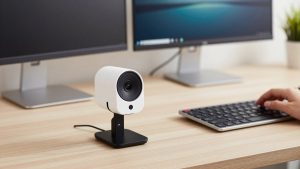
If you use a desktop PC for Zoom, Teams, or Meet and you are tired of juggling a webcam, headset, and crackly monitor speakers, an all-in-one webcam with mic and speaker makes sense. It is one USB device that handles video, voice pickup, and room audio.
For PC use this category is small but confusing. Most products sold this way are not normal webcams. They are mini video bars or conference cams meant to sit under your monitor and fill a home office or small meeting room with sound. Get the wrong size and you will either get weak, tinny audio or an echoey mic that annoys everyone else on the call.
📄 In This Review
What “Webcam with Mic and Speaker” Actually Means
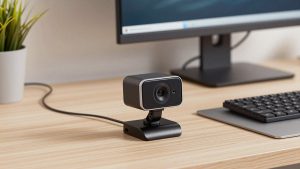
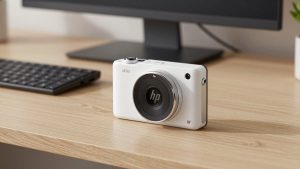
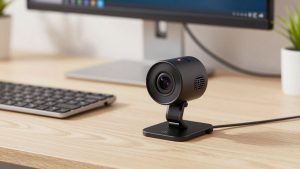
A true all-in-one has three things in one housing: camera, microphone array, and loudspeaker, all running over one USB connection to your PC. Windows sees it as both a camera and an audio device. You select it as speaker and mic in Zoom or Teams and you are done.
That is different from the common workaround: a regular webcam plus a separate USB speakerphone puck on the desk. That two-piece setup often sounds better because the speaker and mics are closer to you, but it means two devices, two cables, and two things for Windows to forget after an update.
For laptops and Macs, the same hardware works, but PC desktops benefit most because most desktop monitors have terrible speakers and no mic at all. If you already wear a headset all day, you do not need this category. Buy a normal webcam without a speaker and save money.
Who Should Buy One — and Who Should Not
See also: Best Monitor for MacBook Air: Two USB-C 4K Screens and Six Adapter-Dependent Alternatives • Best Monitor for MacBook Pro: Eight Listings Sorted by Cable, Sharpness and Scaling
Buy an all-in-one if you take calls at a desktop PC without headphones, you share the PC for calls with one or two other people in the room, or you want visiting family, clients, or coworkers to hear clearly without passing a headset around. They are also useful in a home office where you stand up and move around; a headset mic drops out when you step away, a desk bar keeps picking you up.
Do not buy one if you work in a noisy open space, take sensitive calls, or need the best mic quality for recording. The speakers leak into the mics. Vendors add echo cancellation, but in a glassy room or at high volume it still fails and the other side hears themselves back. In that case a headset or a close-range mic will always win.
Also skip it if you already own a good USB speakerphone. Pairing that with a simple 1080p webcam is usually cheaper and sounds better than replacing both with a cheap all-in-one.
Comparison: All-in-One vs. Separate Setup
The core tradeoff is convenience versus audio quality and placement. A camera wants to be at eye level. A speaker wants to face you. A mic wants to be close to your mouth. An all-in-one forces a compromise.
| Setup Type | Best For | Speaker Quality | Mic Pickup | Typical Failure Mode |
|---|---|---|---|---|
| Compact all-in-one bar for desk | 1 person at a PC, no headset | Good for voice, weak for music | Good to 6-8 ft in quiet room | Echo at high volume, picks up keyboard |
| Wide-angle conference bar | 2-4 people around a PC in small room | Loud, fills 12×12 ft room | Good to 10-13 ft, worse for single voice clarity | Room reverb, distant sound on calls |
| Regular webcam + USB speakerphone puck | Best voice clarity on PC | Clear voice, puck near you | Best noise rejection | More cables, Windows resets defaults |
| Regular webcam + headset | Noisy offices, all-day calls | Private, no leak | Best for others hearing you | Wearing fatigue, you are tethered |
What to Check Before You Buy for PC
First, connection. For a PC, get wired USB-A or USB-C, UVC/UAC plug-and-play with no driver. Avoid Bluetooth-only audio for work calls on Windows. Bluetooth on PC adds latency, drops, and often forces the headset-profile that ruins mic quality. USB is boring and reliable.
Second, speaker reality. Most bars use 2-5W speakers tuned for voice. They sound clear at 60-70% volume and harsh at 100%. Check rated room size, not watts. A personal desk bar will not fill a conference room, and a conference bar at arm’s length will be too loud and cause echo.
Third, mic range and field of view. A 120-degree wide-angle camera paired with a long-range mic array is for groups. For solo PC work, you want 65-90 degrees and a mic focused in front. Wider just shows your messy office and picks up more fan and keyboard noise.
Fourth, Teams/Zoom certification and physical controls. Certification is not just marketing; it usually means the mute button actually syncs with Teams and the echo canceller was tested. At minimum you want a physical mute button and volume controls you can hit without opening Windows sound settings.
One common PC headache: Windows will keep switching back to your monitor speakers after updates. After you plug in the bar, go to Settings – System – Sound and set it as default for both output and input, then also set it inside Zoom and Teams. Otherwise you will get video from the bar but audio from somewhere else.
Which Type to Buy for Your Situation
For solo desktop work in a home office, a compact all-in-one conference webcam with speaker is usually enough. Look for 1080p or 2K, dual mics with noise reduction, and a front-facing speaker. The cheaper 1080p options are fine here; 4K does not improve how you sound and just adds heat and CPU load on older PCs. Spend extra only for better echo cancellation, not more pixels.
For a small huddle space where a PC drives a shared monitor, step up to a larger USB video bar for PC conference room with 4+ mics and a wider 110-120 degree lens. These sit below the TV, plug into the room PC over one USB cable, and can hear people on a couch 8-10 feet away. Tradeoff: you will sound more distant than with a headset, and you need soft furnishings or the room will sound echoey no matter what you buy.
If you already like your webcam, do not replace it. Keep it and add a wired speakerphone puck next to your keyboard as a webcam and speakerphone combo for desk. This is often the best-sounding option for under-desk PCs because the mic is 18 inches from your mouth instead of 3 feet away under your monitor. It is two devices to manage, but failure is easier to fix: if the mic echoes, move the puck, not the whole camera.
Avoid no-name bars that promise 4K, 8 mics, and room-filling bass for very little money. In testing, those tend to fail in the same ways: speaker distortion above 70%, aggressive noise gating that clips the start of sentences, and autofocus hunting under office fluorescents. A simpler 1080p unit from an established office-audio brand will be more consistent on daily calls.
Setup Mistakes That Cause Most Complaints
Placement matters more than specs. Put the bar centered under your monitor, not off to the side on a shelf. Keep it at least 2 feet from a wall corner and away from your PC fans. If callers say they hear typing loudly, move your keyboard back or turn on the low keyboard-noise mode if it has one; most mic arrays point forward and typing directly in front is the worst case.
Do not run PC speakers and the bar speaker at the same time. Mute or unplug monitor audio to prevent feedback. Keep bar volume at 60-75% and use Windows volume for fine control. If you still get echo complaints, lower the speaker 10% before blaming the mic; echo is almost always too much speaker, not a bad mic.
Finally, test before an important call. Record a 20-second Teams test call at your normal sitting distance with your normal fan or HVAC on. Listen for hiss, room echo, and whether your voice fades when you lean back. That one test tells you more than any spec sheet.
FAQ
Will a webcam with speaker work with Zoom, Teams, and Meet on PC?
Yes, if it is USB plug-and-play. Windows should list it as a camera and as a speaker/microphone. You still need to select it inside each app under audio and video settings. Bluetooth models can work but are less reliable on Windows desktops.
Does an all-in-one sound as good as a headset?
No. For the other side hearing you clearly, a headset or close mic always wins, especially in noisy rooms. An all-in-one wins on convenience and for group listening where headsets are impractical.
Can I use it for music or movies too?
You can, but do not buy it for that. These speakers are tuned for voice clarity, not bass. They are fine for YouTube and calls and thin for music. If you want both, use separate desktop speakers.
When is the cheaper option fine?
When you sit alone 2-3 feet away in a quiet room and just need clear two-way voice. A basic 1080p bar with dual mics and echo cancellation is enough. Pay more only for larger rooms, longer mic range, or certified Teams controls.