Last Updated: September 12, 2026
🛒 Best Price Today on Amazon
Prime members get fast, free shipping on everything above, plus member-only deals. New members get a 30-day free trial — cancel anytime.
📄 In This Review
Best Monitor Arm for Beginners (2026): Easy First Upgrades
Buying your first monitor arm can feel intimidating, with talk of VESA patterns, weight ratings, and clamp types. It doesn’t have to be. The best monitor arm for beginners installs in minutes, holds your screen securely, and delivers the two big wins right away: a higher, healthier screen position and a clearer desk. This 2026 guide picks the most beginner-friendly monitor arms and explains everything in plain language.
As an Amazon Associate I earn from qualifying purchases.


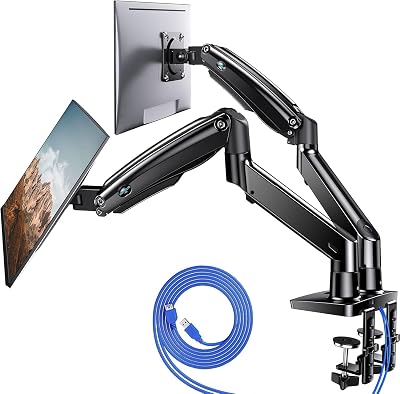


A first monitor arm should be forgiving, not fiddly. The picks below prioritize simple setup and reliable holding over advanced features, and they fit naturally into the layout from our desk setup guide.
| Product | Best For | Standout Feature | Rating |
|---|---|---|---|
| AmazonBasics Single Arm | First-time buyers | Simple tool-light install | 4.5/5 |
| HUANUO Single Monitor Arm | Easy adjustment | Gas-spring smooth motion | 4.6/5 |
| WALI Basic Monitor Mount | Budget beginners | Low-cost sturdy build | 4.4/5 |
| VIVO Pneumatic Arm | Frequent height changes | Effortless one-hand lift | 4.6/5 |
| ErGear Height-Adjustable Arm | Small monitors | Wide compatibility range | 4.5/5 |
Monitor Arm Basics Every Beginner Should Know
Before you buy, learn three simple things. First, VESA: it’s the standard grid of holes on the back of your monitor, usually 75x75mm or 100x100mm, that the arm screws into. Second, weight rating: make sure the arm comfortably covers your monitor’s weight. Third, mount type: a C-clamp grabs the desk edge with no drilling, which is what most beginners want. Get those right and you’re set. Our ergonomics checklist explains why screen height matters so much.
AmazonBasics Single Arm — Best for First-Time Buyers
The AmazonBasics single arm is the classic starting point. Clear instructions, a straightforward C-clamp, and just enough adjustment make it hard to get wrong, and it reliably delivers the core benefits of any monitor arm at a gentle price.
Pros: Easy install, affordable, dependable. Cons: Motion is stiffer than premium arms. It’s the safe, low-risk first arm and pairs with a cable management guide for a clean finish.
HUANUO Single Monitor Arm — Best for Easy Adjustment
The HUANUO single arm uses a gas spring, which means you can nudge your screen up, down, or forward with one hand and it stays put. That smooth motion makes a beginner feel like a pro from day one, without any tension tuning headaches.
Pros: Smooth one-hand movement, tidy cable clips, good value. Cons: Slightly bulkier head. It’s a beginner arm that won’t feel limiting as you get comfortable, and it suits a dual monitor upgrade path.
WALI Basic Monitor Mount — Best Budget Beginner Arm
For the lowest-risk entry, the WALI basic mount keeps things simple and cheap. It’s a sturdy tilt-and-swivel arm that covers the fundamentals, screen height and freed desk space, without extra features to learn or pay for.
Pros: Very affordable, solid build, easy assembly. Cons: Limited full-motion range. If you just want to try a monitor arm without spending much, it’s ideal.
VIVO Pneumatic Arm — Best for Frequent Height Changes
If you already know you’ll adjust your screen often, the VIVO pneumatic arm makes it effortless. A gentle push raises or lowers the monitor smoothly, so switching between sitting tasks or sharing your screen never feels like a chore.
Pros: Effortless lift, smooth range, stable hold. Cons: Needs occasional tension check. It’s a beginner arm that grows with you and complements a standing desk pairing guide.
ErGear Height-Adjustable Arm — Best for Small Monitors
Not every beginner has a big screen. The ErGear arm shines with smaller and mid-size monitors, offering wide compatibility and easy height tweaks that suit a compact laptop-plus-monitor setup perfectly.
Pros: Broad compatibility, light and easy, good for small screens. Cons: Less suited to heavy displays. For a modest first monitor, it’s a comfortable match.
How to Choose Your First Monitor Arm
Keep it simple. Confirm your monitor has VESA holes and note the pattern, then pick an arm whose weight range covers your screen with a little headroom. Choose a C-clamp mount unless your desk has a cable grommet you’d rather use. If you’ll move the screen a lot, spend slightly more for a gas-spring or pneumatic arm; if you’ll set it once and forget it, a basic tilt arm is plenty. Read the install steps before buying so nothing surprises you.
Frequently Asked Questions
See also: 1440p vs 4K Monitor for Gaming: Which Resolution Fits Your GPU, Desk and Budget • Best Monitor for MacBook Air: Two USB-C 4K Screens and Six Adapter-Dependent Alternatives
What does VESA mean and how do I find mine?
VESA refers to the standardized pattern of screw holes on the back of most monitors that mounting hardware attaches to. To find yours, look at the rear of your monitor for four holes in a square and measure the distance between them in millimeters, commonly 75×75 or 100×100. Match that pattern to the arm’s supported sizes, and use an adapter plate if your monitor lacks VESA holes.
Is a monitor arm hard to install for a beginner?
Not at all. Most beginner monitor arms use a C-clamp that tightens onto the desk edge without drilling, and attaching the monitor is usually just four screws into the VESA holes. The whole process typically takes ten to fifteen minutes with the included hardware. Reading the instructions once before starting and checking the weight rating are the only real prerequisites.
Should a beginner get a single or dual monitor arm?
Start with a single arm if you use one screen, since it’s simpler, cheaper, and easier to install correctly the first time. Choose a dual arm only if you actually run two monitors, because managing two screens adds weight and complexity. You can always add a second single arm later, so there’s no need to over-buy on your first purchase.
Will a monitor arm work with my desk?
Most C-clamp monitor arms fit standard desks with an edge thickness within a common range, so measure your desk’s edge and compare it to the arm’s clamp specification. Thin, glass, or hollow-core surfaces need extra care and sometimes a support plate. If your desk has a cable grommet hole, a grommet-mount arm offers an even more secure, cleaner alternative to the edge clamp.
Related Reviews & Guides

Best Monitor for MacBook Air: Two USB-C 4K Screens and Six Adapter-Dependent Alternatives
6 Best Thunderbolt Docking Stations For Laptop 2026