Last Updated: October 18, 2026
If you stream live for a living, your webcam is a business tool. Viewers decide in seconds whether your image looks clean and professional or soft, noisy, and hard to watch. You do not need the most expensive camera, but you do need reliable autofocus, good low-light handling, and 1080p or better that holds up after platform compression.
Most camming happens in a bedroom or home office with mixed lighting, long sessions of 2-4 hours, and a laptop or Mac doing encoding at the same time. That changes what to buy compared to someone who just takes Zoom calls.
📄 In This Review
What actually matters for camming
Resolution is less important than most listings suggest. Almost every cam site re-encodes you to 1080p or 720p anyway. What viewers notice is sharp focus on your face, smooth motion, natural skin tones, and low noise in dim light.
Prioritize these in order: autofocus speed, low-light performance and sensor size, 60 fps at 1080p if you move a lot, manual exposure and white balance controls, and a standard tripod mount. 4K sounds better on paper but often means worse low light and more CPU load for little visible gain after compression.
Failure mode to watch: cheap 4K webcams that drop to 15-20 fps in low light. Motion turns choppy, autofocus hunts every time you lean forward, and audio drifts out of sync. A solid 1080p camera at a locked 30 or 60 fps looks far more professional.
Fix lighting before you upgrade the camera
See also: Best Monitor for MacBook Air: Two USB-C 4K Screens and Six Adapter-Dependent Alternatives • Best Monitor for MacBook Pro: Eight Listings Sorted by Cable, Sharpness and Scaling
No webcam can save a backlit room. If you sit with a window behind you, you will be a silhouette even on a $300 camera. Put your main light in front of you, slightly above eye level, and kill bright lights behind you.
A single large, diffused dedicated key light will improve a $70 webcam more than upgrading to a $200 webcam in a dark room. Ring lights are fine for close-up face work, but panel lights with a diffuser give softer skin and less harsh reflection in glasses. Keep room lights warm and steady, avoid auto-brightness lamps that flicker on camera.
Hands-on tip: set exposure manually in the camera app. Auto-exposure will pulse brighter and darker every time you move or change outfits. Lock it, then adjust your light to match. It takes five minutes and makes long shows far less tiring to watch.
Which type to buy
There are really three workable tiers. Do not buy a no-name 4K camera with no software support just because the sample images look sharp. Driver and software support matter when you stream for hours.
| Type | Best for | Strengths | Trade-offs |
|---|---|---|---|
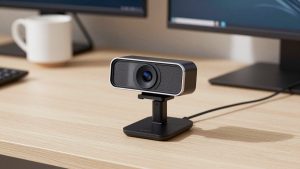
| Budget 1080p 30fps autofocus webcam | Starting out, second angle, laptop streaming | Cheap, low CPU load, plug-and-play on Mac and PC | Soft in low light, narrow dynamic range, basic mics |
| Mid-range 1080p 60fps or 1440p webcam | Full-time streaming in home office | Smoother motion, larger sensor, better auto-focus, manual controls | Needs good USB port and light to hit 60fps, costs 2-3x budget |
| Mirrorless / DSLR as webcam via USB or capture card | Established earners who want shallow depth-of-field | Best low light, interchangeable lenses, pro look | Expensive, runs hot, needs dummy battery, capture card, and more setup |
For most people starting or going full-time, the sweet spot is a mid-range 1080p 60fps autofocus webcam from a brand with real desktop software for focus, framing, and firmware updates. You get reliable face tracking, you can turn off aggressive auto-focus if it hunts, and it will not overheat after three hours like many small 4K models do.
A basic 4K autofocus webcam only makes sense if you crop in for close-ups while still delivering 1080p, or you also record clips for sale and want extra detail to edit with. For pure live streaming, the cheaper 1080p option is often fine and easier on older laptops and MacBook Airs.
Who should skip a webcam entirely and use a mirrorless camera? Only if you already own one, you stream from a fixed desk where you can leave it rigged, and you are willing to manage batteries, HDMI clean output, and heat. The image is better, but a dropped USB connection mid-show is a real failure mode if you use cheap adapters.
Audio, framing, and long-session reliability
Viewers forgive 720p before they forgive bad audio. Built-in webcam mics pick up fans, keyboards, and room echo. Even a $40 USB condenser or lav mic placed close to you beats any webcam mic. If you move around, a wireless lav is worth it to avoid volume swings.
Mounting matters more than specs. Laptop-height cameras shoot up your nose and pick up ceiling lights. Get the lens to eye level or slightly above with a tripod or monitor mount. A standard 1/4-inch tripod thread is essential. Clamp-only models slip when cables tug.
For long sessions, test for heat. Run the camera for 90 minutes in your actual lighting before you go live. Some compact cameras get soft or disconnect when hot. Keep firmware updated, use a powered USB port directly on the machine rather than an unpowered hub, and close background apps that fight for the camera.
Laptop and Mac notes
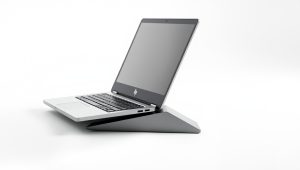
On M1/M2/M3 Macs, most modern UVC webcams work without drivers, but advanced features like background blur, auto-framing, and manual exposure often require the vendor’s Mac app, which can lag behind Windows. Check Mac support before you buy if you use OBS for Mac or browser-based streaming sites.
Windows laptops are less picky, but USB bandwidth is the common failure. Do not run a 4K webcam, external mic, and external drive on the same cheap hub. Put the camera on its own port. If OBS shows stutter but your preview looks fine, drop to 1080p30 and turn off the camera’s auto-focus and auto low-light boost.
Privacy shutters and mute LEDs are useful if you work from the same desk you live at. A physical shutter avoids accidental preview leaks when switching between work calls and streaming apps.
FAQ
Is 4K necessary for camming?
No. Most platforms compress to 1080p or lower. Clean 1080p with good light and locked focus looks better than noisy 4K. Buy 4K only if you crop or also record high-res clips.
Is 60fps worth it?
Yes if you dance, move around, or do a lot of close motion. It looks smoother and more fluid. If you mostly sit and talk, 30fps with better low light is fine and uses less CPU.
Why does my webcam look great in the app but blurry live?
That is compression plus low upload speed. Test with 10 Mbps or higher stable upload, use Ethernet if possible, lower your streaming bitrate to match, and add light. More light lets the camera use less gain, which compresses much cleaner.
Can I use two cameras?
Yes, most streaming software supports it, but use two identical or similar models to avoid color mismatch, and put them on separate USB ports. A budget second angle is fine; spend your money on the main face camera and lighting.