Last Updated: October 18, 2026
If you mean taking Zoom and Teams calls from a deck, backyard office, job site trailer, or cabin, a standard indoor webcam will disappoint you fast. It blows out the sky, turns your face dark, picks up every gust of wind, and overheats or fogs up. There is no perfect outdoor video-call webcam, but there are setups that work reliably if you match them to how exposed you really are.
📄 In This Review
Why indoor webcams fail outside
Indoors, light is dim and even. Outdoors, it is 10 to 50 times brighter and constantly changing. Most work webcams have small sensors and no real HDR, so they expose for the bright background and leave you as a silhouette. Auto white balance also swings when clouds pass or you sit under green trees.
Sound is the second failure. The tiny dual mics on a laptop clip or desk webcam are tuned for a quiet room. Outside, wind hits the mic diaphragm directly and creates low-frequency thumping that noise removal cannot fully fix. Traffic, birds, leaf blowers, and echo off a house wall make it worse.
The third failure is physical. Consumer webcams are not sealed. Morning dew, light rain, dust, and direct sun heat will kill them early. A webcam left in full sun in a window or on a fence post can hit 140F / 60C internally and shut down mid-call.
What actually matters for outdoor calls
See also: Best Monitor for MacBook Air: Two USB-C 4K Screens and Six Adapter-Dependent Alternatives • Best Monitor for MacBook Pro: Eight Listings Sorted by Cable, Sharpness and Scaling
Forget 4K. For outdoor work calls, prioritize dynamic range, exposure control, wind-resistant audio, and shelter. A 1080p sensor that handles backlight well will look better than a cheap 4K sensor that clips highlights.
Look for a wide dynamic range or HDR mode that is designed for video, not just photos. Manual exposure or backlight compensation in the camera app helps a lot. A larger sensor and a slightly larger lens also help, which is why phones and action cameras often beat tiny webcams outside.
For audio, plan to bypass the webcam mic. Wind muffs help, but moving the mic close to your mouth helps more. If you take calls outside more than occasionally, a close-worn mic is not optional.
The 3 setups that actually work
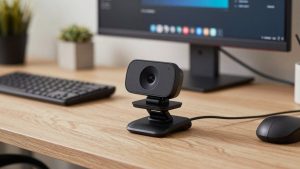
1. Covered patio / shed office: weather-resistant USB webcam under shelter. This is the closest to a true outdoor webcam for work. You mount it under an eave, pergola roof, or inside a shed office window, never in direct rain or sun. Choose a wired USB model with a metal or sealed-style housing and a shade hood. Image quality will be similar to a good indoor webcam, but it survives humidity and dust far longer.
A weatherproof USB webcam suits someone with a fixed outdoor desk who wants plug-and-play with Mac or Windows. Trade-off: most are fixed focus, have narrow software support, and still need shade to avoid backlight blowout. Failure mode: condensation on the lens on cool mornings and USB cable length limits. Keep runs under 10 feet unless you use an active extension.
2. Fully exposed / mobile: phone or action camera as webcam. If you work from a truck, campsite, balcony, or garden with no roof, do not leave a webcam out. Bring the camera out only for the call. Modern phones have far better HDR and auto-exposure than any $80 webcam, and most can act as a webcam over USB with Continuity Camera, Samsung / Pixel webcam mode, or a webcam app.
An action camera with webcam mode suits field workers and contractors who already own one for documentation. It handles bright sun, light rain, and bumps, and the wide lens keeps you framed if you move. Trade-off: wide lenses distort your face up close, colors can look harsh for office calls, and battery drains fast in webcam mode. Failure mode: overheating shutdown after 30-45 minutes in direct sun. Keep it in shade when possible and run it on USB power without the battery inside if the model allows it.
3. Laptop-only outside: fix light and sound, not the webcam. If you just take your MacBook or Windows laptop to the porch once or twice a week, buying a new camera is overkill. Your built-in webcam is fine. What ruins the call is backlight and wind.
Sit with your back to a wall or fence, facing open shade, not facing the sun and not with bright sky behind you. Put the sun at a 45-degree angle to your face in morning or late afternoon. Add a cheap laptop shade or even a patio umbrella. For sound, switch to earbuds or a wired lavalier mic with wind muff clipped 6 inches below your chin. Trade-off: you still look a bit contrasty at noon. Failure mode: laptop screens wash out and overheat in direct sun. If you cannot read the screen without max brightness, the camera image will be bad too. Move to shade.
Quick comparison
| Setup | Weather handling | Backlit image | Wind audio | Best for |
|---|---|---|---|---|
| Sheltered USB webcam | Good under roof, not in direct rain | Average, needs shade behind you | Poor without separate mic | Fixed backyard / shed desk |
| Phone as webcam | Bring inside after call | Very good HDR | Fair, better with earbuds | Occasional patio calls, travel |
| Action camera as webcam | Good for rain, dust, bumps | Good, but wide and contrasty | Poor without separate mic | Jobsite, field work, makers |
| Laptop webcam + shade + lav mic | Bring inside after call | Fair to good in open shade | Good with lav / earbuds | Cheapest fix for 1-2 calls/week |
Power, Wi-Fi, and mounting matter more outside
Outdoor calls drop more often from Wi-Fi than from camera quality. A backyard office 30 feet from the router through an exterior wall can lose half its speed. If your video freezes while audio continues, test with your phone in the same spot. A mesh node or wired access point in the shed pays off more than a camera upgrade.
Power is the other hidden issue. USB webcams hate long passive cables. If the camera flickers or disconnects, the cable is usually too long or too thin for outdoor routing. Use a short, thick cable with a powered hub, or keep the computer close. For permanent mounts, use a clamp or eave mount, not adhesive. Adhesive softens in heat and the camera ends up pointing at the ground.
Do not confuse a security camera with a work webcam. Security cameras are built for weather and night vision, but most have 1-3 second delay, no echo-cancelled mic, and no UVC webcam driver for Zoom or Teams. They are fine for monitoring a gate, not for two-way meetings.
What to buy for your situation
If you have a roof and an outlet and sit in the same spot daily, get a sheltered USB webcam and a separate close mic. The cheaper option is absolutely fine here. Image differences between basic 1080p and premium 4K models mostly disappear in daylight. Spend the savings on shade and audio.
If you are exposed and mobile, do not buy a dedicated outdoor webcam. Use your phone as the camera and earbuds for mic and speaker. It looks better, costs nothing extra, and you are not leaving electronics in the weather.
If you do construction, farming, field research, or outdoor teaching and need something tough you can wipe off, an action camera in webcam mode makes sense. Just test your exact video app first. Some models only do webcam mode over specific USB modes and will not charge and output video at the same time on Macs without a hub.
FAQ
Can I leave a regular webcam outside permanently?
No. Even under cover, humidity, dust, and heat shorten its life. If you need a permanent mount, use a model rated for damp or outdoor use, keep it shaded, and expect to replace cables before the camera.
Why do I look dark when the background is bright?
The camera is exposing for the sky. Sit facing open shade with a dark background behind you, enable HDR or backlight compensation if available, and avoid having bright sky or white walls directly behind your head.
How do I fix wind noise on calls?
Move the mic out of the wind. Use earbuds or a lav mic under your chin with a fuzzy windscreen, turn your back to the wind, and enable noise removal in Zoom or Teams. A webcam mic on the desk will always sound windy.
Is 4K worth it for outdoor video calls?
Usually not. Zoom and Teams compress to 720p or 1080p anyway. Better exposure, stable mount, good light on your face, and clean audio make a bigger difference than extra pixels.