

Last Updated: October 9, 2026
- Where the “Sitting Is the New Smoking” Idea Came From
- What Standing Desks Actually Do (and Don’t Do)
- Standing vs Sitting: A Direct Comparison
- The Real Answer: Movement Beats Either Extreme
- Who Benefits Most From a Standing Desk?
- Setting Up Either Option Correctly
- Building a Sit-Stand Routine That Actually Sticks
- Frequently Asked Questions
- Conclusion
- Related Articles
- Related Guides
⚡ Key Takeaways


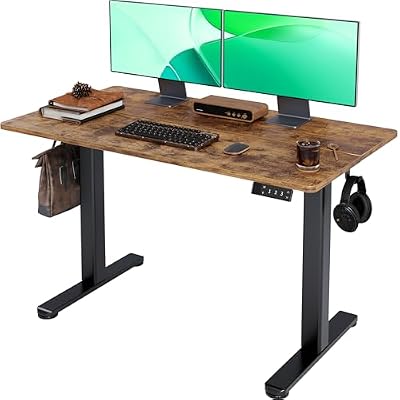


- The alarm around prolonged sitting traces back to epidemiological studies that linked long daily sitting time with higher risks of cardiovascular disease, type 2 diabetes, and all-cause mortality.
- Standing desks have measurable benefits, but they are smaller than the marketing suggests.
- The most consistent finding across the research is that the body thrives on position changes.
- Standing desks are not equally useful for everyone.
The debate over a standing vs sitting desk has become one of the most discussed topics in home-office ergonomics, and for good reason. Marketing claims promise that standing desks will torch calories, fix your posture, and rescue you from the dangers of a sedentary lifestyle. The reality, when you dig into the actual research, is more nuanced and arguably more useful. Neither sitting nor standing all day is the goal. The science points clearly toward movement and variety as the real winners. This guide breaks down what peer-reviewed studies actually show, where the popular claims fall apart, and how to build a desk setup that supports your body rather than working against it.
Related: best standing desks with storage.
🛒 Best Price Today on Amazon
Prime members get fast, free shipping on everything above, plus member-only deals. New members get a 30-day free trial — cancel anytime.
📄 In This Review
- Where the “Sitting Is the New Smoking” Idea Came From
- What Standing Desks Actually Do (and Don’t Do)
- Standing vs Sitting: A Direct Comparison
- The Real Answer: Movement Beats Either Extreme
- Who Benefits Most From a Standing Desk?
- Setting Up Either Option Correctly
- Building a Sit-Stand Routine That Actually Sticks
- Frequently Asked Questions
- Conclusion
- Related Articles
- Related Guides
Quick answer: Our top pick in 2026 is the Calorie use — our #1 rated choice. See the full ranked comparison, alternatives and buying advice below.
Where the “Sitting Is the New Smoking” Idea Came From
The alarm around prolonged sitting traces back to epidemiological studies that linked long daily sitting time with higher risks of cardiovascular disease, type 2 diabetes, and all-cause mortality. These associations are real, but they are also frequently misread. The strongest negative effects show up in people who sit for very long uninterrupted stretches and who are otherwise physically inactive. The risk is tied less to the chair itself and more to the total lack of movement throughout the day.
This distinction matters enormously. A person who sits for focused work but takes regular breaks, walks during calls, and exercises a few times a week is in a very different category than someone who sits motionless for ten hours straight. The catchy “sitting is the new smoking” headline oversimplifies a more careful body of evidence.
What Standing Desks Actually Do (and Don’t Do)
See also: How to Unlock Ichigo in Universal Tower Defense • How to Romance Reggie in Date Everything
Standing desks have measurable benefits, but they are smaller than the marketing suggests. Here is what controlled research generally supports:
- Calorie burn: Standing burns only marginally more calories than sitting, roughly 8 to 20 extra calories per hour for most people. Over a year this is not a meaningful weight-loss strategy on its own.
- Reduced sedentary time: Sit-stand desks reliably cut the total hours people spend seated, which is the metric most associated with health benefits.
- Lower-back comfort: Some studies show modest reductions in self-reported back discomfort when people alternate positions, though results vary by individual.
- Energy and focus: Many users report feeling more alert when standing, and a few small studies suggest minor improvements in mood and engagement.
What standing does not do is replace exercise, dramatically improve posture by itself, or guarantee a healthier heart. Standing still for hours brings its own problems, including foot pain, varicose vein aggravation, and lower-back fatigue.
Standing vs Sitting: A Direct Comparison
| Factor | Sitting (prolonged) | Standing (prolonged) | Alternating (best) |
|---|---|---|---|
| Calorie use | Lowest | Slightly higher | Variable, highest with movement |
| Lower-back load | Higher when slouched | Lower if posture is good | Balanced |
| Leg and foot fatigue | Low | High over time | Low |
| Focus for deep work | Good | Mixed | Good |
| Circulation | Poorer when static | Better but pooling risk | Best |
The Real Answer: Movement Beats Either Extreme
The most consistent finding across the research is that the body thrives on position changes. Sitting becomes a problem when it is uninterrupted, and standing becomes a problem when it is prolonged and static. A widely cited rule of thumb suggests roughly a 1:1 to 2:1 ratio of sitting to standing, with a position change every 30 to 60 minutes. The exact numbers matter less than the principle: do not hold any single posture for too long.
If you only take one action from this article, make it this: set a timer and change position regularly. A height-adjustable desk makes this easy, but even a fixed desk works if you stand up to stretch, walk to refill water, or take phone calls on your feet.
How to Stand Without Hurting Yourself
Standing badly is worse than sitting well. To stand comfortably and safely:
- Keep your elbows at roughly 90 degrees with the keyboard at elbow height.
- Position the top of your monitor at or slightly below eye level so your neck stays neutral.
- Use an anti-fatigue mat to reduce pressure on your feet and lower back.
- Shift your weight, micro-step, and avoid locking your knees.
Getting monitor placement right is a big part of standing comfort. Our detailed walkthrough on choosing the right laptop stand can help you raise a laptop screen to a healthy height in either position.
Who Benefits Most From a Standing Desk?
Standing desks are not equally useful for everyone. They tend to help most for:
- People who currently sit for very long, unbroken stretches.
- Those with mild lower-back discomfort that eases when they stand.
- Workers who feel sluggish in the afternoon and want an easy way to re-energize.
They are less essential for people who already move frequently, or who do precise tasks that are easier seated. If you experience significant back pain at your desk, it is worth reading our guide on how a footrest supports seated posture, since the chair side of the equation often gets ignored.
Setting Up Either Option Correctly
Whichever you choose, ergonomics fundamentals stay the same. Your forearms should be roughly parallel to the floor, your screen should be an arm’s length away, and your spine should keep its natural curve. A supportive surface under your wrists and a comfortable mat under your feet both reduce strain. A quality desk mat also keeps your workspace organized while protecting your wrists during long sessions. If you want a low-cost way to try standing before committing to a full desk, a standing desk converter sits on top of your existing desk and raises your screen and keyboard on demand.
Building a Sit-Stand Routine That Actually Sticks
Knowing that alternating positions is healthiest is only useful if you can turn it into a habit. Most people who abandon their standing desk do so not because the science was wrong, but because they never built a sustainable rhythm. The first week is where good intentions usually collapse, so it pays to plan it deliberately rather than relying on willpower in the moment.
Start conservatively. Stand for the first 10 to 15 minutes of each hour and sit for the rest. This feels almost too easy, which is the point: you want to finish each standing interval wanting slightly more, not counting the seconds until you can sit. As the days pass, lengthen your standing intervals naturally rather than forcing them. Within two to three weeks most people comfortably reach a near-balanced split without any sense of strain.
Anchor your position changes to events that already happen in your day. Stand whenever you start a phone call, switch to a new task, or return from a break. Tying the change to an existing trigger removes the need to remember a timer, and the habit forms far faster. Many people also find that standing pairs well with lighter cognitive tasks like email and reading, while sitting suits deep, focused work that benefits from stillness.
Finally, listen to your body’s signals rather than rigidly following a clock. Aching feet, a stiff lower back, or restlessness are all cues to change position. The aim is not to hit a perfect ratio every day but to keep your body in gentle, regular motion across the working hours. Over a few weeks this stops feeling like a system and starts feeling like the natural way you work.
Frequently Asked Questions
Is standing all day better than sitting all day?
No. Standing all day introduces its own problems, including foot, leg, and lower-back fatigue, and in some people it aggravates circulation issues. The healthiest approach is alternating between sitting and standing throughout the day.
How long should I stand at a standing desk?
A common guideline is to change position every 30 to 60 minutes and aim for a roughly balanced ratio of sitting to standing. Start with shorter standing intervals, around 15 to 20 minutes, and build up as your body adapts.
Will a standing desk help me lose weight?
Only marginally. Standing burns a small number of extra calories compared to sitting, but not enough to drive meaningful weight loss without diet and exercise. Its real value is reducing total sedentary time.
Can a standing desk fix my posture?
Not on its own. A standing desk only helps if it is set up correctly, with the screen at eye level and keyboard at elbow height. Poor standing posture can be just as harmful as poor seated posture.
Do I need a height-adjustable desk or is a converter enough?
A converter is a budget-friendly way to test whether you like standing to work. If you find yourself switching positions often and want a cleaner setup, a full height-adjustable desk is more stable and easier to use long term.
Conclusion
The science on the standing vs sitting desk debate is clear: the magic is not in the chair or the standing position, but in the movement between them. Choose a setup that makes changing posture effortless, dial in your ergonomics, and build regular movement into your day. Do that, and you get the genuine benefits both options have to offer without the downsides of either extreme.
Ready to decide? Our #1 pick for 2026 is the Calorie use.
Live price & availability on Amazon.
Related Reviews & Guides

L-Shaped vs Standard Desk: Which Should You Choose?
Standing Desk Cyber Monday Deals 2026: What to Expect and When to Buy

