Last Updated: September 12, 2026
- The Core Trade-Off: Portability Versus Power
- Performance and Value
- Side-by-Side Comparison
- Ergonomics: The Hidden Cost of Laptops
- Upgradeability and Longevity
- Desk Space and Cable Management
- The Hybrid Approach: Best of Both
- Which Should You Choose?
- Top-Rated Picks
- Frequently Asked Questions
- Conclusion
- Related Articles
⚡ Key Takeaways
- At the simplest level, the laptop-versus-desktop choice trades portability against raw capability.
- Dollar for dollar, desktops deliver more performance.
- A laptop's screen and keyboard are fixed together, which means you cannot put both in ergonomic positions at once.
- Desktops are far easier to upgrade and repair.
One of the first decisions when setting up a home office is the choice between a laptop and a desktop for work. It shapes how much you spend, how you sit, how powerful your machine is, and how easily you can change where you work. There is no universally correct answer, the right pick depends on whether you travel, how demanding your tasks are, how much you value upgradeability, and how important ergonomics are to you. The good news is that a smart hybrid approach often gives you the best of both. This guide compares laptops and desktops across the factors that actually matter for getting work done, so you can decide with confidence.
🛒 Best Price Today on Amazon
Prime members get fast, free shipping on everything above, plus member-only deals. New members get a 30-day free trial — cancel anytime.
📄 In This Review
- The Core Trade-Off: Portability Versus Power
- Performance and Value
- Side-by-Side Comparison
- Ergonomics: The Hidden Cost of Laptops
- Upgradeability and Longevity
- Desk Space and Cable Management
- The Hybrid Approach: Best of Both
- Which Should You Choose?
- Top-Rated Picks
- Frequently Asked Questions
- Conclusion
- Related Articles
The Core Trade-Off: Portability Versus Power
At the simplest level, the laptop-versus-desktop choice trades portability against raw capability. A laptop packs everything, screen, keyboard, battery, into a slab you can carry anywhere, which is invaluable if you work from cafes, travel, or move between rooms. A desktop stays put but offers more performance per dollar, easier upgrades, and better ergonomics because the screen, keyboard, and computer are separate components you position independently.
Ask yourself honestly how often you actually need to work away from your desk. Many people buy laptops for a flexibility they rarely use, then live with the compromises every day. Others genuinely need to pack up and go, for whom a desktop would be a poor fit.
Performance and Value
See also: Best Monitor Under 300: Eight Listings Compared by Refresh Claims, Panel Type and Pixel Load • Best Adjustable Standing Desk Converters for Dual Monitors: Width, Weight and Fit Compared
Dollar for dollar, desktops deliver more performance. Their larger cases allow bigger, better-cooled components that run faster for longer without throttling, and the same budget buys more processing power, memory, and storage than a comparable laptop. For demanding work, video editing, 3D rendering, software compilation, large datasets, a desktop stretches your budget further.
That said, modern laptops have closed much of the gap for everyday office tasks. For email, documents, web work, and video calls, a midrange laptop is more than enough, and the performance difference is invisible. The value argument for desktops grows stronger the more demanding your workload.
Side-by-Side Comparison
| Factor | Laptop | Desktop |
|---|---|---|
| Portability | Excellent | None |
| Performance per dollar | Good | Excellent |
| Upgradeability | Limited | Extensive |
| Ergonomics (out of box) | Poor | Good |
| Repairability | Harder | Easier |
| Desk footprint | Small | Larger |
| Battery backup | Built in | Needs UPS |
Ergonomics: The Hidden Cost of Laptops
This is where laptops carry a real, often overlooked penalty. A laptop’s screen and keyboard are fixed together, which means you cannot put both in ergonomic positions at once. If the screen is at the right height for your neck, the keyboard is too high for your wrists; if the keyboard is comfortable, the screen is too low and you hunch. Used on a lap or a low desk for hours, a laptop quietly encourages neck and back strain.
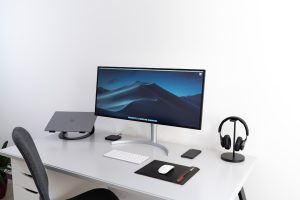
The fix is to dock the laptop at your desk. Raising it on a laptop stand to bring the screen to eye level and adding a separate keyboard and mouse gives a laptop the same ergonomic posture as a desktop. With this setup, a laptop becomes a portable machine that turns into a proper workstation the moment you sit down. Desktops have this ergonomic flexibility built in, since every component is separate from the start.
Upgradeability and Longevity
Desktops are far easier to upgrade and repair. Need more memory, a bigger drive, or a new graphics card? On most desktops you open the case and swap parts, extending the machine’s useful life for years. Laptops increasingly solder their memory and storage in place, meaning what you buy is often what you are stuck with. When a laptop component fails, repairs are usually more involved and expensive.
If you want a machine that grows with your needs and lasts as long as possible, a desktop’s modularity is a major advantage. If you prefer to simply replace the whole device every few years, this matters less.
Desk Space and Cable Management
The two form factors affect your desk differently. A laptop has a tiny footprint, ideal for small spaces, but when docked it sprouts cables to a monitor, keyboard, mouse, and charger, often consolidated through a single dock. A desktop tower can sit on the floor to keep the desk clear, but it connects to more peripherals and generates more cabling overall.
Either way, a docked workstation produces a tangle of wires behind the desk. Routing them through a cable management box keeps power bricks and adapters hidden and your workspace tidy. A clean surface, helped by a desk mat to define your working zone, makes either machine pleasant to work at.
The Hybrid Approach: Best of Both
For many people the smartest answer is not either-or. A laptop paired with a docking station, external monitor, keyboard, and mouse gives you a full desktop-like workstation at home and full portability when you leave. You get ergonomic posture when docked and flexibility when mobile, sacrificing only the peak performance and value of a dedicated desktop.
This hybrid setup has become the default for a large share of office workers, and it is worth considering before committing to a pure desktop. If your work is performance-hungry and you never move, a desktop still wins. If you value mobility at all, a docked laptop is hard to beat.
One practical consideration with the hybrid approach is the dock itself. A good docking station connects to your laptop with a single cable, often USB-C or Thunderbolt, and breaks out to your monitor, peripherals, wired network, and power all at once. That means sitting down to work and leaving for a meeting both take seconds rather than unplugging a fistful of cables. When shopping, check that the dock supports your monitor’s resolution and refresh rate and that it can charge your specific laptop, since power delivery varies. A capable dock is what makes the hybrid model genuinely convenient rather than a daily chore.
Which Should You Choose?
To summarize the decision: choose a desktop if you never need to move your machine, want the most performance for your money, value easy upgrades, and prioritize built-in ergonomic flexibility. Choose a laptop if you travel, work from multiple locations, or have limited space, and plan to dock it with external peripherals at home for comfortable long sessions. Choose the hybrid, a docked laptop, if you want one machine that serves as both a portable computer and a proper workstation. For most home office workers whose tasks are not extremely demanding, the docked laptop offers the best blend of flexibility and comfort.
Top-Rated Picks
 | Multiport adapter with 5Gbps Data Transfer for USB-A Port Laptop, PC, Desktop and More (Charging Not Supported)(USB-A, 2ft)](https://m.media-amazon.com/images/I/51+U60trRlL._AC_SL400_.jpg)



| Product | Brand | Rating | Reviews | Price |
|---|---|---|---|---|
| Anker USB Hub 4 Ports, Multiple USB 3.0 Hub, USB Spli… | — | ★ 4.7 | 134k | $7.98 |
| LEVOIT Air Purifiers for Bedroom Home Dorm, AHAM VERI… | Levoit | ★ 4.6 | 170.4k | $49.99 |
| Alex Tech 10ft – 1/2 inch Cord Protector Wire Loom Tu… | AlexTech | ★ 4.7 | 82.9k | $8.99 |
| Alex Tech 25ft – 1/2 inch Cord Protector Wire Loom Tu… | AlexTech | ★ 4.7 | 82.9k | $14.99 |
| Nulaxy Dual Folding Cell Phone Stand, Fully Adjustabl… | Nulaxy | ★ 4.7 | 79k | $9.99 |
Frequently Asked Questions
Is a desktop or laptop better for working from home?
It depends on your needs. Desktops offer more performance per dollar, easier upgrades, and better ergonomics, while laptops offer portability. Many home workers find a docked laptop, paired with an external monitor and keyboard, gives the best balance.
Are laptops bad for your posture?
Used directly, yes, because the attached screen and keyboard cannot both be ergonomic at once. Docking the laptop with a stand to raise the screen and adding an external keyboard fixes this and gives desktop-like posture.
Do desktops really last longer than laptops?
Often, yes. Desktops are easier to upgrade and repair, so you can replace memory, storage, or other parts to extend their life, whereas many laptops have soldered components that cannot be upgraded.
Can a laptop replace a desktop for demanding work?
For everyday office tasks, easily. For very demanding workloads like heavy video editing or 3D rendering, a desktop still delivers more sustained performance for the same money, though high-end laptops can come close.
What is the best setup for a home office?
For most people, a docked laptop with an external monitor at eye level, a separate keyboard and mouse, and tidy cable management combines portability with proper ergonomics. Dedicated desktops are better for performance-critical, stationary work.
Conclusion
The laptop-versus-desktop question comes down to how much you value portability against performance, upgradeability, and built-in ergonomics. Desktops win on power and longevity; laptops win on flexibility. For a large share of home office workers, the hybrid path, a laptop docked with external peripherals, delivers the comfort of a desktop and the freedom of a laptop. Whichever you choose, set it up ergonomically and keep the cables tidy, and the machine will serve you well.
Related Reviews & Guides


Best Monitor Under 300: Eight Listings Compared by Refresh Claims, Panel Type and Pixel Load
Dead Rails Potions Liquids Guide: Recipes & Effects