Last Updated: September 12, 2026
- The Core Rule: Top of Screen At or Below Eye Level
- Why Looking Slightly Down Is Best
- Measuring the Ideal Height for You
- Adjusting for Screen Size
- How to Raise a Monitor That Sits Too Low
- What If the Monitor Is Too High?
- Don’t Forget the Rest of Your Setup
- Frequently Asked Questions
- Conclusion
- Related Articles
- Related Guides
⚡ Key Takeaways


- The standard ergonomic guideline is straightforward.
- Tilting your head back to look up at a high monitor compresses the back of your neck and tires the muscles that hold your head up.
- Because people and desks vary, use these reference points rather than a fixed number:
- With a 32 inch or larger screen, placing the top at eye level can push the bottom of the screen too low, forcing your gaze and neck to travel a long way down.
If you finish your workday with a stiff neck or a dull ache at the base of your skull, your monitor height is one of the first things to check. Where the top of your screen sits relative to your eyes determines the angle of your neck for every hour you work, and getting it wrong quietly accumulates strain. The widely repeated rule is that the top of your monitor should be at or slightly below eye level, but the full answer depends on screen size, whether you wear glasses, and how far away you sit. This guide explains exactly how high a monitor should be, why the rule works, and how to hit the right height with the equipment you already own.
🛒 Best Price Today on Amazon
Prime members get fast, free shipping on everything above, plus member-only deals. New members get a 30-day free trial — cancel anytime.
📄 In This Review
- The Core Rule: Top of Screen At or Below Eye Level
- Why Looking Slightly Down Is Best
- Measuring the Ideal Height for You
- Adjusting for Screen Size
- How to Raise a Monitor That Sits Too Low
- What If the Monitor Is Too High?
- Don’t Forget the Rest of Your Setup
- Frequently Asked Questions
- Conclusion
- Related Articles
- Related Guides
The Core Rule: Top of Screen At or Below Eye Level
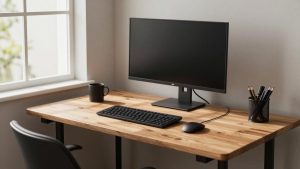
The standard ergonomic guideline is straightforward. When you sit upright in your normal working posture and look straight ahead, your eyes should land on a point at or just below the top edge of the screen. From there, your gaze naturally drops downward to scan the rest of the display.
This works because your eyes and neck are most comfortable looking slightly downward, not straight ahead or up. The center of your screen typically ends up about 15 to 20 degrees below horizontal eye level, which is the natural resting angle for your gaze and keeps your neck in a relaxed, neutral position.
Why Looking Slightly Down Is Best
See also: Best Monitor Under 300: Eight Listings Compared by Refresh Claims, Panel Type and Pixel Load • Best Adjustable Standing Desk Converters for Dual Monitors: Width, Weight and Fit Compared
Tilting your head back to look up at a high monitor compresses the back of your neck and tires the muscles that hold your head up. Looking too far down, on the other hand, bends your neck forward, which loads the spine, the so-called forward head posture that strains the muscles between your shoulder blades. The sweet spot is a slight downward gaze that keeps your head balanced over your spine.
A gentle downward angle also helps your eyes. When you look down slightly, your eyelids cover more of the eye surface, which slows tear evaporation and reduces the dry, gritty feeling that comes from staring at a screen for hours.
Measuring the Ideal Height for You
Because people and desks vary, use these reference points rather than a fixed number:
| Factor | Guideline |
|---|---|
| Top of screen | At or slightly below seated eye level |
| Center of screen | About 15–20° below horizontal gaze |
| Viewing distance | 20–28 inches (about an arm’s length) |
| Screen tilt | Back top edge tilted slightly away (10–20°) |
| Neck position | Neutral, head balanced over spine |
To set it up, sit in your normal posture, close your eyes, then open them looking straight ahead. Your gaze should hit the top portion of the screen. Adjust the monitor up or down until it does, then tilt the screen back slightly so the surface faces your eyes squarely.
Adjusting for Screen Size
Larger monitors complicate the rule. With a 32 inch or larger screen, placing the top at eye level can push the bottom of the screen too low, forcing your gaze and neck to travel a long way down. For big screens, it is often better to position them so the center sits at a comfortable height and accept that the very top is slightly above eye level, since you will spend most of your time looking at the middle.
Curved ultrawide monitors and very tall screens may need to sit a touch lower than a standard 24 or 27 inch monitor. The guiding principle stays the same: your most-used portion of the screen should sit at or just below eye level, and your neck should stay neutral.
How to Raise a Monitor That Sits Too Low
Many monitors, and nearly all laptops, sit too low out of the box. You have several ways to raise them:
- Adjustable stand: If your monitor’s stand has height adjustment, use it first. It is the simplest solution.
- Monitor arm: A VESA-mounted arm gives full control over height, tilt, and depth and frees up desk space.
- Monitor riser or shelf: A sturdy platform lifts the screen and often adds storage underneath.
- Stack of books: A free, if inelegant, last resort that works for fine-tuning.
Laptops are a special case. Their screen and keyboard are attached, so raising the screen to eye level on a laptop stand requires adding a separate external keyboard and mouse. This single change fixes the most common laptop posture problem, where the screen is so low that users hunch their necks all day.
What If the Monitor Is Too High?
A monitor that sits too high is just as harmful as one too low, forcing you to tilt your head back and compress your neck. This often happens when people stack a monitor on a riser that is taller than needed, or set a laptop on a stand without realizing the external monitor next to it is now at a different height. If you find yourself lifting your chin to see the screen, lower it. The fix is the same equipment in reverse: drop the arm, remove the riser, or lower the stand until your gaze falls slightly downward again.
Don’t Forget the Rest of Your Setup
Monitor height does not exist in isolation. If your chair is too low, raising it brings your eyes up to meet the screen, but only if your feet still rest flat, possibly with help from a footrest. If you sit too far back, the screen will seem low even at the correct height. Set your chair and desk first so your elbows are at about 90 degrees and your feet are supported, then dial in the monitor height to match your seated eye level. When you adjust a sit-stand desk between sitting and standing, remember that your eye level changes too, so a monitor on an arm that follows you is far more convenient than a fixed riser.
Frequently Asked Questions
How high should the top of my monitor be?
The top of the screen should sit at or slightly below your seated eye level when you look straight ahead. From there, your gaze naturally drops to the rest of the screen, keeping your neck neutral.
Should I look up or down at my monitor?
Slightly down. The center of the screen should be about 15 to 20 degrees below your horizontal line of sight, which is your eyes’ natural resting angle and keeps your neck relaxed.
How do I raise a monitor that is too low?
Use the stand’s height adjustment if it has one, a VESA monitor arm, a monitor riser, or, as a last resort, a stack of books. For laptops, a laptop stand plus an external keyboard raises the screen properly.
Does monitor height change for large screens?
Yes. On very large monitors, putting the top at eye level can push the bottom too low. Instead, position the screen so its center, where you look most, sits at a comfortable height, even if the top edge is slightly above eye level.
Why does my neck hurt even with the monitor at eye level?
Check the rest of your setup. A chair that is too low or sitting too far from the screen can recreate strain. Set your chair height and viewing distance first, then confirm the monitor height matches your seated eye level.
Conclusion
The right monitor height keeps your neck neutral and your gaze falling slightly downward, with the top of the screen at or just below your seated eye level and the screen about an arm’s length away. Adjust for large screens by centering on your most-used area, raise low monitors with a stand, arm, or riser, and treat laptops as a special case that needs an external keyboard. Set your chair and distance first, and the monitor height that follows will keep you comfortable through the longest workday.
Related Reviews & Guides

How to Play 32-Bit Games on Mac
Webcam Lighting Setup: Look Better on Every Call