Last Updated: August 21, 2026
- Top Pick: GMKtec Mini PC Computer, G10 Ryzen 5 3500U (Beats N150/4300U/3200U), 16GB RAM 512GB SSD 2.5GbE NIC LAN Desktop Office Home Business HTPC, Triple 4K Display, WiFi, BT, USB-C, DP, Type-C PD, HDMI 2.1
- Best Value: GMKtec Mini PC Computers Intel N95 Processor (Turbo 3.4GHz)
- Premium Choice: GMKtec M6 Ultra Gaming Mini PC Ryzen 7640HS 32GB RAM DDR5 1TB SSD
The mini PC category has quietly become one of the best value stories in computing, and in 2026 the GMKtec lineup sits right at the center of that shift. If your desk is short on space but your workload is not, a palm-sized machine that sips power while handling browser tabs, spreadsheets, video calls, and the occasional photo edit is an easy thing to fall in love with. GMKtec has built its reputation on packing surprisingly capable hardware into enclosures barely larger than a sandwich, and the current generation leans hard into that promise with modern Ryzen and Intel silicon, generous memory, and connectivity that punches well above the price.
This review looks at the GMKtec mini PC as an everyday driver for home, office, and multimedia use, with a nod toward light creative work like photo retouching or casual video trimming. It is not a gaming rig or a workstation replacement, and it does not pretend to be. What it offers instead is quiet, tidy, affordable competence, the kind of machine you set up once, tuck behind a monitor, and stop thinking about. Below we break down the design, the real-world performance, the honest trade-offs, and a few alternatives worth weighing before you commit.
As an Amazon Associate we earn from qualifying purchases at no extra cost to you.







⚡ Save on Your Next PC — Amazon Prime
Prime members get fast free shipping on the systems above, plus early access to Prime Day & Black Friday PC deals. New members get a 30-day free trial.
📄 In This Review
Watch: GMKtec Mini PC Review — Video Review
Design & Build
See also: 1440p vs 4K Monitor for Gaming: Which Resolution Fits Your GPU, Desk and Budget • Best Monitor for MacBook Air: Two USB-C 4K Screens and Six Adapter-Dependent Alternatives
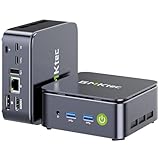
Physically, the GMKtec mini PC is a triumph of restraint. The chassis measures roughly the footprint of a coaster and stands only a couple of inches tall, so it disappears on a desk, mounts easily behind a VESA monitor, or slots into a media cabinet without fuss. Build quality feels reassuringly solid, with a metal-and-plastic shell that stays cool to the touch during ordinary tasks and vents heat through discreet side and rear grilles. Port selection is where the design really earns its keep: you get multiple USB-A and USB-C connectors, HDMI 2.1 and DisplayPort outputs capable of driving triple 4K displays, a 2.5GbE LAN jack for fast wired networking, plus Wi-Fi and Bluetooth for everything else. For a home office or a multimedia corner, that combination covers nearly every accessory you are likely to plug in, and the front-facing USB-C makes quick transfers painless.
Performance
In daily use, the GMKtec mini PC handles the modern productivity grind without complaint. The Ryzen and integrated Radeon graphics chew through dozens of browser tabs, office documents, video conferencing, and 4K media playback smoothly, and the 16GB of RAM paired with a fast NVMe SSD keeps multitasking responsive. Boot times are quick, application launches feel snappy, and streaming from any service looks crisp on a 4K panel. Light creative work is realistic too: photo edits in Lightroom or Photoshop, simple 1080p video trims, and design tasks all run at a comfortable pace, though heavy 4K timelines or 3D rendering will expose the limits of integrated graphics. Under sustained load the small fan becomes audible but never obnoxious, and thermals stay in check. For anyone whose computing lives in a browser, an office suite, and a media player, this is more performance than the price suggests.
Pros & Cons
- Tiny footprint that frees up desk space and mounts behind a monitor
- Strong everyday performance for browsing, office work, and 4K media
- Generous connectivity, including 2.5GbE LAN and triple 4K display support
- Runs quiet and power-efficient during typical tasks
- Excellent value against traditional desktop towers and laptops
- Integrated graphics limit demanding gaming and heavy video rendering
- Small chassis means limited internal upgrade room beyond RAM and storage
- Fan noise rises noticeably under prolonged full load
- No discrete GPU option for creative professionals who need one
Alternatives to Consider
If your needs lean heavier, the GMKtec M6 Ultra with its Ryzen 7 7640HS, 32GB of DDR5, and a 1TB SSD delivers meaningfully more muscle for light gaming and creative multitasking, making it the natural step up. Budget-focused buyers who mostly browse, stream, and handle documents can save considerably with the GMKtec G3S built around the Intel N95, which covers the essentials at a lower entry price. And if you prefer an Intel Core experience for maximum compatibility, the GMKtec i7-1185G7 model with 16GB of RAM and a roomy 1TB SSD offers a snappier single-core feel for office and productivity workloads. Each targets a slightly different balance of price and power within the same reliable family.
Frequently Asked Questions
Can the GMKtec mini PC handle 4K video and multiple monitors?
Yes. It supports triple 4K display output through HDMI and DisplayPort and plays 4K streaming content smoothly, making it well suited to a multi-monitor home or office setup.
Is it good enough for photo and light video editing?
For photo retouching and simple 1080p video trims it performs comfortably. Heavy 4K editing, color grading, or 3D work will strain the integrated graphics and is better left to a dedicated workstation.
Can I upgrade the RAM or storage later?
In most configurations the RAM and NVMe SSD are user-accessible, so you can expand memory and storage down the road. The compact chassis, however, leaves no room for adding a discrete graphics card.
Does it come with Windows installed?
GMKtec mini PCs typically ship with Windows preinstalled and ready to use out of the box, so you can set up your accounts and start working within minutes of powering on.
Verdict
The GMKtec mini PC is one of the smartest value buys in 2026 for anyone building a clean, capable home or office setup that prioritizes space, quiet, and efficiency over raw gaming or rendering power. It nails the everyday essentials, offers connectivity that shames machines twice its size, and asks very little of your desk or your wallet. If your work lives in browsers, documents, video calls, and 4K media with a bit of light creative work on the side, this little machine earns a confident recommendation.
Related Reviews & Guides

Best Webcam for Working from Home Reddit
Best Webcam and Microphone for Mac