Last Updated: October 9, 2026
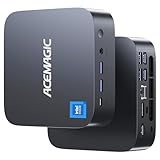
- Top Pick: ACEMAGIC M1 Mini PC Windows 11 Pro, Intel Core i9 13900HK 32GB RAM 1TB SSD Computers(14C/20T,up to 5.4GHz), Small Desktop for Business Home Office Everyday Use, Beat i9-12900HK/R7 7840HS/6800H,54W MAX
- Best Value: ACEMAGIC M1 PC, AMD Ryzen 7 7735HS, 24GB LPDDR5, 1TB NVMe SSD, Windows 11 Pro, Radeon 680M, 2.5Gbps LAN, WiFi 6, Triple 4K Display Office & Light Gaming
- Premium Choice: ACEMAGIC Mini PC AMD Ryzen 7 6800H 16GB DDR5 512GB PCle SSD Mini Computers (8C/16T, up to 4.7GHz), 11 Pro Radeon 680M 4K Triple Display Desktop Computers 3.2Type-C/LAN 2.5G/BT5.2/WiFi 6
Mini PCs have quietly become the smartest way to reclaim desk space without giving up real computing power, and the ACEMAGIC M1 is one of the more talked-about palm-sized machines heading into 2026. Built around an Intel Core i9-11900H processor, paired with 32GB of RAM and a roomy 1TB SSD, it promises full-size desktop performance in a chassis that disappears behind a monitor. For anyone juggling office work, multimedia playback, and the occasional light 3D task, that combination is genuinely appealing on paper.
But specs alone do not make a good buy, especially in a crowded field where MINISFORUM, KAMRUI, and ACEMAGIC’s own cheaper models all compete for the same shelf space. In this 2026 review we look at how the M1 handles real-world use, where its compact design shines, where it stumbles, and whether the price makes sense against a few worthy alternatives. If you want a tidy, capable desktop that sips power and stays out of the way, read on before you decide.
As an Amazon Associate we earn from qualifying purchases at no extra cost to you.




⚡ Save on Your Next PC — Amazon Prime
Prime members get fast free shipping on the systems above, plus early access to Prime Day & Black Friday PC deals. New members get a 30-day free trial.
📄 In This Review
Watch: ACEMAGIC M1 Mini PC Review — Video Review
Design & Build
See also: 1440p vs 4K Monitor for Gaming: Which Resolution Fits Your GPU, Desk and Budget • Best Monitor for MacBook Air: Two USB-C 4K Screens and Six Adapter-Dependent Alternatives
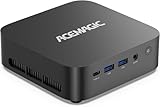
The M1’s headline feature is its footprint. This is a truly palm-sized unit that fits comfortably in one hand, making it easy to VESA-mount behind a display, tuck into a media cabinet, or slide into a cramped dorm setup. The metal-and-plastic shell feels solid rather than premium, and the muted, understated finish suits both home offices and living-room entertainment setups. Connectivity is where a small machine either wins or loses buyers, and the M1 is reasonably well-stocked: you get multiple USB ports, HDMI and DisplayPort outputs capable of driving several 4K screens, a 2.5Gbps LAN jack, and modern Wi-Fi. That triple-display support alone makes it a credible productivity hub. The cooling system runs an active fan, which keeps thermals in check but does become audible under sustained load, something to keep in mind if you want silence during movie nights. Overall the build is practical and thoughtfully arranged, prioritizing versatility and port selection over luxury materials, which is exactly the right call at this size and price.
Performance
With the eight-core Core i9-11900H, 32GB of RAM, and fast NVMe storage, the M1 chews through everyday workloads without complaint. Web browsing with dozens of tabs, Office documents, spreadsheets, video calls, and 4K media streaming all feel snappy, and the generous memory means heavy multitasking rarely forces a slowdown. The 1TB SSD gives real breathing room for large media libraries and project files, and boot times are near-instant. For multimedia the M1 is a comfortable fit, handling high-resolution playback and casual photo or video editing with ease. Light 3D work, entry-level CAD, hobby modeling, and older or less demanding games, is within reach thanks to the capable CPU, though the integrated graphics set a firm ceiling; do not expect smooth performance in modern AAA titles or heavy GPU rendering. Under prolonged stress the compact chassis limits sustained boost clocks somewhat, so this is a machine that sprints happily but is not built for marathon rendering sessions. For its intended audience of office and multimedia users, performance lands right where it should.
Pros & Cons
- Genuinely palm-sized, easy to mount or hide
- Strong 32GB RAM and 1TB SSD for the price
- Triple 4K display output plus 2.5Gbps LAN
- Snappy for office, multitasking, and multimedia
- Low power draw compared to a full desktop
- Integrated graphics limit serious 3D and gaming
- Fan becomes audible under sustained load
- Thermals cap peak performance in long sessions
- Non-premium materials, functional rather than luxurious
- Prior-generation CPU rather than the latest silicon
Alternatives to Consider
If graphics matter more to you, the ACEMAGIC M1 variant with the AMD Ryzen 7 7735HS and Radeon 680M is a strong sibling, offering noticeably better integrated GPU performance for light gaming and triple 4K output at a similar or lower price. Shoppers who want the newest platform should look at the MINISFORUM M1 Pro, which pairs an Intel Core Ultra 5 125H with 32GB DDR5, a 1TB SSD, and cutting-edge connectivity including USB4, Oculink, and Wi-Fi 7, though it costs more. Budget-focused buyers who only need basic office and browsing duties can save meaningfully with the ACEMAGIC Ryzen 7 6800H model, which trims RAM and storage but keeps the same tidy, multi-display-friendly design.
Frequently Asked Questions
Can the ACEMAGIC M1 handle gaming?
It manages older, indie, and less demanding titles at modest settings, but the integrated graphics are not built for modern AAA games or high frame rates. Treat gaming as a light bonus, not a core use case.
How many monitors can it drive?
The M1 supports multiple simultaneous displays, including triple 4K output through its combined HDMI and DisplayPort connections, making it a solid choice for productivity and multi-screen workstations.
Is 32GB of RAM enough for my needs?
For office work, heavy multitasking, media playback, and light creative tasks, 32GB is comfortably ample and leaves room to spare. Only very heavy virtualization or professional workloads would benefit from more.
Does it run quietly?
At idle and during light tasks it is very quiet, but the active fan spins up and becomes audible under sustained heavy load. For most everyday use the noise is minimal and unobtrusive.
Verdict
The ACEMAGIC M1 is a smart pick for anyone who wants a compact, low-power desktop that handles office work, multimedia, and light 3D without dominating the room, and its generous 32GB of RAM and 1TB SSD make it feel more capable than its size suggests; just temper expectations on gaming and heavy graphics, and if those matter, one of the AMD-based alternatives may serve you better.