Last Updated: September 18, 2026
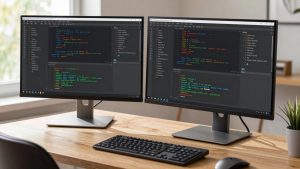
- Top Pick: Across-Star Dual-Monitor-Stand-Riser-For-Desk Adjustable Length 32-40 Inch,Large Desktop Computer Monitor Riser For 2 Screens,Desk Shelf Organizer Riser Stand For Computer/Laptop/PC/Printer/TV Black
- Best Value: Monoprice Medium Multimedia Desktop Stand, Black Glass (27.6" x 12.2" x 3") – Stand & Riser, Laptop Stand, Desktop TV Stand, Dual Monitors w/ Height Adjustable Legs – Workstream Collection (116360), 25.6" x 11.0"
- Premium Choice: XINYAO Wood Monitor Stand Riser for Desk, 24x12x3 inch, Black
Choosing a monitor riser is less about finding the largest platform and more about matching its height, width, depth, and weight capacity to your desk setup. A well-sized riser can raise a screen to a more comfortable viewing position, create storage space underneath, and keep a keyboard, laptop, speakers, or accessories organized. The wrong size, however, can crowd your work surface or place the monitor too high.
This monitor riser height and width guide explains the most useful dimensions in inches and centimeters, how to measure your desk, and which sizes work best for single monitors, dual screens, laptops, printers, and televisions.
As an Amazon Associate we earn from qualifying purchases at no extra cost to you.


📄 In This Review
The Short Answer
For most desk setups, choose a monitor riser that is 3 to 5 inches (7.6 to 12.7 cm) high, 24 to 32 inches (61 to 81.3 cm) wide, and 9 to 12 inches (22.9 to 30.5 cm) deep. A 24-inch-wide riser is usually enough for one monitor, while a 32- to 40-inch model is better for two monitors placed side by side.
The correct height depends on your seated posture. When you look straight ahead, the top edge of the screen should be at or slightly below eye level. Your eyes should land roughly 2 to 3 inches below the top of the display. A riser that is too tall can cause neck strain, especially when paired with a monitor arm or a screen with a high built-in stand.
For a typical single-monitor desk, a 24 x 10 x 3-inch riser is a practical starting point. For two screens, look for a platform between 32 and 40 inches wide. Check the product’s stated load capacity before placing heavy monitors, a printer, or a television on top.
Standard Sizes
See also: Best 240Hz Gaming Monitors: Ten Listings From 24-Inch 1080p to Ultrawide 1440p • Best BenQ Monitor: Eight Models Compared by Pixel Density and Ports
Monitor risers are commonly sold in small, medium, large, and adjustable formats. The measurements below refer to the approximate overall platform size, not the usable space after legs, brackets, or side rails are installed.
| Riser type | Typical size in inches | Approximate size in centimeters | Best for |
|---|---|---|---|
| Compact single-monitor | 20 x 9 x 3 in | 50.8 x 22.9 x 7.6 cm | Small desks, one monitor, laptop accessories |
| Standard single-monitor | 24 x 10 x 3 in | 61.0 x 25.4 x 7.6 cm | One monitor with keyboard storage |
| Wide single-monitor | 28 x 11 x 3 in | 71.1 x 27.9 x 7.6 cm | Large monitors, speakers, and desk accessories |
| Dual-monitor | 32 x 11 x 3 in | 81.3 x 27.9 x 7.6 cm | Two smaller or medium monitors |
| Extra-wide dual-monitor | 40 x 12 x 3 in | 101.6 x 30.5 x 7.6 cm | Two large monitors or a monitor and laptop |
| Adjustable-height riser | 24 to 40 x 10 to 12 x 3 to 6 in | 61.0 to 101.6 x 25.4 to 30.5 x 7.6 to 15.2 cm | Shared workstations and changing seating positions |
A riser measuring 24 x 12 x 3 inches provides a generous surface without taking up the entire back half of a desk. A glass multimedia stand may have a similar footprint, such as approximately 27.6 x 12.2 x 3 inches, while smaller versions can be about 25.6 x 11 inches. These dimensions are suitable for one monitor, a laptop, or a compact television, provided the stand’s weight rating is sufficient.
Dual-monitor risers often use adjustable side sections. Some models extend from approximately 32 to 40 inches wide, giving you flexibility if your monitor arrangement changes. A two-pack of smaller adjustable risers can also work when you want separate support for two screens, but measure carefully to prevent a gap or uneven height between platforms.
Prices for basic monitor risers commonly range from about $18 to $47. Simple metal or adjustable two-piece designs often sit near the lower end, while wood, glass, or larger finished platforms may cost more. Price does not replace checking stability, dimensions, and load capacity.
How to Measure Your Space
- Measure the desk width. Use a tape measure across the area where the riser will sit. Leave at least 2 inches of clearance on each side if you need access to cables or want the riser to look visually balanced.
- Measure the available depth. Measure from the back edge of the desk to the front edge. Subtract the depth needed for your keyboard, mouse, writing area, and cable access. A 12-inch-deep riser needs more room than a 9-inch model.
- Measure the monitor base. Record the base’s maximum width and depth, including any feet that extend forward or sideways. The riser should support the entire base rather than only its center.
- Check the clear space underneath. Measure the height and width of your keyboard, notebook, or accessories. A 3-inch-high riser creates limited storage; a 4- to 6-inch model is better if you want to slide a full-size keyboard underneath.
- Calculate the needed screen height. Sit in your normal chair with your back supported. Measure from the desktop to your eye level. Compare that number with the monitor’s current screen position, then add only the difference needed to place the top of the display near eye level.
- Account for the stand and accessories. Add the height of the monitor’s factory stand, webcam, speakers, desk lamp, or monitor arm. A riser that works for a bare display may be too tall when these accessories are installed.
- Confirm weight capacity. Add the weight of the monitor, laptop, printer, or television. Stay below the manufacturer’s stated maximum, and avoid assuming that a wide platform automatically supports more weight.
By Room or Use Case
Home office with one monitor
A 20- to 28-inch-wide riser is usually appropriate. Choose 3 to 4 inches of height for a standard desk and keep the depth between 9 and 12 inches. If you use a full-size keyboard, look for an open front or at least 4 inches of vertical clearance underneath.
Dual-monitor workstation
Start with a width of 32 inches for two compact monitors and move toward 40 inches for two 27-inch displays. Measure the combined width of both monitor bases, including the space required for their stands. A 10- to 12-inch depth accommodates most display bases, but a monitor arm may allow you to choose a shallower shelf.
Laptop and monitor combination
A 28- to 36-inch riser can hold a monitor on one side and a laptop on the other. If the laptop will be used on top, confirm that the platform is at least 10 inches deep. For better ergonomics, place the laptop on a separate stand and use an external keyboard rather than typing on a raised laptop for long periods.
Printer or accessory storage
Printer risers need more attention to weight and vibration than ordinary monitor shelves. Measure the printer’s footprint and add at least 1 inch of clearance on each side. A 12-inch depth is a safer starting point for many compact printers, while larger models may need 14 inches or more. Keep paper trays and output paths unobstructed.
Small desk or dorm room
Choose a compact riser around 20 to 24 inches wide and 9 to 10 inches deep. Adjustable legs are useful when you need to switch between a monitor and laptop, but make sure the legs do not reduce usable keyboard space. A narrow platform may also leave room for a lamp or notebook beside the screen.
Television or media console
For a small television, select a stand wider than the TV’s base and verify the screen’s weight. A riser can add 3 to 6 inches of height, but do not block the television’s infrared sensor, ventilation openings, or cable ports. Glass and wood risers are common for media furniture, while metal designs are often better for utility rooms or workspaces.
Common Sizing Mistakes
- Choosing width based on screen size alone: A 27-inch monitor does not always have a 27-inch-wide base. Measure the stand, not just the display.
- Ignoring depth: A platform may fit the monitor but leave no room for a keyboard, mouse, or cable bend.
- Adding too much height: Measure your eye level before buying a tall riser. A screen that is only 1 inch too high can become uncomfortable over a full workday.
- Forgetting clearance underneath: Check the height of your keyboard, docking station, notebooks, and charging cables.
- Overlooking the support structure: Legs, center supports, and adjustable brackets can reduce the usable storage area.
- Exceeding the load rating: Do not place a heavy printer or television on a riser designed only for a lightweight monitor.
- Failing to plan for cable access: Leave space behind or beside the riser for power and display cables. Tight bends can stress connectors.
FAQ
How tall should a monitor riser be?
Most users need between 3 and 5 inches of added height. Measure your seated eye level and raise the monitor until the top edge is at or slightly below your eyes. Use a shorter riser if the monitor already has a tall stand.
How wide should a riser be for two monitors?
Choose at least 32 inches for two smaller monitors and 36 to 40 inches for larger screens. Add the widths of both bases and include a few inches for adjustment and cable clearance.
Is a 12-inch-deep monitor riser enough?
For many monitors, yes. Twelve inches is a versatile depth for a display, laptop, or small television. If the monitor base extends farther forward, or if you need to store a large keyboard underneath, measure the equipment before choosing the platform.
Can a monitor riser hold a laptop or printer?
It can, if the platform is deep and strong enough and the manufacturer permits that type of load. Compare the equipment’s footprint and weight with the riser’s published limits. Keep printer trays, vents, and laptop cooling openings clear.
Related Reviews & Guides

Best 5K Monitors in 2026: Compared and Ranked
6 Best Dual Screen Monitor Arms 2026