Last Updated: September 18, 2026
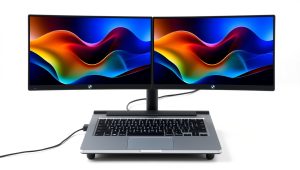
- Top Pick: gianotter Dual Monitor Stand Riser With Drawer and 2 Pen Holders
- Best Value: Canyora Computer Monitor Stand Riser for Desk, 3 Height Adjustable PC Laptop TV Desktop Monitor Stand Shelf, Metal Printer Table with Phone Holder, Stand Riser for Desk, Office Desk Organizers and Accessories, 2 Pack
- Premium Choice: WALI Computer Monitor Stand for Desk, Adjustable Laptop Riser, up to 44 lbs
A monitor riser can solve a surprisingly specific problem: your screen is too low, your desk is crowded, or you need to turn unused space beneath a monitor into storage. But shoppers often choose one based on appearance or the highest advertised weight limit alone. That can lead to a shelf that is too narrow for the monitor base, a metal riser that transfers every keystroke, or a “height-adjustable” model that still leaves the screen at an uncomfortable angle.
The best choice depends on your monitor, desk, posture, and daily habits. Before comparing finishes and features, measure the equipment you already own. Then use the following guide to identify what actually matters in 2026.
As an Amazon Associate we earn from qualifying purchases at no extra cost to you.



📄 In This Review
Decide These 3 Things First
- How high does the screen need to go? When you sit upright, the top edge of the display should be at or slightly below eye level. Measure from the desk to your preferred screen height; that number tells you whether you need a 2-inch shelf, a 4-inch riser, or adjustable legs.
- What must fit underneath? Decide whether the space will hold a keyboard, laptop, notebook, speakers, or desk accessories. A riser with 3 to 5 inches of clearance may fit a compact keyboard but not a full-size one with a wrist rest.
- How much weight and movement will it handle? Add the monitor’s weight, the stand or base, and anything stored on the riser. For a dual-monitor setup, include both screens and leave a safety margin rather than buying to the exact stated limit.
Size and Height
See also: Best 240Hz Gaming Monitors: Ten Listings From 24-Inch 1080p to Ultrawide 1440p • Best BenQ Monitor: Eight Models Compared by Pixel Density and Ports
Start with the footprint of the monitor base, not the size of the screen. A 27-inch monitor can have a relatively compact stand, while a 24-inch all-in-one computer may use a deep, wide base. Measure the base at its widest and deepest points, then add at least 1 inch on each side for comfortable placement. For a dual-monitor arrangement, check the total width of both bases and their positions; many single-shelf risers are not wide enough for two displays.
For most desks, a riser between 20 and 24 inches wide and 8 to 10 inches deep is a practical starting point. A 27- to 32-inch display may need 24 to 32 inches of width, particularly if its stand has a broad V-shaped foot. Depth matters too: a shelf only 7 inches deep can feel unstable with a monitor positioned near the front edge.
Height is a comfort decision. Fixed risers commonly add 2 to 6 inches. Adjustable models may offer two or three settings, often in roughly 1-inch increments. If you switch between sitting and standing, look for a wider adjustment range or use a monitor arm instead; a small desktop riser usually cannot provide the 10 to 16 inches of movement needed for a true sit-stand transition.
Material
Steel is usually the strongest choice for a slim platform and is well suited to heavier monitors or printers. It can support substantial loads when properly braced, but thin steel may transmit keyboard vibration and can feel hollow if the platform is not reinforced.
Aluminum is light, corrosion-resistant, and attractive in a modern workspace. It is often more expensive than basic steel and may flex if the shelf is wide and lacks a center support.
Wood and engineered wood offer a warmer appearance and can reduce the hard, resonant sound associated with metal. Solid wood is durable but heavier. Particleboard or fiberboard is affordable, though its edges and screw holes can deteriorate if repeatedly assembled or exposed to moisture. Look for a sealed surface and a thickness of at least about 0.5 inch for a broad shelf.
Plastic works for lightweight monitors and simple storage, but inspect the underside for ribs or other reinforcement. Avoid a large, completely flat plastic panel if the manufacturer provides no clear load rating.
Construction and Stability
A riser’s stated weight capacity is useful only when you understand how the load is supported. A shelf with two widely spaced legs may hold less securely at the center than one with a center brace. For a shelf 24 inches or wider, center support, a folded steel frame, or a thick reinforced platform is reassuring.
Look for a load rating of at least 30 pounds for a single-monitor setup and 50 to 80 pounds for two monitors, depending on their actual weights. Never assume a two-pack’s capacity applies to one unit; verify the rating for each riser. A monitor weighing 18 pounds should not sit on a riser rated for 20 pounds once you add a speaker, webcam, and accessories.
Feet are equally important. Rubber or silicone pads help protect the desk and reduce sliding. Check whether they are wide enough to stay planted when you type. A riser with four small, hard plastic feet may wobble more than a heavier model with broad, non-skid supports. If the shelf has adjustable legs, tighten every fastener and confirm that all legs touch the desk before placing equipment on top.
Comfort and Performance
Raising a monitor only helps if it improves your viewing position. Sit with your shoulders relaxed and your elbows near a 90-degree angle. The screen should be roughly an arm’s length away—commonly 20 to 30 inches for a desktop monitor—while the top edge sits around eye level. If the riser forces the display too high, you may compensate by tilting your head down, creating a different strain.
Consider glare and viewing angle. A shelf with a very high front lip can block a keyboard or make it harder to pull the keyboard close. A top surface with no ventilation may be a poor choice for a laptop, especially if it covers intake vents. Leave the laptop’s required airflow clear and check the manufacturer’s guidance.
Cable management is a small feature with a large effect. A rear cutout or cable channel keeps display, power, and USB cables from pressing against the wall. Storage drawers and pen holders, such as those found on some dual-monitor organizer designs, are useful if they do not reduce the space needed for your keyboard or obstruct cable routing.
Price Tiers
Budget: $10 to $25. Expect a basic fixed or lightly adjustable platform, often in steel or plastic. The WALI adjustable laptop riser, listed at $9.99 as an example, represents this category. At this price, verify dimensions, foot design, and the precise load rating. A low-cost two-pack, such as the Canyora example listed at $17.98, can be useful for separate workstations, but compare the per-unit width and height rather than assuming two smaller risers replace one wide shelf.
Midrange: $25 to $50. This tier commonly adds a drawer, pen holders, a more finished surface, thicker supports, or multiple height settings. The gianotter and OPNICE organizer-style examples are listed at $26.99 and illustrate the appeal of combining monitor elevation with storage. Make sure the drawer does not consume the legroom you intended for a keyboard.
Premium: $50 to $150 or more. Higher prices may buy a stronger dual-monitor platform, better adjustability, heavier materials, or a polished design. The value is clearest when you need a wide load-bearing surface or frequent height changes. For a single lightweight monitor, premium styling alone may not justify the cost.
Warranty and Support
Check the warranty length, what it covers, and whether replacement parts are available. A one-year limited warranty is common for budget accessories. Two or three years is more reassuring for a heavier adjustable frame, particularly if the mechanism includes locking joints or moving legs.
Read the exclusions. Cosmetic scratches, misuse, weight beyond the stated limit, and damage from incorrect assembly may not be covered. Keep the receipt and assembly instructions, and confirm that the seller—not just the brand—has a clear return period. A 30-day return window is helpful if the riser turns out to be too shallow or too tall for your desk.
Delivery and Assembly
Many fixed risers arrive ready to use, while adjustable and storage models may require 10 to 30 minutes of assembly. Count the hardware before starting, use the supplied washers, and tighten screws evenly rather than fully tightening one corner first. After assembly, press lightly on each corner and the center to check for rocking.
Packaging matters when a shelf includes glass, wood veneer, or a long metal platform. Inspect the corners immediately and photograph damage before discarding the box. Also check the delivered dimensions: a product described as a “dual monitor stand” may consist of two separate narrow units rather than one continuous shelf.
Spec Checklist
| Spec | Budget | Mid | Premium |
|---|---|---|---|
| Typical price | $10–$25 | $25–$50 | $50–$150+ |
| Useful width | 16–22 in. | 20–28 in. | 24–40+ in. |
| Typical height gain | 2–4 in. | 3–6 in. | Adjustable, often 3–10+ in. |
| Recommended capacity | 20–30 lb | 30–50 lb | 50–100+ lb, depending on design |
| Best for | One lightweight monitor | Monitor plus storage | Dual monitors or frequent adjustment |
| Features to prioritize | Non-slip feet, correct footprint | Drawer, cable cutout, stronger frame | Center support, broad adjustment range, serviceable parts |
Red Flags
- The product lists a maximum weight but does not specify whether it applies to one shelf, one leg set, or the entire package.
- Dimensions are shown only for the shipping box or include the legs, with no usable shelf measurements.
- The riser is wider than 24 inches but has no center support or underside reinforcement.
- Feet are smooth plastic, uneven, or too narrow to prevent sliding.
- “Adjustable” means only that the legs can be assembled in one of two fixed positions.
- A laptop riser covers intake vents or provides no cable opening for a power cord.
- Reviews repeatedly mention stripped screws, missing hardware, wobbling, or a strong chemical odor.
- The seller gives no clear warranty, return policy, or replacement-part information.
FAQ
How tall should a monitor riser be?
Measure from the desk to your eye level while sitting in your normal working posture, then subtract the height of the monitor itself from its base to the top edge. The remaining number is your approximate required lift. Most people need about 2 to 6 inches, but the correct height depends on your chair, desk, monitor, and posture.
Can a monitor riser hold two monitors?
Yes, if its usable width, depth, and load rating accommodate both bases. Add the two monitor weights and stands, then leave a safety margin of at least 20 percent. A continuous shelf is usually more stable than placing two unrelated risers side by side, though separate risers allow independent height adjustment.
Is a monitor riser better than a monitor arm?
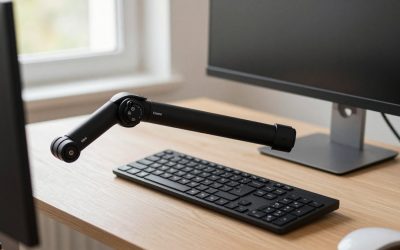
A riser is simpler, often less expensive, and provides convenient shelf storage. A monitor arm offers more height, depth, tilt, and swivel adjustment while freeing desk space. Choose an arm when you need frequent repositioning, a sit-stand setup, or a very large display; choose a riser when you want a stable, low-maintenance lift.
What should go under a monitor riser?
A keyboard, notebook, compact speakers, laptop, or small desk accessories can use the space underneath. Keep heavy items centered and do not block vents, power strips, or cable paths. If you store a laptop there, measure its closed height and confirm that the riser provides enough airflow and clearance.
Related Reviews & Guides



6 Best HP Docking Stations For Laptop Dual Monitor 2026
6 Best Huanuo Dual Monitor Stands 2026