Last Updated: October 18, 2026
If you do Zoom, Teams, or Google Meet all day from a home office, the Logitech C920 family is still the default safe pick. It is not the sharpest or smartest webcam you can buy in 2026, but it is predictable: true 1080p, decent color without tweaking, and it works plugged into a Windows laptop or Mac without drivers.
There are now several versions with almost identical hardware: C920, C920s, C920e, and C920x. Reviews get confusing because retailers mix them together. In practice the lens and sensor are the same across all of them. What changes is the privacy shutter, the bundled software, and whether it is aimed at retail or business buyers. Buy whichever is cheapest from a reliable seller unless you need a specific feature for IT deployment.
📄 In This Review
What you actually get
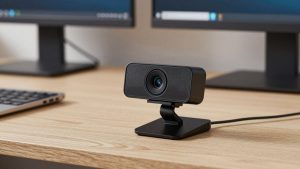
In the box you get the camera with a folding universal clip, a 5-foot USB-A cable permanently attached to the camera, and either a clip-on privacy shutter or a built-in shutter depending on the variant. No tripod is included, though the base has a standard 1/4-inch thread if you want to put it on a small desktop tripod.
Specs have not changed much in years: 1080p at 30 fps, 720p at 30 fps, 78-degree field of view, fixed focus range with autofocus, dual integrated mics, and automatic low-light correction. There is no 60 fps at 1080p, no 4K, no AI framing, and no built-in ring light. USB is USB-A 2.0. On newer MacBooks with only USB-C, you will need an adapter or dock.
Build quality is fine for a desk that never moves. The hinge grips a laptop lid or external monitor well, but the attached cable is stiff and short for a large dual-monitor setup. If your PC tower is under the desk, measure first. A USB extension often introduces dropouts with this camera, so a short, powered hub is better than a cheap 10-foot passive extender.
Image and audio in real work calls
See also: Best Monitor for MacBook Air: Two USB-C 4K Screens and Six Adapter-Dependent Alternatives • Best Monitor for MacBook Pro: Eight Listings Sorted by Cable, Sharpness and Scaling
For video calls in a typical home office, the C920 looks better than any built-in laptop camera from the last five years, including MacBook Air and most ThinkPads and Dells. Skin tones are warm but not orange, text on a whiteboard behind you is readable, and exposure does not pulse badly when you share screen.
Low light is acceptable, not great. In a room with just one overhead light at night, expect soft detail and visible noise. Logitech’s RightLight correction brightens your face, but it also smears fine detail. You will look noticeably better with a $20 desk lamp bounced off a wall in front of you than with any settings tweak.
Autofocus is the most common complaint. It hunts if you lean in and out, hold up a document, or gesture with your hands. For desk work where you sit 2-3 feet away, turn off autofocus in Logitech’s software and set fixed focus once. That solves 90 percent of soft-image complaints.
The dual mics are usable for calls but thin and pick up keyboard clatter. They are fine as a backup if your headset dies. For daily meetings, a dedicated USB headset or even wired earbuds will sound much clearer to coworkers. Do not buy the C920 for its microphones.
C920 vs C920s vs C920e vs C920x
All four use the same 1080p sensor and the same clip design. Do not pay a large premium for one over another for image quality alone. The differences are practical:
| Model | Key difference | Software | Best for |
|---|---|---|---|
| C920 (original) | No privacy shutter in most bundles, older packaging | Logi Tune / Capture | Buy only if it is clearly cheapest |
| C920s HD Pro | Clip-on privacy shutter + bundled 3-month XSplit license | Logi Tune | Home office workers who want a shutter |
| C920e Business | Attached privacy shutter that flips, certified for Teams/Zoom | Logi Tune, mass deployment tools | Work-issued laptops, IT-managed setups |
| C920x | Same as C920s, usually a retail bundle variation | Logi Tune | Same as C920s, pick by price |
For most people, the choice is simple: get the Logitech C920s at the current street price if you want a shutter, or the C920e if your employer requires business certification. Image quality between them is indistinguishable in Zoom.
Watch out for gray-market listings. Because this model has been sold for over a decade, there are refurbished units sold as new. Check that the privacy shutter is included if advertised, and test autofocus and mic on arrival. Counterfeits usually fail at low light and have misspelled packaging.
Setup on Macs and Windows laptops
On both Windows 11 and macOS, the C920 is plug-and-play for Teams, Zoom, Meet, Webex, and Slack. No driver install is required for basic 1080p. The extra software is only for settings like zoom, focus, and white balance.
On Mac, use Logi Tune (free from Logitech) to update firmware and disable autofocus. Logitech Capture, the older camera app many reviews mention, has been discontinued. Logi Tune is simpler but still lets you crop to 78 degrees or zoom in slightly if your office background is messy. Settings do not always persist after unplugging, so check after macOS updates.
On Windows laptops, the same advice applies. If you use an external 4K monitor with a laptop lid closed, mount the C920 on top of the external monitor, centered. Off-center placement above a side monitor creates an odd eye-contact angle that coworkers notice more than resolution differences.
Performance failure mode to know: on underpowered USB hubs, especially bus-powered docks, the C920 can drop to 720p or freeze when another USB device wakes up. Plug it directly into the laptop if you see stuttering. This is more common on M1/M2 MacBook Air docks with many peripherals.
Who should skip it
Skip the C920 if you need 60 fps for whiteboard demos, hand movement, or product demos. It tops out at 30 fps, so fast motion blurs. The Logitech C922 or C935 do 720p60 and 1080p30 with better compression, though they cost more for only a modest gain.
Also skip it if you are often backlit by a window. The C920 has limited dynamic range and will silhouette you. No settings fix physics. Either move your desk to face the window or step up to a camera with better HDR like the Logitech Brio 500 or Obsbot Meet SE. For most people, moving the lamp is cheaper than upgrading the camera.
If your laptop already has a good 1080p camera – some newer ThinkPads, HP Dragonfly, and MacBook Pro models are decent – the upgrade from built-in to C920 is smaller than it used to be. The big win is placement: an external camera at eye level on a monitor looks better than a low-angle laptop camera looking up your nose, even at the same resolution.
Alternatives worth checking
The cheaper option is often fine. If all you do is twice-weekly check-ins in a bright room, a basic no-name 1080p webcam is acceptable, though mics and low-light handling are usually worse. Be honest about your use: daily client calls justify the C920’s consistency; occasional calls do not.
If you want sharper image or wider framing for a small conference room, look at current 4K webcams for home office use like the Brio series or similar. They offer digital zoom without as much quality loss, auto-framing, and better noise reduction. Trade-off is price, higher CPU use, and sometimes finicky software on Mac.
If you are on a tight budget for a second desk or kids’ school laptop, a basic budget 1080p webcam for laptops will handle daylight calls. Expect weaker autofocus, no privacy shutter, and plastic mounts that slip. For a primary work camera you use 4+ hours a day, the C920’s mount and long-term driver support are worth the extra $20 to $30.
FAQ
Is the Logitech C920 good for Zoom and Teams in 2026?
Yes, for standard desk calls. You get reliable 1080p30, correct color, and business app certification on the C920e variant. It is not ideal for 60 fps demos or very dark rooms.
What is the difference between C920, C920s, and C920e?
Image hardware is essentially the same. The C920s adds a privacy shutter for consumers, the C920e adds a flip shutter and business certifications for IT, and the base C920 is usually older stock without a shutter.
Does the C920 work with MacBook Air and MacBook Pro?
Yes, plug-and-play over USB-A with an adapter. Use Logi Tune on macOS for focus and zoom controls. You will need a USB-C adapter or dock, and avoid overloaded bus-powered hubs to prevent freezes.
Why does my C920 look blurry?
Most blur is autofocus hunting or low light. Sit 2 to 3 feet away, add frontal light, then in Logi Tune turn off autofocus and set manual focus. Wipe the lens – office dust causes haze that looks like soft focus.