Last Updated: September 12, 2026
- Quick Comparison
- How Wireless Charging Desk Pads Work
- Key Specs to Compare
- Surface Materials: Microfiber vs PU Leather
- Compatibility: What Phones Work
- Desk Setup Integration
- Frequently Asked Questions
- Bottom Line
- What to Look For in a Wireless Charging Desk Pad
- Tips for Your Charging Pad Setup
- Frequently Asked Questions
- About the Author
- Related Articles

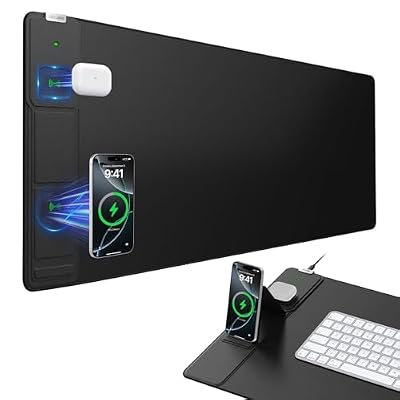


TL;DR: A wireless charging desk pad combines a large mouse pad surface with a built-in Qi charger — one cable runs the whole thing. Best for anyone tired of hunting for a charging cable mid-workday. Works with iPhone 8+ and most Android flagship phones.
Best Wireless Charging Desk Pad: Clean Desk, Zero Cable Hunting
Desk cable management is a constant battle. A wireless charging desk pad solves two problems at once — it gives your mouse a smooth, consistent gliding surface while charging your phone without a dedicated cable. It’s one of the best single-purchase upgrades for a cleaner desk. I’ve tested several alongside my home office setup and the top picks below are worth every dollar.
As an Amazon Associate we earn from qualifying purchases at no extra cost to you.




🛒 Best Price Today on Amazon
Prime members get fast, free shipping on everything above, plus member-only deals. New members get a 30-day free trial — cancel anytime.
📄 In This Review
- Quick Comparison
- How Wireless Charging Desk Pads Work
- Key Specs to Compare
- Surface Materials: Microfiber vs PU Leather
- Compatibility: What Phones Work
- Desk Setup Integration
- Frequently Asked Questions
- Bottom Line
- What to Look For in a Wireless Charging Desk Pad
- Tips for Your Charging Pad Setup
- Frequently Asked Questions
- About the Author
- Related Articles
Quick Comparison
| Product | Brand | Price | Rating |
|---|---|---|---|
| Schkner RGB Gaming Mouse Pad with Wireless Charging 15W | Schkner | $34.99 | 4.4/5 |
| Wireless Charging Mouse Pad with Foldable Phone Holder | abcmat | $52.24 | 4.5/5 |
| TopMade Wireless Charging Mouse Pad | TopmadeProduct-Ordernow | $36.54 | 4.5/5 |
| Mouse Pad with Phone Holder | miroddi | $59.49 | 4.6/5 |
| VOVIPO 3 in 1 Wireless Charging Mouse Pad | VOVIPO | $26.99 | 4.1/5 |
How Wireless Charging Desk Pads Work
See also: Good Height for a Desk: Seated and Standing Numbers by Body Height • Best Desks for Posture: Height, Depth and Sit-Stand Options
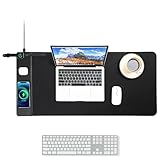
The pad contains a Qi inductive charging coil embedded beneath the surface fabric. A single USB-C cable powers the whole pad. Place your Qi-compatible phone on the charging zone (usually marked with a small circle or icon) and charging begins automatically. The mouse pad surface extends well beyond the charging zone so your workflow isn’t interrupted.
Most pads top out at 10W wireless charging — fine for overnight or passive charging while you work, though slower than a 20W+ wired charger. If fast charging is critical, keep a wired option nearby. For passive desk-level charging throughout the day, 10W is more than sufficient.
Key Specs to Compare
| Spec | What to Look For | Why It Matters |
|---|---|---|
| Charging wattage | 10W (Qi standard) | Adequate for passive desk charging |
| Pad dimensions | 800mm x 300mm minimum | Covers keyboard + mouse comfortably |
| Surface material | Microfiber or PU leather | Microfiber = faster mouse; PU = easier to wipe |
| Cable type | USB-C input | Universal, reversible |
| Edge stitching | Yes | Prevents fraying over time |
| Non-slip base | Rubber backing | Keeps pad anchored during use |
Surface Materials: Microfiber vs PU Leather
Microfiber cloth surfaces are the standard for gaming and productivity mice — they provide consistent low-friction glide and are gentle on optical sensors. PU leather surfaces are smoother, wipe clean in seconds, and look more premium on camera for video calls. The trade-off: PU can feel slightly less precise for fast mouse movements, but for office work it’s largely irrelevant.
If you’re running a wired keyboard, consider how the USB cable routes across the pad — you want enough surface area so the cable doesn’t constantly cross the charging zone. Most XL pads (900mm+) handle this cleanly.
Compatibility: What Phones Work
Qi wireless charging works with iPhone 8 and newer, Samsung Galaxy S6 and newer, Google Pixel 3 and newer, and most Android flagships since 2018. Cases up to 3mm thick typically still charge — thicker cases or metal cases will block charging. MagSafe accessories (for iPhone 12+) don’t align with standard Qi coils, so you won’t get MagSafe’s 15W speed, just standard 7.5W–10W.
Desk Setup Integration
A wireless charging pad works best as a foundational layer — lay it down first, then position your keyboard and mouse on top. Route the single USB-C cable to a USB-C docking station or a power strip behind the monitor. Combined with a headphone stand, you can eliminate most loose cables from your desktop surface entirely.
For monitor placement, pair this pad with a proper monitor arm to free up even more desk surface for the pad to sit flat without obstruction.
Frequently Asked Questions
Does wireless charging through a desk pad damage my phone battery?
No more than any other wireless charger. Modern phones manage charging current intelligently. The main consideration is heat — wireless charging generates slightly more heat than wired, so avoid leaving your phone charging in direct sunlight on the pad.
Can I use any mouse on a wireless charging desk pad?
Yes. The wireless charging coil is embedded deep enough that it doesn’t interfere with optical or laser mouse sensors. Any wired or wireless mouse works normally across the entire pad surface.
What happens if I put my phone in the wrong spot?
Nothing harmful — charging simply won’t initiate. The charging indicator light (if present) won’t activate. Reposition your phone over the marked charging zone and it starts automatically.
How much desk space do I need?
Standard XL desk pads are 800–900mm wide by 300–400mm deep. That fits comfortably on any desk 1200mm or wider. If you have a smaller desk, look for a “large” (not XL) pad around 600mm x 300mm.
Will the charging coil interfere with my credit cards or hotel keys?
Only if placed directly on the charging zone for extended periods. The magnetic field is localized to that spot. Cards in a wallet sitting on the general pad surface won’t be affected. Don’t leave RFID cards sitting on the charging circle itself.
Bottom Line
A wireless charging desk pad is one of the cleanest single-cable upgrades you can make. One USB-C cable in, full mouse pad + phone charging out. It fits naturally into any ergonomic desk build — check out the dual monitor ergonomics guide for a complete desk layout that pairs well with this accessory.
What to Look For in a Wireless Charging Desk Pad
A charging desk pad combines a writing surface with a built-in Qi coil, so it has to perform two jobs well at once. The trade-offs between charging reliability and desk usability are where most pads succeed or fail.
- Charging coil placement: look for a clearly marked charging zone so you can drop your phone without hunting for alignment; some pads use a visible indicator light.
- Power output: 10W or 15W pads charge modern phones meaningfully faster than basic 5W units, though your phone must support the higher rate.
- Surface material: vegan leather or PU resists spills and wipes clean, while felt feels softer for writing but stains more easily.
- Size and coverage: a full-desk pad protects more surface and gives your mouse room, but confirm it fits your desk depth before buying.
- Case compatibility: thick or metal-ringed cases can block charging; a pad rated to charge through 5mm of case material is more forgiving.
- Cable and adapter: check whether a compatible wall adapter is included, since many pads ship with only a USB-C cable.
Tips for Your Charging Pad Setup
Position the charging zone at the top corner of the pad nearest your dominant hand so setting your phone down to charge is a natural motion rather than a reach. Use a power adapter that matches the pad rated wattage; a low-output charger will silently fall back to slow charging even on a 15W coil.
Keep the charging area free of paper clips, coins, and other metal objects, which can heat up on an active coil. If your phone uses a heavy case, test charging before committing the pad to a permanent spot, and remove magnetic wallets that interfere with coil alignment.
Frequently Asked Questions
Will it charge my phone through a case?
Most pads charge through cases up to about 5mm thick. Thick rugged cases, metal cases, or magnetic mounts can block or slow charging, so test yours first.
How fast does a wireless charging pad work?
A 15W pad charges compatible phones noticeably faster than a 5W unit, though wireless charging is still generally slower than a wired connection. Pairing it with the right adapter matters.
Can I use the rest of the pad while my phone charges?
Yes. The charging coil sits in one zone, leaving the remaining surface free for your mouse, keyboard, or writing without affecting the charge.
Does wireless charging damage the desk surface or generate heat?
The pad itself insulates the desk, and a quality unit manages heat with a temperature limit. Just keep metal objects off the active charging zone to avoid stray heating.
Related Reviews & Guides




Quick Picks: Best Laptop Cooling Pad Fan Stands

Laptop Docking Station USB C Review