Last Updated: October 9, 2026
As an Amazon Associate we earn from qualifying purchases at no extra cost to you.






🛒 Best Price Today on Amazon
Prime members get fast, free shipping on everything above, plus member-only deals. New members get a 30-day free trial — cancel anytime.
📄 In This Review
Quick Comparison
| Product | Brand | Price | Rating |
|---|---|---|---|
| Ergotron – Upgraded LX Pro Premium Monitor Arm | — | $199 | 4.1/5 |
| Ergotron – Upgraded LX Pro Premium Monitor Arm | — | $199 | 4.2/5 |
| Ergotron – Upgraded LX Pro Premium Dual Monitor Arm | — | $429.14 | 4.6/5 |
Introduction
See also: Good Height for a Desk: Seated and Standing Numbers by Body Height • Best Desks for Posture: Height, Depth and Sit-Stand Options
A dual monitor setup is one of the highest-return productivity upgrades for any home office worker. Research consistently shows that two screens can boost productivity by 20–30% by allowing you to keep reference material on one screen while working on the other. The good news is that building a dual-monitor desk has never been more affordable or space-efficient.
What to Look For
- Matching Specs: Pair monitors with the same panel type, color temperature, and brightness so your eyes don't have to adjust as they shift between screens.
- Monitor Arm vs. Stands: Dual monitor arms free up significant desk space and let you position each screen at the perfect height and angle; look for arms rated for your monitor's weight.
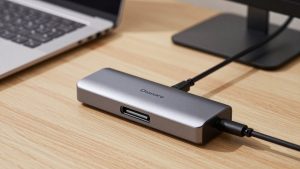
- GPU Output: Confirm your computer has two video outputs (HDMI, DisplayPort, USB-C); a USB-C to DisplayPort adapter or a docking station can add ports if needed.
Top Picks
LG 27UK850-W 27-Inch 4K IPS Monitor (Pair)
Buying two LG 27UK850-W displays gives you a matched pair of 27-inch 4K IPS screens with USB-C and HDR10 support. Each monitor includes a USB-A hub, so your dual setup effectively becomes a four-port USB hub. The slim bezels make side-by-side placement nearly seamless.
VIVO Dual Monitor Arm STAND-V002
The VIVO STAND-V002 is a fully adjustable dual monitor arm that mounts to your desk via a grommet or C-clamp. It supports monitors up to 27 inches and 22 lbs each, with full tilt, swivel, and rotation. Routing channels keep cables tidy, and the gas-spring mechanism makes repositioning effortless throughout the day.
Dell SE2722H 27-Inch FHD Monitor (Pair)
For a budget-friendly dual setup, two Dell SE2722H monitors deliver solid 1080p IPS performance at an accessible price. With AMD FreeSync, thin bezels, and VESA-mounting support, they're a practical choice for general productivity, video calls, and web browsing. Dell's consistent factory color calibration means both units will match closely out of the box.
Final Thoughts
A dual monitor setup pays for itself quickly in saved time and reduced frustration. Focus on matching your displays and investing in a good monitor arm to maximize desk space. Whether you go 4K or 1080p, two screens will transform your daily workflow.
What to Look For in a Dual Monitor Setup
Building a dual monitor workspace is about more than buying two screens; it is about making them work together as one seamless surface. The details that make or break the experience are matched displays, the right mounting solution, and enough video outputs on your computer. Plan these three things and the rest falls into place easily.
- Matched panels: Use two identical monitors, or at least the same panel type, resolution, and size, so colors and text look consistent as your eyes move between them.
- Monitor arm versus stands: A dual monitor arm reclaims desk space and lets you fine-tune height, tilt, and angle, while the included stands work but eat into your usable surface.
- Video outputs: Confirm your computer has two usable outputs, whether HDMI, DisplayPort, or USB-C, and add a dock or adapter if you come up short.
- Bezel thickness: Thin bezels minimize the visual gap between screens, which makes a side-by-side arrangement feel more like one continuous workspace.
- Stand and arm weight rating: Check that the arm or mount is rated for the weight and size of your specific monitors so it holds position without sagging.
- Connectivity and hubs: A monitor with a built-in USB hub or USB-C passthrough can simplify cable management and charge your laptop at the same time.
Tips for Your Dual Monitor Setup
Decide whether you want a primary and secondary screen or two equal displays. Most people set one monitor straight ahead for their main task and angle the second slightly inward for reference material, email, or chat.
Align the tops of both screens at the same height to keep your neck neutral as you glance between them. A monitor arm makes this easy; with stands, a sturdy riser can lift the shorter display into line.
Route your cables together along the back of the arm or desk to keep the setup tidy. A clean cable run not only looks better but also makes it painless to reposition or upgrade a monitor later.
Common Mistakes to Avoid
A frequent mistake is pairing two mismatched monitors with different brightness or color temperatures. The constant adjustment as your eyes shift between them causes fatigue, so matching the displays is worth the small extra effort.
Another error is forgetting to confirm video outputs before buying. Plenty of people set up two monitors only to discover their laptop drives just one external display, which means budgeting for a docking station or USB-C adapter from the start.
Frequently Asked Questions
Do my two monitors need to be identical?
Identical is ideal because colors and text match perfectly, but at minimum aim for the same resolution and panel type so your eyes do not have to readjust between screens.
Is a monitor arm worth it for a dual setup?
For most people, yes. A dual arm frees significant desk space and makes it effortless to align heights and angles, which improves both ergonomics and the look of the setup.
How do I connect two monitors to a laptop?
Check your laptop’s ports and graphics support first. Many laptops drive only one external display directly, so a USB-C docking station or dual-output adapter is often the reliable solution.
Should both monitors be the same height?
Yes. Aligning the tops of both screens keeps your neck neutral as you look between them, which prevents the strain that comes from one screen sitting noticeably lower than the other.
Getting the Most from Two Screens
Once your dual monitor setup is dialed in, build habits that take advantage of the extra space. Dedicate one screen to your active task and reserve the second for email, chat, reference documents, or your video call window. Keeping communication tools on a side screen means notifications never cover the work in front of you. Over time this division of attention reduces the constant window-shuffling that quietly eats into a workday, and it is the real reason a second monitor consistently ranks among the most worthwhile home office upgrades you can make.
Related Reviews & Guides




Best Ergonomic Split Keyboards for Typing All Day in 2026: Compared and Ranked

Branch Ergonomic Chair: Top Picks Compared in 2026