

Last Updated: October 9, 2026
- Quick Comparison
- Top Picks at a Glance
- The Specs That Actually Reduce Eye Strain
- LED Desk Lamp Spec Comparison
- Monitor Light Bar vs. Desk Lamp: Which Setup Works for You
- Desk Lamp Placement: Where You Put It Matters as Much as the Lamp Itself
- Evening Use and Circadian Rhythm
- FAQ: LED Desk Lamps and Eye Strain
- Frequently Asked Questions
- About the Author
- Related Articles
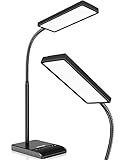
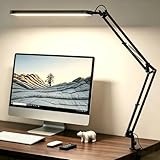
- Top Pick: Pzloz Led Desk Lamp for Office Home – Eye Caring Architect lamp with Clamp,Dual Screen Computer Monitor Work Smart Light: 24W 5 Color Flexible Adjustable Lighting Table Lamp for Study Drafting
- Best Value: Motumen Led Desk Lamp for Home Office, Eye-Care Desk Light Clamp, Black
- Premium Choice: LEPOWER Desk Lamp, 800LM LED for Home Office, True Eye-Caring for Reading
As an Amazon Associate we earn from qualifying purchases at no extra cost to you.






Best LED Desk Lamp for Eye Strain 2026: What Actually Reduces Fatigue vs. What’s Just Marketing
Quick Answer / TL;DR
The best LED desk lamp for eye strain has three things: high CRI (90+) for accurate color rendering, flicker-free output (PWM frequency above 1kHz or DC-regulated), and a color temperature range that includes warm white (2700–3000K) for evening use. BenQ ScreenBar Plus wins for monitor-mounted workstation lighting. TaoTronics TT-DL16 wins for traditional desk lamp ergonomics under $50. Neither requires blue light glasses as a compensating workaround when used correctly.
Eye strain from screens isn’t primarily a blue light problem — it’s a contrast and flicker problem. Your eyes constantly adjust to brightness differences between your screen and surrounding environment, and the rhythmic on-off cycling of cheap LED drivers causes involuntary micro-contractions in your iris muscles. Fix the light source and you fix the fatigue.
This guide covers the specs that actually matter (CRI, flicker rate, lux output), explains the monitor-mounted vs. desk lamp choice, and identifies the desk lamp features that are genuine ergonomic value vs. marketing features you’ll never use.
🛒 Best Price Today on Amazon
Prime members get fast, free shipping on everything above, plus member-only deals. New members get a 30-day free trial — cancel anytime.
Start 30-Day Prime Free Trial →See Today’s Amazon Deals📄 In This Review
- Quick Comparison
- Top Picks at a Glance
- The Specs That Actually Reduce Eye Strain
- LED Desk Lamp Spec Comparison
- Monitor Light Bar vs. Desk Lamp: Which Setup Works for You
- Desk Lamp Placement: Where You Put It Matters as Much as the Lamp Itself
- Evening Use and Circadian Rhythm
- FAQ: LED Desk Lamps and Eye Strain
- Frequently Asked Questions
- About the Author
- Related Articles
Quick Comparison
| Product | Brand | Price | Rating |
|---|---|---|---|
| OttLite Prevention LED Desk Lamp with Wireless Charging… | Ottlite | $79.99 | 4.7/5 |
| Voncerus LED Desk Lamp with Clamp | Voncerus | $17.99 | 4.6/5 |
| Lepro LED Desk Lamp for Home Office | Lepro | $21.99 | 4.8/5 |
| Airlonv LED Desk Lamp for Office Home | Airlonv | — | 4.6/5 |
| JKSWT LED Desk Lamp | JKSWT | $29.99 | 4.7/5 |
Top Picks at a Glance
See also: Good Height for a Desk: Seated and Standing Numbers by Body Height • Best Desks for Posture: Height, Depth and Sit-Stand Options
BEST FOR MONITOR SETUPS
BenQ ScreenBar Plus — monitor-mounted, asymmetric beam, no screen glare, ambient sensor
~$129.99
BEST TRADITIONAL LAMP
TaoTronics TT-DL16 — CRI 90+, 5 color temps, USB-A charging, $45
~$44.99
BEST BUDGET
Quntis LED Desk Lamp — CRI 92, 10 brightness/3 color levels, under $30
~$27.99
The Specs That Actually Reduce Eye Strain
Most desk lamp marketing focuses on “eye care mode” and “blue light reduction” — neither of which is a standardized spec. Here’s what to actually check:
- CRI (Color Rendering Index): 80+ is adequate, 90+ is recommended for task lighting. Higher CRI means colors appear more natural and accurate. Eyes work less hard under high-CRI lighting because they’re not unconsciously compensating for color distortion. This spec should be on the product listing — if it’s absent, assume it’s low.
- Flicker: Cheap LED drivers use PWM (pulse-width modulation) to dim LEDs by turning them on and off rapidly. Below ~1kHz, this causes imperceptible but physiologically real eye fatigue. Quality lamps use DC regulation or very high-frequency PWM. Look for “flicker-free” certification (per IEC TR 61547-1) or “DC-regulated” in the specs.
- Color temperature range: 2700–3000K (warm white) for evening use to wind down naturally. 4000–5000K (cool white/daylight) for focused daytime work. Having both matters — single-temperature lamps are a compromise that serves neither well.
- Lux output at task distance: Target 300–500 lux at your keyboard/document surface for comfortable reading without eye strain. Too dim forces your pupils to dilate further and increases contrast with your screen; too bright creates glare on paper documents.
LED Desk Lamp Spec Comparison
| Spec | BenQ ScreenBar Plus | TaoTronics TT-DL16 | Quntis LED |
|---|---|---|---|
| CRI | 95 | 90+ | 92 |
| Color temp range | 2700–6500K | 3000–6000K | 3000–6000K |
| Brightness levels | Continuous (dial) | 5 levels × 5 temps | 10 levels × 3 temps |
| Flicker-free | Yes (certified) | Yes | Yes |
| Mount type | Monitor-clip | Desk base | Desk base |
| Auto-dimming | Yes (ambient sensor) | No | No |
| USB charging port | Yes (USB-A) | Yes (USB-A) | No |
| Power supply | USB-C or adapter | AC adapter | AC adapter |
| Price | ~$129.99 | ~$44.99 | ~$27.99 |
Monitor Light Bar vs. Desk Lamp: Which Setup Works for You
The BenQ ScreenBar Plus isn’t a traditional desk lamp — it clips to the top of your monitor and projects light downward onto your desk, angled to avoid screen glare. For monitor-centric workstations (typical home office setup with 24–32″ display), this is often the better solution than a traditional desk lamp.
Choose a monitor light bar when: your desk is smaller (limited space for a lamp base), you have a single primary monitor, and you primarily want to illuminate your keyboard/documents without affecting screen brightness. See the full monitor light bar guide for the complete comparison.
Choose a traditional desk lamp when: you work with physical documents frequently, need to illuminate a wider desk area, or have a dual-monitor setup where a single monitor-clip light doesn’t cover both screens. A lamp on the left side of your desk (for right-handed users) reduces hand shadows on documents.
For dual monitor setups, many users combine both: a monitor light bar on the primary screen plus a traditional desk lamp providing ambient fill lighting from the side.
Desk Lamp Placement: Where You Put It Matters as Much as the Lamp Itself
Poor placement with a good lamp causes the same eye strain as a mediocre lamp in the right position.
- Never place a lamp directly beside your monitor at eye level: Any light source at eye level creates glare that your eye muscles work to compensate for constantly.
- Ideal position for right-handed users: Left side of the desk, slightly behind the work surface, angled downward. This creates side lighting on documents without casting hand shadows and keeps the light source out of peripheral vision.
- Distance from work surface: Most desk lamp arms are designed for 20–24″ above the surface at full extension. At this distance, a 500-lumen lamp delivers approximately 300–400 lux — in the recommended task lighting range.
- Avoid positioning behind your monitor: Backlit monitors with ambient room light behind the screen (from a window or lamp) increase perceived screen brightness, causing your eyes to adjust constantly between screen and background. This is the most common cause of monitor-related eye fatigue and can be fixed by moving the light source.
Evening Use and Circadian Rhythm
The circadian angle on blue light isn’t about immediate eye strain — it’s about melatonin suppression for sleep quality. High color temperature light (5000K+) in the 2–3 hours before sleep genuinely affects sleep onset. For evening desk work, switch your lamp to 2700–3000K warm white and enable Night Shift/Night Light on your monitor. Combining the two with blue light filtering glasses is a third layer of protection for users who work late regularly.
The BenQ ScreenBar Plus’s ambient sensor automatically reduces color temperature as ambient light dims — this passive adaptation is one of the few “smart” lamp features that delivers genuine daily value rather than a one-time configuration novelty.
FAQ: LED Desk Lamps and Eye Strain
Do LED desk lamps actually reduce eye strain?
The right ones do. A high-CRI, flicker-free LED lamp at appropriate brightness reduces three causes of eye fatigue: color compensation effort, involuntary iris micro-contractions from flicker, and the contrast between your screen and a dark surrounding environment. Cheap LED lamps with low CRI and PWM dimming can make eye strain worse than working in ambient light alone.
What color temperature is best for reducing eye strain?
4000–4500K (neutral white) for daytime focus work with minimal fatigue. 2700–3000K for evening use to support sleep quality. Avoid 6500K (daylight) as a desk lamp setting — it creates excessive brightness contrast with most home office environments and accelerates fatigue in dim rooms. If you can only choose one: 4000K is the most versatile all-day setting.
Is a monitor light bar better than a desk lamp for eye strain?
For reducing screen-related eye strain specifically, monitor light bars are often more effective — they’re designed to illuminate the area in front of your monitor without creating glare on the screen surface, which is the primary source of monitor-related fatigue. Traditional desk lamps are better for paper documents and wider workspace illumination. Most serious home office setups use both.
What is CRI and why does it matter for desk lamps?
CRI (Color Rendering Index) measures how accurately a light source renders colors compared to natural sunlight (CRI 100). Low-CRI lighting (CRI 70–80) causes subtle but real visual processing overhead — your brain compensates for the shifted color spectrum without you noticing consciously. Over 8 hours, this compensation contributes to fatigue. CRI 90+ lamps eliminate most of this processing overhead. Always check for this spec when buying a lamp for task lighting.
Do I still need a desk lamp if I have an ergonomic monitor setup?
Yes. A properly positioned monitor at arm’s length reduces screen-related strain, but it doesn’t solve the ambient lighting problem. You still need task lighting to reduce the contrast ratio between your screen and surrounding environment. Even with optimal monitor ergonomics, working in a dark room with only screen light is a recipe for eye fatigue. A desk lamp at 300–500 lux brightens the environment to reduce that contrast.
Frequently Asked Questions
Can a desk lamp actually reduce eye strain?
Yes, even, flicker-free lighting at the right brightness reduces the contrast your eyes fight against when staring at a screen in a dark room. A good LED desk lamp fills in ambient light so your pupils are not constantly adjusting. Pairing it with the screen’s brightness, rather than a harsh single source, is what eases strain.
What color temperature is best for reducing eye strain?
A neutral white around 4000 Kelvin is comfortable for most focused work, while warmer tones near 3000 Kelvin suit evening use. Many eye-strain lamps are tunable so you can cool the light during the day and warm it at night. Avoid very cool, blue-heavy light late in the evening.
Does a flicker-free lamp really make a difference?
Flicker-free LEDs hold a steady output instead of pulsing, which prevents the subtle eye fatigue and headaches that flickering light can cause over long sessions. Cheaper lamps often flicker at rates your eyes do not consciously see but still react to. For all-day desk use, flicker-free is worth prioritizing.
Where should I position my desk lamp to avoid glare?
Place the lamp to the side of your dominant writing hand and angle the head so light falls on your work, not toward your eyes or the screen. Positioning it behind the monitor can create distracting reflections. The goal is soft, indirect light that brightens the desk without hot spots on your display.
Related Reviews & Guides


3 Best Document Scanners for Home Office: Go Paperless with Ease

Posture Corrector Brace Office Back Review










