Last Updated: September 29, 2026
A 20-inch deep standing desk is enough space for a laptop or single monitor setup with a keyboard in a small room, but it is tight for dual monitors, deep monitor stands, and large desktop accessories without careful layout planning.
📄 In This Review
What Actually Fits on a 20-Inch Deep Surface
A 20-inch depth gives you about 19 to 19.5 inches of usable depth once you account for the rear edge, cable management tray, and front lip. That leaves just enough room for two depth zones: a monitor zone at the back and a keyboard and arm zone at the front. How that space gets used depends entirely on your equipment footprints.
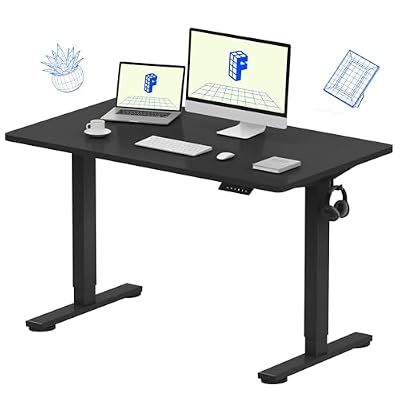
FLEXISPOT EN1 One-Piece Standing Desk, Electric Adjustable with 4 Memory Presets, 176 LBS Capacity, Stable & Quiet, Seamless Desktop for Home Office & Dual Monitors, 48"x24" Black
Included for 'Standing Desk 20 Inches Deep: Is It Enough Space?' because the listing specifies Electric Adjustable with 4 Memory Presets and 176 LBS Capacity, details this guide uses to compare options.
View on Amazon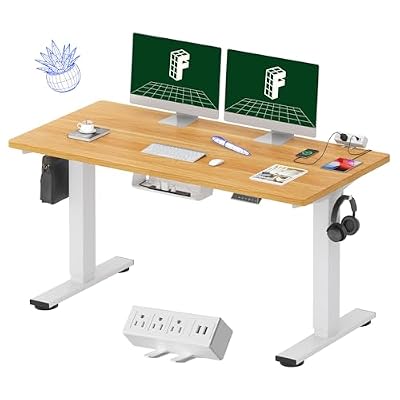
FLEXISPOT EN2 55"x28" Whole-Piece Standing Desk with Power Strip, Maple
Included for 'Standing Desk 20 Inches Deep: Is It Enough Space?' because the listing specifies Maple, details this guide uses to compare options.
View on Amazon| Item | Typical Depth Required | What It Leaves on a 20-Inch Desk |
|---|---|---|
| Laptop (13-16 inch open) | 9 to 11 inches | 8 to 10 inches of free space in front or behind |
| Monitor on factory stand (24-27 inch) | 8 to 10.5 inches | 9.5 to 12 inches for keyboard and wrists |
| Monitor on single arm clamp | 2 to 3 inches (pole + clamp) | 17 to 18 inches for keyboard and accessories |
| Keyboard + wrist rest | 6.5 to 9 inches | Requires at least 11 inches in front of monitor base |
| Keyboard + mousepad (standard) | 12 to 16 inches front-to-back when placed side by side | Fits only if monitor is on an arm or is very shallow |
| Desktop speakers (pair) or soundbar | 5 to 6 inches | Crowds a 20-inch depth if placed behind keyboard |
Single monitor: the ideal use case
A single 24-inch or 27-inch monitor on its included stand will sit with the front of its base about 10 inches from the wall edge. That leaves roughly 10 inches for your keyboard. A compact keyboard without a number pad (about 12 inches wide x 5 inches deep) fits comfortably with your wrists at the desk edge. A full-size keyboard with a separate wrist rest will push your hands to the very front edge, which can feel cramped for taller users who need more forearm support.
Dual monitors and ultrawides: where 20 inches struggles
Two 24-inch monitors on their factory stands need 32 to 36 inches of width and 8 to 10 inches of depth each. On a common 20×40 inch standing desk frame, you can physically place them, but you will have less than 9 inches of depth left for typing. An ultrawide 34-inch monitor has a deeper stand, often 10 to 11.5 inches, which leaves even less. For any dual or ultrawide setup, a monitor arm is not optional on a 20-inch desk. It reclaims 6 to 8 inches of depth and lets you push screens to the back edge.
Laptop-only setups work best
If you primarily work from a laptop with or without an external keyboard, 20 inches is efficient. A 15-inch laptop occupies the center 10 inches of depth, leaving a strip for a notebook, phone, or external mouse to the side. Adding a laptop riser or stand (typically 10 x 10 inches) helps with eye height for standing use without increasing the depth footprint.
Pros and Cons of a 20-Inch Deep Standing Desk
See also: Best 49 Inch Monitor: Eight Super Ultrawides Compared by Bandwidth and Desk Depth • Working Table for Home: Sit-Stand and L-Shaped Setups Compared
The main trade-off is floor space versus working depth. A 20-inch deep desk saves significant square footage and improves circulation space, but it requires disciplined cable and accessory management.
- Pros for small rooms: Saves 4 to 10 inches of floor depth compared to standard 24-inch and 30-inch desks. Leaves more clearance for chair movement and walking paths. Lighter desktop, usually 20 to 35 lbs less than a 30-inch top, which reduces wobble and makes the desk easier to move. Lower price range, usually $250–$500 for electric height-adjustable models in this depth.
- Pros for ergonomics if optimized: Keeps the monitor within the recommended 20 to 30 inch viewing distance without pushing you too far back. With a monitor arm, you can achieve proper eye height and neutral wrist position in less space.
- Cons for workspace: Not enough depth to place a monitor, keyboard, and a written notebook in a single front-to-back line. Factory monitor stands eat nearly half the depth. Limited room for desk mats that are 16 inches deep or larger, document holders, or desk lamps with wide bases.
- Cons for stability at height: Narrow tops can feel less stable for heavy typing if the frame has a narrow foot depth. Look for frames with feet at least 22 to 24 inches deep even if the top is only 20 inches.
Room-Size Fit and Clearance: Will It Fit Your Space?
Depth matters more than width for how a room feels. Standing desks need clearance behind and in front to transition between sitting and standing and to push a chair in.
| Room and Placement Scenario | Recommended Clearance | Why It Matters for a 20-Inch Desk |
|---|---|---|
| Behind desk against wall | 2 to 3 inches from wall for cables + ventilation | Allows monitor arm clamp and power strip; prevents pinching cables when raising desk |
| In front of desk to chair (sitting) | 36 to 42 inches from desk edge to wall or furniture behind you | Enough to roll back and stand up without hitting the wall |
| 10×12 ft bedroom or home office | 20-inch desk at 48 inches wide uses ~6.6 sq ft vs 10 sq ft for a 30×48 desk | Saves 3.4 sq ft, enough to keep a 30-inch walkway clear per fire and accessibility guidelines |
| Standing height range needed | Desk height 37 to 47 inches for users 5’4″ to 6’2″ | Check that the frame adjusts at least 27 to 47 inches to cover sitting (28-30 inches) and standing |
| Weight capacity | Top + equipment usually 40 to 70 lbs; look for frame rated 150 lbs+ for dual motors | 20-inch tops are lighter (25-40 lbs for particleboard, 40-60 lbs for solid wood), leaving more payload for equipment |
In a 10×10 ft room with a bed or sofa, a 20×40 inch desk placed against a short wall leaves a 48 to 54 inch corridor on the opposite side, while a 30-inch deep desk cuts that corridor to 38 to 44 inches and can make the room feel blocked. If you need to fit the desk in an alcove, closet nook, or under a window, measure the narrowest doorway or hallway it must pass through. Most interior doorways are 28 to 30 inches wide, so a 20-inch deep top can be carried vertically through easily, while a 30-inch top often needs to be tilted.
Decision Matrix: Should You Choose 20 Inches Deep?
| Your Situation | Is 20 Inches Enough? | Better Choice If Not |
|---|---|---|
| Small apartment, bedroom office, or dorm (under 100 sq ft) | Yes – prioritize floor space and add a monitor arm | 24×38 inch compact desk if you need a single drawer |
| Laptop + second monitor, mostly typing and video calls | Yes, with a monitor arm or laptop stand | 24 inches deep if you want both screens on factory stands |
| Dual 27-inch monitors, or 34-inch ultrawide on included stand | No – too shallow for stable placement and keyboard distance | 24 to 30 inches deep, minimum 48 inches wide |
| Gaming, design, or large mousepad (30+ inches wide) | No – you will run out of front-to-back space for mouse sweeps | 30 inches deep for low-DPI mouse movement and speakers |
| Renters who move frequently | Yes – lighter, easier to disassemble, fits through narrow hallways and elevators | Same depth, choose a frame that breaks into two columns for moving |
| Back pain and need frequent sit-stand changes | Yes if ergonomic setup is correct; depth matters less than height range and monitor height | Focus on 4-leg or dual-motor frame with 26 to 48 inch height range instead of extra depth |
| Paper-heavy work, drafting, or crafting | No – documents and tools need horizontal space in front of keyboard | 30 inches deep or add a side table for reference materials |
How to Make a 20-Inch Desk Work Comfortably
1. Use a monitor arm to reclaim depth
A single-arm clamp typically costs $35–$80 and frees up 6 to 8 inches compared to a factory stand. Position the monitor so the screen is 20 to 26 inches from your eyes when standing. The center of the screen should be at or slightly below eye level, which on a 20-inch desk often means the arm post sits at the rear edge, not the middle of the desk.
2. Choose a compact keyboard and efficient layout
A tenkeyless or 75% keyboard saves 3 to 4 inches of width and lets you center the mouse closer to your body. Place the mousepad to the side of the keyboard rather than behind it. If you use an external number pad rarely, keep it in a drawer and pull it out only when needed.
3. Manage cables and power off the desktop
On a shallow desk, cables quickly eat usable space. Use an under-desk cable tray and route the power strip to the frame leg. A desk with a rear grommet hole or cutout keeps monitor and charger cables from draping across the 20-inch depth. Leave the 2 to 3 inch gap behind the desk for the cable bundle so it does not get pinched when you lower the desk to sitting height.
4. Check frame footprint and stability
Even if the top is 20 inches deep, the feet underneath are often 22 to 26 inches deep for stability. Measure the foot depth against the space behind your chair, especially if the desk is near a rug edge or baseboard heater. For assembly and moving, expect a box weight of 55 to 85 lbs for an electric 20-inch desk, a desktop thickness of 0.75 to 1.1 inches, and adjustable feet to level on uneven floors. The first parts to show wear on budget models are usually the laminate edge banding and the hand control rather than the motor itself.
20 Inches vs 24 vs 30 Inches: Quick Comparison
If you are deciding between depths, think in terms of workflow layers. A 20-inch desk fits two layers (screen + input), a 24-inch desk fits two layers plus a narrow document strip, and a 30-inch desk fits three full layers (screen + input + reference materials or speakers) with room for your forearms to rest on the desk.
- Choose 20 inches if your room is tight, your setup is laptop or single monitor on an arm, and you prefer a minimal desk with disciplined storage elsewhere.
- Choose 24 inches if you want a single monitor on its stand plus a full-size keyboard and mouse without an arm. This is the most common sweet spot for home offices in 2026, usually $300–$600 for electric models.
- Choose 30 inches if you use dual monitors on stands, keep paper notebooks or tablets flat in front of you, or want a desk extender for studio monitors and large mats. It needs at least a 42-inch deep floor zone including chair clearance.
FAQ
Can I put a 27-inch monitor on a 20-inch deep desk?
Yes, but use a monitor arm. A 27-inch monitor on its factory stand is 9 to 10.5 inches deep and will leave only about 9 inches for your keyboard, which puts your wrists at the edge. An arm reduces the monitor footprint to about 2 inches and restores comfortable typing distance.
Is a 20-inch deep desk good for standing work?
Depth does not affect standing comfort directly; height range and monitor eye level do. Ensure the desk adjusts to your standing elbow height, roughly 40 to 44 inches for someone 5’8″ tall, and that the top of the screen is at eye level. A 20-inch desk can be fully ergonomic if those two heights are correct.
What desk size pairs well with a 20-inch depth?
Pair 20 inches deep with at least 40 to 48 inches of width for a single monitor plus keyboard and mouse. A 20×40 inch top is the smallest that still allows centered monitor placement with space for a mousepad to the side. For dual monitors, go at least 55 to 60 inches wide regardless of depth.
Related Reviews & Guides


4 Best Anti Fatigue Mats for Standing Desk
30 Inch Deep Standing Desk: Room to Work and Stay Organized