Last Updated: September 18, 2026
📄 In This Review
The Short Answer
Yes—a monitor riser is worth it if your screen sits too low and the riser raises it to a comfortable viewing height without making your desk unstable or cramped. It is one of the least expensive ergonomic upgrades you can make, especially if you are currently stacking books, boxes, or storage bins under your display.
That said, a riser is not a universal fix. It will not replace an adjustable monitor arm when you need a wide range of movement, and it may be a poor choice if your desk is already shallow. The value comes from solving a specific problem: lifting your monitor, creating usable storage underneath, or both.
As an Amazon Associate we earn from qualifying purchases at no extra cost to you.


What You Actually Get
See also: Best 240Hz Gaming Monitors: Ten Listings From 24-Inch 1080p to Ultrawide 1440p • Best BenQ Monitor: Eight Models Compared by Pixel Density and Ports
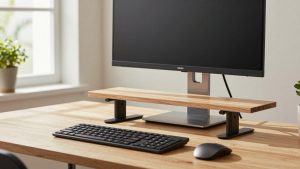
A monitor riser is a small shelf or platform that sits on your desk and supports one or more screens. Most models raise a display by roughly 3 to 6 inches, though adjustable designs can offer several height positions. That extra lift can help you look more straight ahead instead of tilting your chin downward for hours.
The simplest risers are flat platforms made from metal, wood, plastic, or a combination of materials. More useful versions include a drawer, open storage, pen cups, a phone holder, or space for a keyboard. A dual-monitor model may be wide enough for two smaller displays, but “dual monitor” does not automatically mean it can safely support two large or heavy screens. Check the listed width and weight capacity before buying.
For example, the Gianotter Dual Monitor Stand Riser With Drawer and 2 Pen Holders costs about $26.99. Its appeal is not just the height: it combines monitor elevation with small-item storage, which can reclaim some of the visual space around your keyboard. A two-pack such as the Canyora Computer Monitor Stand Riser costs about $17.98 and offers three height settings. That format can work well for separate displays, a printer, a laptop, or a smaller TV, although a two-piece setup may not look as unified as one wide shelf.
A riser also changes the usable geometry of your desk. The space beneath the platform can hold a keyboard, notebook, small speakers, or a compact docking station. Measure that opening before assuming it will fit your equipment. A full-size keyboard is commonly around 17 to 18 inches wide, while a compact keyboard may be closer to 12 to 14 inches. Leave room for cables and your hands rather than filling every inch.
Pros
- Improves screen height for little money. A $15 to $40 riser can correct a low monitor without requiring a new desk or an expensive arm.
- Creates storage in unused space. The area below the screen can hold a keyboard, controller, notebooks, or a docking station when you are not using them.
- Can make a small desk feel more organized. Drawers, pen holders, and phone slots keep frequently used items from spreading across the work surface.
- Easy to install. Most desktop risers simply need to be placed on the desk. There is no drilling, clamp, grommet, or complicated cable routing.
- Works for more than monitors. A sturdy platform may also support a laptop, printer, game console, speakers, or a small television, provided the dimensions and weight rating are appropriate.
- Useful for shared workspaces. A riser can be moved between desks or removed when another person needs the surface.
- Offers different height options. Adjustable models are easier to customize than a fixed shelf, particularly when two people use the same workstation.
Cons
- Limited adjustability. A riser usually changes height but not depth, angle, rotation, or side-to-side position. A monitor arm is more flexible.
- Uses valuable desk depth. The platform itself may extend several inches from front to back. On a desk under about 24 inches deep, that can leave less room for your keyboard and mouse.
- Can be unstable when overloaded. A wide or heavy monitor, especially on a narrow riser, may create wobble or excessive leverage. Stay below the manufacturer’s weight limit and keep the load centered.
- May raise the screen too much. If your display is already near eye level, adding another 4 or 5 inches can cause you to tilt your head upward. Fixed risers are less forgiving than adjustable arms.
- Not always ideal for two monitors. Two screens can require a broad, rigid platform. A product advertised for dual monitors may still be better suited to two lightweight displays than two large curved panels.
- Can make cables harder to manage. A raised screen creates a new space for cords to pass through, but some risers have no cable opening. You may need adhesive clips or a cable sleeve.
- Cheap materials vary in quality. Thin plastic can flex, while lightweight metal can slide on a smooth desk. Look for non-slip feet, a rigid frame, and a clearly stated capacity.
Who Should Buy It
Buy a monitor riser if your screen is clearly too low, your neck feels strained after computer work, or you want a modest ergonomic improvement without rearranging your entire office. It is especially practical for people using a fixed-height desk, a compact home-office desk, or a laptop paired with an external monitor.
It is also a good fit if you need extra organization. A riser with a drawer or pen holders can be worthwhile when your desk is crowded with small accessories. The Gianotter model, at approximately $26.99, makes more sense for someone who wants one broad station with built-in storage. The Canyora two-pack, at approximately $17.98, is more appealing if you want separate platforms or adjustable positions for two devices.
Before buying, measure three things: the monitor’s width, depth, and weight; the available desk width and depth; and the height you need to add. As a general comfort target, the top edge of the display is often close to eye level when you sit upright, though glasses, posture, and screen size can change the ideal position. You should be able to see the screen without consistently bending your neck down or leaning back.
Who Should Skip It
Skip a riser if your monitor is already at a comfortable height, or if your main problem is that the screen is too far away or too close. A riser changes vertical position, not viewing distance. It is also a poor choice for a very shallow desk where the added platform would crowd your keyboard and mouse.
Choose a monitor arm instead if you frequently switch between sitting and standing, need to rotate a display vertically, want to pull the screen forward for detailed work, or use two large monitors. An arm can free the entire surface below the display, although it may cost more and require a compatible VESA mounting pattern. If your monitor has no VESA holes, verify adapter compatibility before shopping.
You may also want to skip a riser if your desk is lightweight or wobbly. Adding a monitor higher off the surface can make movement more noticeable, even when the riser itself is sturdy.
Cheaper Alternatives
| Option | Cost | Trade-off |
|---|---|---|
| Sturdy books or hardcover manuals | $0 if already owned | Very inexpensive, but height is hard to fine-tune and stacks can slide or block airflow. |
| Wooden board with adhesive or rubber feet | About $10–$25 | Can be stable and attractive, but requires measuring, sourcing materials, and possibly sanding. |
| Small storage shelf or cube organizer | About $15–$35 | Adds useful storage, but may be deeper or wider than a purpose-built monitor riser. |
| Two small kitchen or office shelves | About $10–$30 | Flexible for separate devices, though matching height and preventing movement can be difficult. |
| Monitor arm | About $25–$100+ | Much more adjustable and space-saving, but requires a suitable desk mount and compatible monitor. |
FAQ
How high should a monitor riser be?
Start with the smallest lift that lets you sit upright with your eyes near the upper portion of the screen. Many people need about 3 to 5 inches, but the correct amount depends on your chair, desk, monitor size, and posture. If you use bifocals or progressive lenses, a slightly lower position may feel more comfortable.
Can a monitor riser hold two monitors?
Some can, but check the platform width, depth, and weight capacity rather than relying on the product name. Two small monitors may fit comfortably, while two 27-inch displays can require a broad, rigid platform. Place the screens near the center and test for wobble before leaving them unattended.
Is a monitor riser better than a monitor arm?
Neither is automatically better. A riser is simpler, cheaper, and easier to install. A monitor arm is better when you need height, depth, tilt, rotation, or sit-stand adjustment. For a basic low-screen problem, a riser usually delivers enough improvement without the extra cost or installation.
Is a monitor riser worth it for a laptop?
It can be, especially if you use an external keyboard and mouse. Raising a laptop screen improves viewing height, but typing directly on a raised laptop is uncomfortable and can strain your shoulders. Use a separate keyboard, confirm the platform is ventilated, and make sure the laptop cannot slide forward.
Related Reviews & Guides

Is a Monitor Arm Worth It? An Honest Answer (2026)
Best Portable Monitors for Macbooks in 2026: Compared and Ranked