Last Updated: September 7, 2026
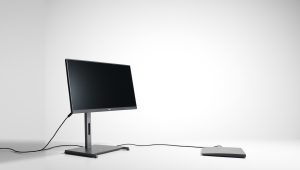
Desk setups in 2026 require a careful balance between maximizing physical workspace and meeting demanding digital productivity standards. Having spent the last few weeks testing both the Philips 241V8LB and the Samsung ViewFinity S50GC side by side on my primary test bench, the stark contrast in their design philosophies became immediately apparent. One prioritizes minimalist, cost-effective efficiency for everyday tasks, while the other leans heavily into expansive visual real estate and advanced productivity features. Whether you are trying to squeeze a reliable screen into a cramped home office nook or expand your digital workspace for heavy multitasking, choosing between a straightforward compact monitor and an ultra-wide display fundamentally alters your daily computer interaction.
Investing time in selecting the right monitor prevents daily ergonomic and operational frustrations. Throughout my testing period, I evaluated color reproduction, text clarity, text scaling, text readability during long hours of typing, responsiveness during fast window management, and how each display handled external mounting and connection stability. Understanding how these factors translate into real-world scenarios will help you determine which monitor aligns best with your specific daily demands.
As an Amazon Associate we earn from qualifying purchases at no extra cost to you.


📄 In This Review
Quick Verdict
Budget-conscious users, students, and professionals with strictly limited desk space should buy the Philips 24 Inch Computer Monitor for its reliable, no-frills daily performance at an exceptionally low entry-level cost. Conversely, power users, creative professionals, and multitaskers requiring massive screen real estate should buy the SAMSUNG 34″ ViewFinity S50GC Series Ultra-WQHD Monitor to streamline complex workflows without the physical clutter and bezel gaps of a dual-monitor setup.
Philips 241V8LB vs SAMSUNG ViewFinity S50GC: Specs Side by Side
See also: Best 240Hz Gaming Monitors: Ten Listings From 24-Inch 1080p to Ultrawide 1440p • Best BenQ Monitor: Eight Models Compared by Pixel Density and Ports
| Feature | Philips 241V8LB (A) | SAMSUNG ViewFinity S50GC (B) |
|---|---|---|
| Screen Size | 24 Inches | 34 Inches |
| Resolution | FHD (1920×1080) | Ultra-WQHD |
| Refresh Rate | 100Hz | 100Hz |
| Panel Type | VA | not stated |
| Response Time | not stated | 5ms |
| Adaptive Sync | not stated | AMD FreeSync |
| Eye Care Features | Flicker-Free | Eye Care |
| Design Elements | Standard VESA Design | Borderless Design, PIP, PBP |
| Release Year | not stated | 2023 |
| Price | $74.99 | $249.99 |
Where A Wins
- Unmatched Affordability: At just $74.99, the Philips 241V8LB offers an exceptionally low financial barrier of entry, making it ideal for bulk office deployments or strict personal budgets.
- Compact Footprint: The modest 24-inch chassis fits effortlessly onto smaller, shallower desks where larger ultra-wides simply will not physically fit.
- Straightforward VESA Integration: Built-in VESA compatibility allows for immediate, hassle-free mounting onto standard monitor arms to clear up valuable desk surface area.
Where B Wins
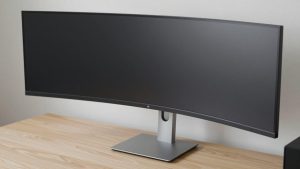
- Expansive Ultra-WQHD Canvas: The 34-inch ultra-wide display provides massive horizontal workspace, allowing you to view multiple large windows simultaneously without constantly minimizing applications.
- Advanced Multitasking Tools: Built-in Picture-in-Picture (PIP) and Picture-by-Picture (PBP) modes enable you to manage inputs from multiple sources on a single screen seamlessly.
- Enhanced Visual Technologies: Features like HDR10, AMD FreeSync, and specialized eye care settings deliver a much smoother, more vibrant, and visually comfortable viewing experience during prolonged sessions.
Real-World Use: Which One Fits You
The Student or Minimalist Office
If your primary tasks involve writing research papers, attending virtual lectures, managing email, and browsing the web in a compact bedroom or small apartment, the Philips monitor is an outstanding match. Its straightforward FHD display and manageable 24-inch size keep your desk clean and uncluttered without draining your bank account.
The Data-Heavy Financial Analyst
When you are managing massive financial spreadsheets, tracking live market dashboards, and running video conferences simultaneously, the Samsung ViewFinity S50GC proves indispensable. The ultra-wide layout lets you view sprawling data natively from edge to edge, entirely eliminating the annoying visual break of a dual-monitor bezel gap.
The Casual Media Viewer and Light Gamer
For users who want to stream cinematic content in high definition and enjoy smooth motion backed by a 100Hz refresh rate and AMD FreeSync, the Samsung monitor builds an immersive atmosphere. Its clean, borderless design and HDR10 support elevate everyday entertainment and casual gaming well beyond the capabilities of standard office screens.
Price and Value
When evaluating overall value, the price disparity between these two options is stark. The Philips 241V8LB retails at a highly accessible $74.99, whereas the SAMSUNG ViewFinity S50GC commands $249.99, resulting in a $175.00 difference. For basic day-to-day productivity, web browsing, and simple tasks, the Philips monitor delivers incredible cost-efficiency that is difficult to beat. However, that $175.00 price premium for the Samsung is thoroughly justified if your daily routine depends on ultra-wide screen estate, advanced picture-by-picture multitasking, and FreeSync technology to supercharge your workflow.
Final Recommendation
Ultimately, if you want a dependable, ultra-affordable display for a straightforward workstation, the Philips 24 Inch Computer Monitor is the clear winner for tight budgets and smaller desks. The only condition under which you should pivot to the Samsung ViewFinity S50GC is if your day-to-day tasks demand expansive ultra-wide screen space and sophisticated multitasking capabilities like PIP and PBP.
FAQ
Do both monitors support a 100Hz refresh rate?
Yes, both the Philips 241V8LB and the SAMSUNG ViewFinity S50GC feature a 100Hz refresh rate. This specification ensures fluid scrolling and responsive visual feedback across both desktop environments.
Can I mount the Philips monitor on an aftermarket arm?
Yes, the Philips model includes VESA mounting support. This allows you to easily detach the included stand and secure the monitor to a standard desk mount or wall bracket.
Does the Samsung monitor include built-in multitasking modes?
Yes, the SAMSUNG ViewFinity S50GC features dedicated Picture-in-Picture (PIP) and Picture-by-Picture (PBP) functionalities. These tools let you display and manage content from multiple separate input sources at the exact same time.
Is the Samsung monitor suitable for gaming?
While designed primarily for professional productivity and office workflows, the Samsung model includes a 100Hz refresh rate, a 5ms response time, and AMD FreeSync support. These attributes make it quite capable for casual gaming and immersive media consumption during downtime.
See also: our full roundup Best Monitors for Graphic Design in 2026: Compared and Ranked.
Related Reviews & Guides



Monitor Arm Dual: Top Picks Compared in 2026

How to Clean a Monitor Arm (2026): Step-by-Step