Last Updated: October 18, 2026
- What Facebook Live actually needs from a webcam
- Quick comparison: which type suits you
- Best for most people: a simple 1080p webcam with real autofocus
- Best for regular hosts: 1440p or premium 1080p with better low light
- Best for demos, crafts, and two people: 4K with adjustable field of view
- Setup matters more than the camera: light, mount, and internet
- FAQ
Facebook Live is forgiving in one way and unforgiving in another. It will compress your video anyway, so you do not need cinema gear. But it will expose bad autofocus, bad low-light handling, and bad audio for an hour straight, and viewers will leave. The best webcam for Facebook Live is not necessarily the sharpest on paper, it is the one that holds focus, handles mixed living-room light, and does not overheat or drop frames 40 minutes in.
For most people streaming from a home office, laptop desk, or kitchen table, a solid 1080p webcam with good autofocus and a decent microphone is enough. You only need to step up to 1440p or 4K if you crop in, stream products up close, host two people in frame, or want more headroom after Facebook compression.
📄 In This Review
- What Facebook Live actually needs from a webcam
- Quick comparison: which type suits you
- Best for most people: a simple 1080p webcam with real autofocus
- Best for regular hosts: 1440p or premium 1080p with better low light
- Best for demos, crafts, and two people: 4K with adjustable field of view
- Setup matters more than the camera: light, mount, and internet
- FAQ
What Facebook Live actually needs from a webcam
Facebook caps and compresses live video aggressively, especially if your upload speed dips. A 4K sensor does not guarantee a better-looking Live. What matters more is stable 30 fps at 1080p, clean autofocus that does not hunt, and auto-exposure that does not blow out your face when a window is behind you. If your room is dim in the evening, low-light performance matters more than maximum resolution.
Audio is the other half people underestimate. Viewers will tolerate 720p video, they will not tolerate echoey, distant audio. A webcam mic is fine if you sit 2-3 feet away in a quiet room. If you move around, demo products, or have a fan, keyboard, or kids in the background, plan on a separate USB mic or headset. Field of view matters too. Around 65 to 78 degrees is best for one person at a desk. Go 90 degrees only if you need two people, a whiteboard, or a demo table in shot, otherwise you will look small and distant.
Quick comparison: which type suits you
See also: Best Monitor for MacBook Air: Two USB-C 4K Screens and Six Adapter-Dependent Alternatives • Best Monitor for MacBook Pro: Eight Listings Sorted by Cable, Sharpness and Scaling
Think in categories first, then pick resolution within your budget. Here is how the trade-offs break down for typical Facebook Live use:
| Type | Best for | Strength | Weakness to watch |
|---|---|---|---|
| Budget 1080p autofocus webcam | Solo talking-head Lives, coaching, Q and As | Cheap, reliable, easy on old laptops | Soft in low light, narrow dynamic range |
| Mid-range 1080p/1440p with larger sensor | Regular hosts, sellers, churches, trainers | Better low light, steadier focus, cleaner image after compression | Needs good USB port and CPU; costs more |
| 4K webcam with digital zoom and wide FOV | Two hosts, demos, crafts, unboxings | Crop without moving camera, flexible framing | Heavier load, can overheat, often needs manual settings |
| Webcam + separate USB mic + light | Anyone streaming weekly | Biggest jump in watch time | More setup, more cables |
Best for most people: a simple 1080p webcam with real autofocus
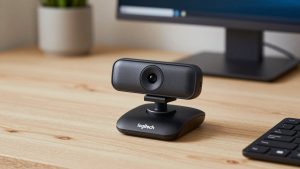
If you do a weekly chat, Bible study, coaching check-in, or sell one item at a time, this is where to stop. Look for 1080p30, true autofocus rather than fixed focus, dual microphones with noise reduction, and a physical privacy shutter. Fixed-focus cameras are cheaper but they are a common failure mode: you lean in to show something and it goes soft, or you sit slightly back and you are never quite sharp.
Where budget models fail is evening light. Expect grain and smeary motion if your only light is a ceiling bulb behind you. The fix is usually not a more expensive camera, it is a $20-$30 daylight LED panel or desk lamp in front of you, slightly above eye level. A cheaper camera with a light in front will beat an expensive camera backlit by a window. If your laptop is more than five years old, this category is also safest because it does not demand much processing power. You can browse a current selection of 1080p autofocus webcams for streaming and prioritize recent reviews that mention Facebook, OBS, and low light, not just daylight test charts.
Best for regular hosts: 1440p or premium 1080p with better low light
If you go live two or three times a week, the mid-range is worth it. These cameras usually have a larger sensor, better auto-exposure, and less aggressive sharpening. On Facebook that shows up as more natural skin tones, fewer blown-out windows, and less pulsing when you move your hands. Many also keep focus locked when you hold a product up to the lens, where cheap models hunt back and forth.
Trade-offs: they are pickier about USB and software. Plug directly into your laptop or a powered hub, not through a monitor dock, or you may get dropped frames. On Macs especially, check that the camera supports UVC plug-and-play without requiring a Windows-only app for basic focus and exposure. You also want manual control if possible, either in the vendor app or OBS. Auto settings are fine to start, but locking exposure and white balance prevents that gray flicker when overhead lights cycle. Shoppers in this tier often compare 1440p webcams with autofocus and microphone because they give you a little extra detail to survive compression without the heat and CPU load of full 4K.
Best for demos, crafts, and two people: 4K with adjustable field of view
Choose 4K for Facebook Live for one reason: flexibility, not because viewers see 4K. Facebook will not deliver 4K to most viewers. The benefit is you can shoot wide to fit two hosts or a demo table, then digitally zoom or crop to 1080p in OBS or the camera app and still look sharp. Adjustable field of view, 65, 78, and 90 degrees, is more useful than raw pixels here.
Failure modes are real in this category. Long 60 to 90 minute Lives in a warm room can cause some compact 4K models to get hot and throttle frame rate. Cheap cables and USB 2.0 ports make it worse. If you buy in this tier, use the short cable that comes in the box, use USB 3.0, and set the camera to 1080p30 output for Facebook unless you specifically need to crop. Also expect to turn off auto-framing if you move a lot. It sounds helpful but can drift at the worst moment during a demo. If that use case sounds like you, look at 4K webcams with adjustable field of view and filter for models that let you set zoom and focus from software.
Setup matters more than the camera: light, mount, and internet
Most disappointing Facebook Lives are not camera problems. Put the camera at eye level on a tripod or stack of books, not looking up your nose from the laptop deck. Face a window or lamp, do not sit with a bright window behind you. If you wear glasses, move the key light higher and to the side to avoid a white reflection bar.
For stability, stream wired ethernet if you can, or sit close to the router on 5 GHz. Run a speed test for upload, not download. You want at least 8-10 Mbps stable upload for reliable 1080p, and you need headroom because Facebook varies bitrate live. In OBS or Streamlabs, 4500-6000 kbps, 30 fps, and 1280×720 or 1920×1080 output is a safe starting point for most home connections. Test privately with Facebook’s test audience or a private group before going public, and record 10 minutes to check for focus hunting and audio echo.
FAQ
Is 4K worth it for Facebook Live?
Usually no, unless you crop or frame two people. Facebook compresses heavily, so a good 1080p camera with proper light often looks identical to viewers. Buy 4K for framing flexibility, not for sharper delivery.
Can I use my laptop’s built-in webcam?
You can for occasional Lives, but most built-ins are fixed-focus, small-sensor, and poor in low light. If viewers complain you look soft or dark, an external autofocus webcam is the cheapest meaningful upgrade.
Why does my stream look good for 10 minutes then get blurry?
That is usually autofocus hunting, overheating, or upload bandwidth dropping. Lock focus and exposure if possible, use USB 3.0 and the included cable, and lower OBS output to 720p30 to test if your internet is the bottleneck.
Do I need a separate microphone?
Not for short desk streams in a quiet room. For weekly shows, moving around, interviews, or noisy rooms, yes. A basic USB condenser mic close to your mouth improves retention more than any camera upgrade.
Related Reviews & Guides

How to Choose an Office Chair: Complete Buying Guide (2026)
Best Webcam for Mac Studio