Last Updated: September 27, 2026
If your home has spots where the WiFi crawls or drops entirely, a Netgear WiFi mesh system is one of the most effective fixes available in 2026. By spreading multiple cooperating nodes throughout your house, Netgear’s Orbi and Nighthawk mesh kits deliver strong, uniform coverage under a single network name. This guide compares the best Netgear WiFi mesh systems and walks you through matching one to your home size, device count, and internet plan.
As an Amazon Associate I earn from qualifying purchases.
A Netgear WiFi mesh system uses smart roaming to hand devices off between nodes as you move around, keeping your connection seamless from room to room. Unlike range extenders that create a slower secondary network, a true mesh unifies everything for consistent speed. Jump to how to choose a Netgear WiFi mesh system for the complete buying framework if you already know the basics.
📄 In This Review
Best Netgear WiFi Mesh Picks for 2026
| Product | Key Spec | Best For | Rating |
|---|---|---|---|
| Netgear Orbi RBK762 (WiFi 6) | Tri-band AX5400, 5,400 sq ft | Best overall value | 4.5/5 |
| Netgear Orbi RBK863 (WiFi 6) | Tri-band AX, 9,000 sq ft | Large multi-story homes | 4.6/5 |
| Netgear Orbi RBE973 (WiFi 7) | Tri-band BE, 33,000 sq ft | Multi-gig future-proofing | 4.5/5 |
| Netgear Nighthawk MK63 (WiFi 6) | Dual-band AX1800, 4,500 sq ft | Budget three-piece kit | 4.4/5 |
| Netgear Orbi RBK353 (WiFi 6) | Dual-band AX1800, 4,500 sq ft | Apartments and condos | 4.3/5 |
| Netgear Nighthawk MK83 (WiFi 6) | Tri-band AX3600, 6,750 sq ft | Balanced tri-band pick | 4.4/5 |
| Netgear Orbi RBK762S with Armor | Tri-band + security suite | Security-focused homes | 4.4/5 |
| Netgear Orbi 970 Series Add-on | Single WiFi 7 satellite | Expanding a WiFi 7 mesh | 4.4/5 |
Why a Netgear WiFi Mesh Beats an Extender
A range extender rebroadcasts your signal on a new network name and usually halves throughput. A Netgear WiFi mesh keeps one seamless network and, on tri-band models, reserves a radio for backhaul so device traffic never competes with node communication. The payoff is consistently strong coverage everywhere, plus automatic device handoff that you never have to manage manually as you walk through the house.
Tri-Band Backhaul Explained
The signature feature of premium Orbi kits is the dedicated backhaul band. In a tri-band Netgear WiFi mesh like the RBK762 or RBK863, one 5 GHz radio handles only satellite communication, keeping speeds high at the network edge. Dual-band systems such as the Nighthawk MK63 share bands between clients and backhaul, which is fine for smaller homes but can slow in large, busy households with many devices.
WiFi 6 vs WiFi 7 Standards
A modern Netgear WiFi mesh runs either WiFi 6 or WiFi 7. WiFi 6 is the mainstream value choice, serving dozens of devices efficiently in a typical home. WiFi 7, found in the Orbi 970 series, adds multi-link operation and wider channels for far higher peak speeds and lower latency, best for multi-gig plans and competitive gaming. For most households in 2026, WiFi 6 delivers the strongest price-to-performance balance.
Coverage Ratings and Real Range
Netgear rates each kit by coverage area, but walls, floors, and interference reduce actual reach. Treat the rating as an optimistic ceiling and add a satellite for basements or detached structures. Because Netgear sells matching add-on satellites, you can start with a two-pack sized to your main living space and expand your Netgear WiFi mesh as your coverage needs grow.
How to Choose a Netgear WiFi Mesh System
See also: 1440p vs 4K Monitor for Gaming: Which Resolution Fits Your GPU, Desk and Budget • Best Monitor for MacBook Air: Two USB-C 4K Screens and Six Adapter-Dependent Alternatives
Start with your square footage, matching it to a kit’s rated coverage and adding a node per dense floor or outbuilding. Choose tri-band for top edge speed or dual-band to save money. Confirm your internet plan so you do not overpay for WiFi 7, and check wired-backhaul support if your walls already have Ethernet for the fastest possible mesh configuration.
Wired Backhaul for Maximum Speed
If your home has Ethernet drops, connecting satellites by cable makes any Netgear WiFi mesh perform at its best. Wired backhaul frees the wireless backhaul band and eliminates distance-based speed loss entirely. Orbi and Nighthawk systems detect a wired connection automatically and switch to it, delivering maximum throughput with no manual configuration required on your part.
App Management and Security
The Orbi and Nighthawk apps make setup easy and let you manage guest networks, prioritize devices, and run speed tests from your phone. Optional Netgear Armor, powered by Bitdefender, adds network-wide threat protection and vulnerability scanning. A Netgear WiFi mesh bundle with Armor is worth considering for households that value parental controls and cybersecurity across every connected device.
Ports for Wired Devices
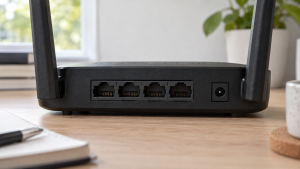
Gamers, streamers, and remote workers often want wired connections for consoles, desktops, and NAS units. Premium Orbi routers and satellites include multiple Ethernet ports and multi-gig WAN, while budget dual-band kits offer fewer. Choose a Netgear WiFi mesh with enough ports to hardwire your important devices without adding a separate network switch to your setup.
Frequently Asked Questions
How many nodes does a Netgear WiFi mesh need?
Most homes need a router plus one or two satellites, but the count depends on your square footage and construction. A Netgear WiFi mesh rated for 5,400 square feet typically covers a two-story home as a two-pack. Add a satellite for each dense floor, basement, or detached building where the signal must pass through additional walls to stay strong.
Is a Netgear WiFi mesh better than a single router?
A Netgear WiFi mesh is better than a single router when your home has dead zones a lone router cannot reach, which is common in larger or multi-story houses. The cooperating nodes provide uniform coverage and seamless roaming. For a small apartment, a quality standalone router may be enough and less expensive, so match the solution to your actual coverage needs.
Can I expand a Netgear WiFi mesh later?
Yes, you can expand most Netgear WiFi mesh systems by adding compatible satellites within the same Orbi or Nighthawk series. The new node adopts your network name and settings through the app. Always confirm series and standard compatibility, since a WiFi 7 satellite pairs only with a WiFi 7 router and will not work with an older WiFi 6 base unit.
Does a Netgear WiFi mesh support wired backhaul?
Yes, Orbi and Nighthawk models support wired backhaul over Ethernet, which delivers the fastest and most stable mesh performance. Connecting satellites by cable frees the wireless backhaul band and removes distance-based speed loss. A Netgear WiFi mesh automatically detects and prioritizes a wired connection whenever you plug a satellite into your router or a wall drop.
Should I buy WiFi 6 or WiFi 7 Netgear WiFi mesh?
For most homes in 2026, a WiFi 6 Netgear WiFi mesh offers the best value and handles dozens of devices efficiently. WiFi 7 becomes worthwhile if you have a multi-gig internet plan, latency-sensitive gaming, or want to future-proof your network. Avoid paying for WiFi 7 speeds that your current internet plan and client devices cannot yet fully utilize.
A Netgear WiFi mesh is the most dependable way to banish dead zones and enjoy fast, even coverage throughout your entire home. Size the coverage to your square footage, choose tri-band or dual-band based on your device load, and weigh WiFi 6 value against WiFi 7 future-proofing to build a network that keeps every room online.
Related Guides
- High Performance Gaming Router (2026 Guide)
- Mesh Netgear (2026 Guide)
- Netgear Mesh System (2026 Guide)
- Router For Unifi (2026 Guide)