Last Updated: September 26, 2026
Basements offer quiet, private space for a home office, but they come with conditions that can shorten the life of a standing desk or make it uncomfortable to use: low headroom around ducts and beams, damp air, cold concrete floors, limited natural light and sometimes an uneven slab. Choosing and placing a standing desk thoughtfully avoids these problems. This guide explains what to look for and how to set up a basement office for comfortable sit-stand work.
📄 In This Review
Basement challenges
Headroom around ducts and beams
Many basements have ceilings of 7 feet or less, with ducts, pipes and beams hanging lower. A standing desk with monitors on arms can reach 6 feet at the top of the screen. Measure the lowest obstacle above where you will stand and set the desk away from beams if possible.
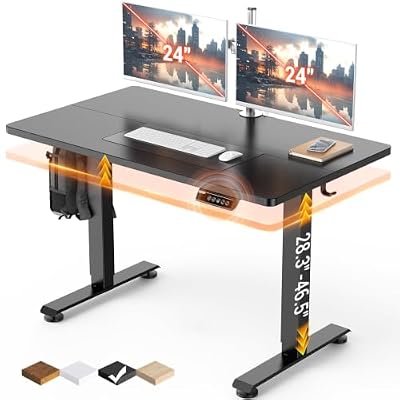
Veken 47.2 Inch Large Electric Standing Desk, Gaming Table, Black
Included for 'Best standing desk for basement office' because the listing specifies Gaming Table and Black, details this guide uses to compare options.
View on Amazon
Veken 63"x28" Wider Large Standing Desk, Electric Height Adjustable, Brown
Included for 'Best standing desk for basement office' because the listing specifies Electric Height Adjustable and Brown, details this guide uses to compare options.
View on AmazonMoisture
Basements often have higher humidity than living spaces. Relative humidity above about 60 percent can encourage mould and corrosion. Particleboard and MDF tops can swell at exposed edges.
Cold floors
Concrete slabs stay cool year-round. Standing on bare concrete is uncomfortable and tiring.
Light
Small windows mean you rely on artificial light, which can create glare on screens if poorly placed.
What to look for in the desk
See also: 1440p vs 4K Monitor for Gaming: Which Resolution Fits Your GPU, Desk and Budget • Best Monitor for MacBook Air: Two USB-C 4K Screens and Six Adapter-Dependent Alternatives
Programmable height limit
A controller with an upper height limit prevents the desk from driving monitors or lamps into ducts. Many dual-motor controllers offer this; check the manual.
Moisture-resistant top
High-pressure laminate or well-sealed hardwood and bamboo resist humidity. Seal any cut edges or grommet holes.
Stable frame and levelling
Basement slabs can be uneven. Adjustable feet help, and a dual-motor frame keeps the desk steady at standing height.
Basement office planning table
| Condition | What to measure or check | Target | Fix |
|---|---|---|---|
| Headroom | Lowest duct or beam above standing spot | 4-6 in clearance above tallest gear | Height limit, low-profile arms |
| Humidity | Hygrometer reading | 30-50% RH | Dehumidifier ($150-$350) |
| Floor | Level and temperature | Level, insulated underfoot | Rubber tiles, rug, anti-fatigue mat |
| Lighting | Screen glare, brightness | Even, indirect light | LED panels, desk lamp, bias light |
Setup tips
Placement
Position the desk where the ceiling is highest, often between joists or away from main ducts. Avoid placing it directly against a damp exterior wall; leave a few inches for air circulation.
Flooring
Put down rubber tiles, carpet tiles over a moisture barrier or a large rug, then an anti-fatigue mat in the standing zone. This adds warmth and comfort.
Lighting for screens
Use ceiling LED panels for ambient light and a desk lamp or monitor light bar for task light. A bias light behind the monitor reduces eye strain in dim rooms.
Air quality
A dehumidifier protects both you and the desk. Some people add an air purifier, especially in older basements.
Power
Basement outlets may be shared with sump pumps or laundry. Use a surge protector and avoid overloading circuits.
Flood and leak precautions
Basements are the first place water shows up. Keep the power strip clamped to the desk rather than lying on the floor, and raise the desk’s control box and any floor-standing computer off the slab on a small platform. A cheap water leak sensor near the desk or water heater gives early warning. If the basement has ever flooded, avoid placing the desk at the lowest point of the floor.
Make it feel less like a basement
Working below ground can feel isolating. A daylight-balanced lamp around 5000K for morning hours, some plants that tolerate low light and a view of something other than a bare wall all help. Many people find they stand more when the space is pleasant to be in.
Budget and space picks
A mid-range dual-motor desk with a programmable height limit and laminate top, typically $450 to $700, suits most basement offices. In small spaces, a 48 by 24 inch desk fits between beams. Allocate budget for a dehumidifier and flooring as well.
FAQ
Is a basement too damp for an electric standing desk?
Not if humidity is controlled. Keep relative humidity around 30 to 50 percent with a dehumidifier and choose a moisture-resistant top.
How do I avoid hitting ducts when the desk rises?
Set a maximum height limit on the controller and choose low-profile monitor mounting. Measure clearance at your standing preset.
Bottom line
For a basement office, choose a stable dual-motor desk with a programmable height limit and a moisture-resistant top, place it where headroom is greatest and control humidity. Warm flooring and good lighting complete the setup. Check height range and controller features on current spec sheets.
Related Reviews & Guides




Best Full HD Web Camera

Herman Miller Office Chair: Top Picks Compared in 2026