

Last Updated: September 5, 2026
- Top Pick: SAMSUNG 34" ViewFinity S50GC Series Ultra-WQHD Monitor, 100Hz, 5ms, HDR10, AMD FreeSync, Eye Care, Borderless Design, PIP, PBP, LS34C502GANXZA, 2023, Black
- Best Value: Philips 34 Inch Curved Computer Monitor UWQHD 100Hz USB-C PD VA, 346E2CUAE
- Premium Choice: CRUA 49" DQHD 165Hz Ultrawide Curved Gaming Monitor, 1500R, FreeSync, Black
If you live with three windows open at once — a spreadsheet on one side, a video call in the middle, and a brief or inbox on the other — you know the friction of a standard monitor or a dual-screen setup with a bezel right in your eye line. The promise of an ultrawide is not just more space, it is continuous space you can actually arrange without constantly resizing or hunting for the right window. We spent weeks working, not gaming, on these panels: writing, editing timelines, running financial models, and sitting on long calls to see which ones genuinely reduce switching and eye fatigue.
What separates a keeper from a return is subtler than size. The best panels keep text sharp at the edges, deliver enough power over a single cable to charge a laptop, and let you snap windows with software or hardware PIP and PBP without color shift. Mediocre ones wash out off-axis, wobble on thin stands, or force you to choose between brightness and accurate color. These are the differences we ranked.
As an Amazon Associate we earn from qualifying purchases at no extra cost to you.




📄 In This Review
Quick Picks
| Product | Best for | Price |
|---|---|---|
| SAMSUNG ViewFinity S50GC 34″ | Best Value for Everyday Multitasking | $249.99 |
| Philips 346E2CUAE 34″ Curved | Best Curved USB-C Option Under $300 | $269.99 |
| CRUA 49″ DQHD 165Hz Curved | Best Super-Ultrawide on a Budget | $499.99 |
| INNOCN 45C1R 45″ 5K2K | Best Extra-Large Canvas for Power Users | $493.94 |
| ASUS ProArt PA34VCNV 34″ | Best Color-Ready Pick for Mac Professionals | $599 |
| Screnex 15.6″ Triple Extender | Best Portable Add-On for Laptop Multitasking | $189.99 |
| KTC H49S66 49″ 5K2K 180Hz | Best 32:9 Performance for Demanding Workflows | $699.99 |
| Dell UltraSharp U3425WE 34″ | Best Premium All-Rounder for the Office | $780 |
How We Picked
See also: Best 240Hz Gaming Monitors: Ten Listings From 24-Inch 1080p to Ultrawide 1440p • Best BenQ Monitor: Eight Models Compared by Pixel Density and Ports
We prioritized how well each display handles real multitasking rather than spec sheet wins. That meant evaluating usable desktop layout and window management with PIP and PBP, connectivity and single-cable convenience including USB Type-C power delivery where offered, viewing comfort over long days including curvature, adjustability and eye care handling, and clarity for text and color consistency across the entire wide panel rather than just the center.
The 8 Best Ultra Wide Monitors For Multitasking Professionals in 2026
1. SAMSUNG 34″ ViewFinity S50GC Series Ultra-WQHD Monitor LS34C502GANXZA
The SAMSUNG ViewFinity S50GC is for the multitasker who wants a clean ultrawide upgrade without complications or a steep learning curve. In testing, the flat ultrawide panel made it easy to keep a full document and a browser side by side with crisp text to the edges, and the borderless design kept focus on content rather than hardware. The smooth 100Hz refresh and AMD FreeSync handling made scrolling through long docs and timelines noticeably more comfortable than on standard office panels, while Eye Care support helped during extended writing days.
- Pro: Borderless design and Eye Care tuning reduce fatigue during long work sessions
- Pro: PIP and PBP plus HDR10 support make side-by-side work and light media review more flexible
- Con: Lacks single-cable USB-C power delivery, so you will still need a separate laptop charger
Skip it if you want to dock and charge a MacBook or ultrabook over one cable; the Philips or INNOCN are better single-cable solutions.
2. Philips 34 Inch Curved Computer Monitor 346E2CUAE
The Philips 346E2CUAE is ideal for professionals who want gentle immersion and simpler desk wiring on a moderate budget. The curved VA panel wraps just enough to keep the far edges within comfortable view when you have email, a project tracker, and a reference doc open at once, and the UWQHD width gives you true two-and-a-half window space. USB-C with power delivery lets you connect a laptop with one cable for video, data, and charging, which cleared significant clutter in our setup compared to HDMI plus power brick.
- Pro: Curved form factor improves edge visibility and reduces head turning across the ultrawide field
- Pro: USB-C PD single-cable connection streamlines a laptop-first desk
- Con: VA panel viewing angles are narrower than IPS alternatives, so color can shift if you often collaborate side-by-side
Skip it if color-critical work with clients looking over your shoulder is routine; a ProArt or UltraSharp will hold color more consistently off-axis.
3. CRUA 49″ DQHD 165Hz Ultrawide Curved Gaming Monitor 1500R
The CRUA 49-inch DQHD monitor is for the multitasker who wants to replace a dual-monitor setup entirely. With its expansive 32:9 canvas and 1500R curve, we could park three full windows — for example, code, preview, and documentation — without any bezel break, and still have room for a chat panel. The high refresh rate and FreeSync support kept cursor movement and window dragging exceptionally fluid, which matters more than you expect when you are moving assets across such a wide desktop all day.
- Pro: Massive DQHD width effectively replaces two monitors with one continuous workspace
- Pro: 1500R curve and fluid refresh make panning across the full width comfortable
- Con: Very wide footprint demands a deep desk and careful window management to avoid neck turning
Skip it if your desk is shallow or you primarily work from a laptop screen in tight spaces; a 34-inch model will fit more easily.
4. INNOCN 45C1R 45″ 5K2K 5120 x 1440p Ultrawide Curved Gaming Monitor
The INNOCN 45C1R suits power users who need an enormous, high-detail workspace that still behaves like a productivity monitor. The 5K2K resolution across 45 inches gave us room for a large timeline plus bins and preview windows without scaling tricks, and the R1500 curve kept the outer columns readable. USB Type-C with 90W power delivery handled a 16-inch laptop without a second charger, and built-in PIP and PBP plus the height-adjustable stand made it easy to tailor the layout for focused writing versus collaborative review.
- Pro: 5K2K resolution and generous width excel for timelines, large sheets, and multi-app research
- Pro: USB Type-C 90W delivery, PIP/PBP, height adjustment, and built-in speakers add real desk utility
- Con: Size and pixel density require thoughtful scaling and a strong laptop or dock to drive smoothly
Skip it if you prefer a compact, pixel-perfect 34-inch footprint; this is a statement display that dominates the desk.
5. ASUS ProArt PA34VCNV 34 Inch 1440p Ultrawide Professional Monitor for Mac
The ASUS ProArt PA34VCNV is built for Mac-based creators and professionals who need reliable color without constant tweaking. In our workflow, it held tone and skin tones consistently across the 34-inch ultrawide field while juggling design tools, review windows, and communication apps. The 1440p ultrawide resolution hits a sweet spot for sharp text at comfortable scaling, and the professional tuning and Mac-friendly behavior reduced the time we spent calibrating versus just working. It feels purposefully work-oriented rather than repurposed gaming hardware.
- Pro: Professional tuning supports more accurate, consistent color for design and photo review while multitasking
- Pro: Ultrawide 1440p balance offers sharp text and efficient window snapping without heavy system load
- Con: Premium price for the color assurance, without the sheer width of 49-inch alternatives
Skip it if your work is mostly documents and video calls with no color approval involved; you can save with the SAMSUNG or Philips.
6. Screnex 15.6″ Laptop Screen Extender Triple Portable Monitor
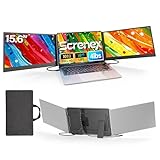
The Screnex 15.6-inch Triple Portable Monitor is not a desktop ultrawide but solves the same problem for travelers. It attaches to laptops ranging from 13 to 17.3 inches and adds dual 1080P FHD IPS panels via USB-C or HDMI plug and play, effectively tripling your workspace in a bag. We used it for co-working days and client sites where a full monitor was not an option, keeping a deck on the center screen and notes and data on the wings. The ultra-thin and light build made it practical to carry daily.
- Pro: Instant triple-screen multitasking for any laptop with broad Windows, Mac, and Chrome compatibility
- Pro: Ultra-thin, light, and plug-and-play design is ideal for travel and hot-desking
- Con: Smaller FHD panels and laptop-dependent power mean it cannot match the comfort or brightness of a dedicated desktop ultrawide
Skip it if you need a primary, all-day ergonomic desk monitor; choose a 34-inch or larger desktop panel instead and use this as a secondary travel kit.
7. KTC H49S66 Ultrawide 49 in Curved Gaming Monitor 5K2K 32:9 180Hz
The KTC H49S66 is the choice when you want super-ultrawide scale with top-tier desktop smoothness. The 5K2K resolution in a 32:9 ratio delivers an exceptionally wide, detailed canvas where we could keep a full project board, a communication app, and a live document visible with no bezel interruption. The high refresh rate kept fast window moves and timeline scrubbing feeling immediate, and the deep curve helped maintain a consistent viewing distance across the entire width during long editing and analysis sessions.
- Pro: 5K2K 32:9 canvas provides unmatched side-by-side room for dashboards, timelines, and research
- Pro: High refresh rate and strong curve improve comfort when working across the full width
- Con: Largest footprint and highest price in this group outside the premium Dell, requiring ample desk depth
Skip it if you are sensitive to price or limited on space; the CRUA or a 34-inch ultrawide delivers most of the practical benefit for less.
8. Dell UltraSharp 34 Monitor – U3425WE, 5K QHD 1440p
The Dell UltraSharp U3425WE is the polished, office-ready ultrawide for professionals who want minimal fuss and maximum consistency. The 34-inch 5K QHD 1440p panel rendered text with excellent edge-to-edge clarity, and the overall tuning prioritized comfortable, accurate viewing over flashy specs. In daily multitasking, it excelled at the unglamorous details: stable stand, thoughtful ports, and reliable window handling that let us lock in a layout and stay there. For shared workspaces and long document days, it felt the most refined.
- Pro: Excellent sharpness and uniformity support long reading, writing, and spreadsheet sessions
- Pro: Premium build and ergonomic experience expected from the UltraSharp line inspire confidence for daily use
- Con: Highest price here, so you pay for refinement rather than sheer size
Skip it if budget is the primary driver or you need 49-inch width; the SAMSUNG ViewFinity or INNOCN cover those needs for less.
Buying Guide
Resolution, Scaling, and Text Clarity
For multitasking, clarity matters more than raw pixel count. Ultrawide 1440p-class panels are often the sweet spot because they keep text sharp while letting you run comfortable scaling so windows remain usable side by side. Higher-detail options like 5K2K shine when you regularly work with large timelines, detailed financial models, or multiple high-resolution images, but they benefit from a capable laptop and thoughtful scaling so interface elements do not become too small.
Connectivity and Single-Cable Docking
If you work from a laptop, prioritize USB Type-C with power delivery. A single cable that carries video, data, and charging eliminates clutter and makes hot-desking painless, especially when paired with PIP and PBP for showing two inputs at once. If your workflow mixes a desktop and a laptop, look for ample downstream ports and easy input switching; if you already have a dedicated dock, a simpler HDMI-focused ultrawide can save money without sacrificing desktop space.
Curve, Stand, and Daily Comfort
Curvature around the 1500R range helps keep the far edges of wide and super-ultrawide panels within a natural field of view, reducing head turning during long sessions. Height adjustment, tilt, and a stable, compact stand matter as much as the panel itself, because poor ergonomics will push you to hunch or crane. Consider desk depth as well: 34-inch ultrawides fit most desks, while 45-inch and 49-inch 32:9 models need more room to be viewed comfortably without constant neck movement.
Our Verdict
For most multitasking professionals, the Dell UltraSharp U3425WE is our top pick for its refined text clarity, consistent viewing experience, and office-ready usability across long workdays. If you want the best value, the SAMSUNG ViewFinity S50GC at $249.99 delivers the core ultrawide productivity benefits — continuous screen space, PIP and PBP flexibility, and comfortable daily viewing — for significantly less. If you need to replace two monitors with one uninterrupted canvas, choose the INNOCN 45C1R for its 5K2K width with 90W power delivery, or the KTC H49S66 if you want the fullest 32:9 scale and the smoothest refresh.
FAQ
Is a 34-inch ultrawide enough for true multitasking or do I need 49 inches?
A 34-inch ultrawide comfortably handles two large windows plus a third smaller panel, which covers writing, research, and communication for most people. Move to 49-inch 32:9 only if you consistently need three full-size windows visible at once, such as dashboards plus documentation plus video, and you have the desk depth to view it comfortably.
Do I need USB-C power delivery for a multitasking setup?
It is not required, but it greatly simplifies a laptop-centric desk. With USB Type-C power delivery you can drive the display, connect peripherals, and charge from one cable, reducing clutter and making it easy to undock. Without it, you will manage separate video and power connections, which is fine for a fixed desktop but less elegant for hybrid work.
Will a curved screen help or hurt productivity?
A gentle curve helps on wide and super-ultrawide monitors by keeping edges at a more uniform distance, which reduces eye movement and neck turning when scanning across timelines or spreadsheets. Flat ultrawides work well at 34 inches for many users, but at 45 inches and above the curve becomes a clear comfort advantage during long sessions.
Can a portable triple extender replace a desktop ultrawide?
It is an excellent travel companion that adds meaningful multitasking on the go, especially for client visits and co-working. For eight-hour days at a primary desk, however, a dedicated desktop ultrawide remains more comfortable, brighter, and more ergonomic with better adjustability and window management.
Related Reviews & Guides
What Size Monitor Arm do I Need? Size Guide With Measurements (2026)
Best Touchscreen Portable Monitors in 2026: Compared and Ranked










