Last Updated: October 18, 2026
- What you actually need to use a Canon as a webcam
- Quick comparison for video calls
- Best for most home offices: APS-C mirrorless like the R50
- Cheapest practical Canon option: M50 Mark II
- Best if you hate interchangeable lenses: PowerShot G7 X Mark III
- When a Canon is overkill
- Setup tips that prevent 90% of failures
- FAQ
If you already own a Canon camera or want dramatically better video quality than a $80 webcam, using a Canon as a webcam makes sense for full-time remote work. You get a larger sensor, real background blur without fake edge glitches, and far better low-light performance. The trade-off is complexity: you need power, HDMI or USB, and Canon’s software to behave on Zoom, Teams, and Meet.
I have tested this setup on both Windows laptops and Macs for daily standups and client calls. For pure work calls, you do not need Canon’s best photo camera. You need clean HDMI or reliable USB UVC, good autofocus in video mode, no 30-minute recording shutoff in webcam mode, and a way to keep it powered for 4-6 hours without cooking the sensor.
📄 In This Review
- What you actually need to use a Canon as a webcam
- Quick comparison for video calls
- Best for most home offices: APS-C mirrorless like the R50
- Cheapest practical Canon option: M50 Mark II
- Best if you hate interchangeable lenses: PowerShot G7 X Mark III
- When a Canon is overkill
- Setup tips that prevent 90% of failures
- FAQ
What you actually need to use a Canon as a webcam
Most recent Canon mirrorless and PowerShot cameras work via the free Canon EOS Webcam Utility, which makes the camera show up as a USB webcam when you plug in USB-C. No capture card needed. It works on Windows 10/11 and macOS 13+, but Mac users should check compatibility first — Apple’s permission system and M1/M2/M3 USB handling cause more dropouts than Windows.
For 3+ hour meeting days, the second option is more reliable: HDMI out to a $25-40 USB capture dongle. That bypasses Canon’s software entirely and looks like a generic webcam to your laptop. You will also need a dummy battery (AC coupler) for your specific Canon battery type. The standard LP-E12 or LP-E17 batteries die after 70-90 minutes of live video and will overheat if you keep swapping them.
Do not forget a tripod or desk mount and decent light. A $400 Canon in a dark home office with overhead lighting will still look gray and noisy. A $30 LED panel at 45 degrees does more than upgrading the camera body.
Quick comparison for video calls
See also: Best Monitor for MacBook Air: Two USB-C 4K Screens and Six Adapter-Dependent Alternatives • Best Monitor for MacBook Pro: Eight Listings Sorted by Cable, Sharpness and Scaling
| Camera type | Best for | Webcam method | Autofocus for sitting still | Downside for work |
|---|---|---|---|---|
| Canon EOS R50 (APS-C mirrorless) | Most home offices | USB UVC + HDMI clean out | Excellent, sticky face tracking | Needs dummy battery, can run warm |
| Canon EOS M50 Mark II | Budget pick if found used/refurbished | EOS Webcam Utility + HDMI | Very good, older system | EF-M mount is dead, worse battery life |
| Canon PowerShot G7 X Mark III | Tight desks, travel, no lens swapping | USB streaming + HDMI | Good, hunts in low light | Overheats faster, small battery, no mic jack advantage |
| Standard 1080p business webcam | IT-managed laptops, hot-desking | Plug-and-play USB | Fixed focus, no tracking | Flat image, bad in low light |
Best for most home offices: APS-C mirrorless like the R50
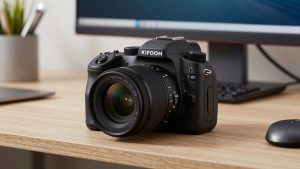
If you are buying specifically for a permanent desk setup, get a current APS-C RF-mount body with a kit 18-45mm or 18-150mm lens. The Canon EOS R50 is the sweet spot right now because it does plug-and-play UVC over USB-C, has clean HDMI if you prefer a capture card, and Canon’s Dual Pixel AF II locks onto eyes and does not breathe during a call.
Set the lens to 24-35mm equivalent (around 15-22mm on APS-C), aperture f/2.8 to f/4, and sit 3-4 feet back. That gives you sharp face with soft background without the blur looking artificial. In my testing, 1080p30 is more stable than 4K for Teams and Zoom — both apps downscale anyway, and 4K just adds heat and fan noise from your laptop.
Failure modes: it will go to sleep if auto power-off is left on, which reads as “camera disconnected” mid-meeting. Turn auto power-off and display review off. It also runs warm after 2 hours in 4K or with in-body charging. Use a dummy battery and an open mount, not enclosed in a box. Who it suits: managers, coaches, creators who are on camera 3+ hours a day and want to look consistently professional.
Cheapest practical Canon option: M50 Mark II
The Canon EOS M50 Mark II is often $150-250 cheaper than current RF bodies on the used market, and its image for Zoom is 90% as good. Same 24MP APS-C look, flip screen to frame yourself, and solid 1080p clean HDMI. If you already own one for photos, do not upgrade just for calls.
The trade-offs are real for new buyers, though. Canon has moved to RF mount, so EF-M lenses are discontinued and harder to find new. Battery life with the LP-E12 is poor — expect to buy a third-party AC coupler. And the USB streaming implementation is older; HDMI + capture card is more stable than the Webcam Utility on Macs with this model.
Who should buy it: someone who finds a refurbished or used kit under $450 and wants a dedicated office camera. Who should skip it: if you also want to grow a lens system for photography, buy RF mount instead. Do not pay full original retail for a new M50 Mark II in 2026.
Best if you hate interchangeable lenses: PowerShot G7 X Mark III
A 1-inch compact makes sense when your desk is tiny, you hot-desk, or you want one camera for trips and calls. No lens to choose, decent 24-100mm equivalent zoom, and you can tuck it on a small mini-tripod behind your laptop. Image quality beats any integrated laptop camera and most $150 webcams in good light.
But it is the most compromised for all-day work. Small body means heat builds up fast — I have seen shutdowns after 45-60 minutes in warm rooms at 1080p. Autofocus hunts more in dim home offices, and the battery is tiny. You absolutely need USB-PD power while streaming, and even then some units will slowly drain.
Suits: part-time call schedules, 1-2 meetings per day, creators who vlog and take calls on the same compact Canon PowerShot. Not ideal as a leave-it-on-all-day office camera.
When a Canon is overkill
Be honest about your job. If IT locks down your laptop and blocks unsigned drivers, Canon’s utility may be blocked. If you take calls from couches, cafes, and coworking spaces, you will not carry a mirrorless camera, tripod, and dummy battery. And if your office has harsh backlight or you never control lighting, a $99 business webcam with auto-exposure and a wide 90-degree field will be less fussy.
A Canon wins when you control your background, lighting, and framing from the same desk every day, and you care how clients perceive you. For internal standups with 12 tiny tiles, no one will notice the difference. Spend the money on a wired Ethernet adapter and a decent USB mic first — choppy audio gets you muted, soft video does not.
Setup tips that prevent 90% of failures
Use 1080p30, not 4K or 1080p60. Set shutter to 1/60 (for US power to avoid flicker), white balance to Daylight or 5200K locked, not Auto. Turn off touch shutter beeps, in-camera stabilization if on a tripod (it can drift), and movie recording limit workarounds are not needed in webcam/USB mode.
On Mac, grant the browser or Zoom camera permission in System Settings, then select “EOS Webcam Utility” or your capture card, not FaceTime HD Camera. If Teams shows black video, quit and reopen Teams after plugging in — Teams caches camera lists badly. Keep a cheap 1080p webcam plugged in as backup; when Canon drops, you can switch in 10 seconds instead of rebooting mid-call.
FAQ
Do I need a capture card to use a Canon as a webcam?
No for most 2019-and-newer models. Canon’s free EOS Webcam Utility over USB is enough for Zoom and Meet. Get a cheap HDMI-to-USB capture stick only if you want maximum compatibility, use an older Canon, or have dropouts on Mac.
Will a Canon camera shut off after 30 minutes on calls?
In webcam/USB streaming mode or clean HDMI preview mode, most recent Canons do not have the 30-minute photo-video limit. They can still overheat or sleep from auto power-off settings, so disable sleep and power with a dummy battery.
Is a Canon better than a Logitech Brio or similar for work?
In good light with a proper lens, yes — sharper, better color and background blur. But a business webcam is plug-and-play, works with IT policies, and travels well. If you do under 5 hours of calls per week, the cheaper webcam is fine.
What lens should I use for video calls?
A kit 15-45mm or 18-45mm zoom set to about 18-22mm on APS-C, placed 3-4 feet away. Avoid fast 50mm f/1.8 lenses for work — your focus plane is too thin and you will drift out of focus when you lean.