Last Updated: September 26, 2026
A gaming setup puts different demands on a standing desk than office work does. You have a heavier load, often a desktop tower, a large mouse pad, a wide monitor or two, speakers or a headset stand, RGB lighting controllers and a nest of cables. You also make fast, forceful mouse movements that expose any wobble. This guide explains what to look for in a standing desk for gaming and how to set it up so it survives constant height changes.
📄 In This Review
Why gaming is tougher on a standing desk
Fast flick shots and aggressive keyboard use transmit force into the desk, and at standing height any sway shows up as crosshair drift and monitor shimmer. Gaming rigs are heavy: a mid-tower PC weighs 20 to 40 lb, a 27 to 34 inch high-refresh monitor 12 to 25 lb, and speakers, a monitor arm and peripherals another 20 to 30 lb. And there are more cables, including display cables, USB hubs, audio and power, all of which must survive about 20 inches of vertical travel.

Huuger 47 X 24 Inch Electric Standing Desk with Power Outlets and USB-C Port, Height Adjustable Desk, Sit Stand Desk for Home Office, Computer & Gaming Desk with 3 Presets, Stable Steel Frame, Black
Included for 'Best Standing Desk for Gaming Setup' because the listing specifies Height Adjustable Desk and Sit Stand Desk for Home Office, details this guide uses to compare options.
View on Amazon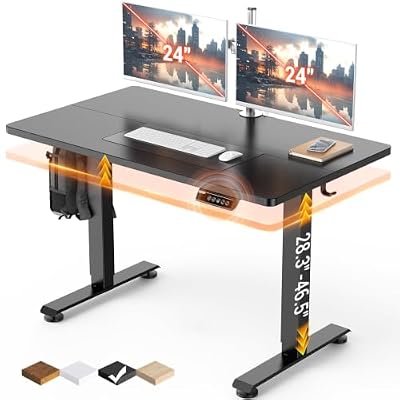
Veken 47.2 Inch Large Electric Standing Desk, Gaming Table, Black
Included for 'Best Standing Desk for Gaming Setup' because the listing specifies Gaming Table and Black, details this guide uses to compare options.
View on AmazonKey specs for a gaming standing desk
See also: 1440p vs 4K Monitor for Gaming: Which Resolution Fits Your GPU, Desk and Budget • Best Monitor for MacBook Air: Two USB-C 4K Screens and Six Adapter-Dependent Alternatives
| Spec | Recommended | Why |
|---|---|---|
| Motors | Dual | Handles heavy, uneven loads such as a tower on one side |
| Load rating | 250 lb or more | Keeps a 100 to 150 lb rig well within limits |
| Top width | 60 to 72 in | Room for a large mouse pad and wide monitor |
| Top depth | 30 in, 32 in for ultrawides | Keeps the screen at a comfortable distance |
| Top thickness | About 1 in, one-piece | Holds monitor arm clamps securely |
| Frame | Heavy columns, crossbar | Reduces sway during fast inputs |
| Price tier | Mid to upper mid | Budget frames struggle with gaming loads |
Where to put the PC
On the floor
Leaving the tower on the floor keeps weight off the desk but means every cable must stretch the full travel range. You need about 25 inches of slack in display, USB and audio cables. Longer cables or a vertical cable spine make this work.
Under-desk tower mount
A steel mount bolted under the top carries the PC with the desk, so cables never stretch. Check that the combined load stays within the rating and that the mount clears your knees at sitting height.
On the desktop
Placing the tower on the surface is simple but uses 8 to 10 inches of width and adds heat and noise near your ears. It also shifts the balance to one side; dual motors handle this well.
Cable management that survives height changes
- Use an under-desk cable tray for power strips and bricks so they move with the desk.
- Run a single bundle from the desk to the wall through a flexible cable spine.
- Leave a slack loop at the desk end and test the full range with everything connected.
- Keep display cables slightly longer than you think; a tight DisplayPort cable can disconnect mid-lift.
Ergonomics for long gaming sessions
At sitting height, keep elbows near 90 degrees with the mouse at the same height as the keyboard. At standing height, the same rule applies; do not reach up for the mouse. Put the monitor’s top edge at or slightly below eye level and 20 to 30 inches away, further for ultrawides. Many gamers prefer to stand during menus, lobbies and casual play and sit for competitive matches, when precise control matters most. Use presets so switching takes one button.
Common gaming desk mistakes
- Choosing a single-motor desk and loading it near its limit.
- Using a split or thin top that flexes under a heavy monitor arm.
- Forgetting that a headset stand or speakers clamped at the far edges increase sway.
- Running cables tight, which stresses ports when the desk moves.
- Buying a desk whose minimum height is too tall for seated gaming with a low gaming chair.
FAQ
Is a standing desk good for gaming?
Yes, if it is sturdy enough. Standing during casual play breaks up long sitting sessions, and a stable dual-motor frame prevents the wobble that makes aiming harder.
Should I put my gaming PC on the desk or the floor?
An under-desk mount is the best compromise: the PC moves with the desk, so cables never stretch, and it keeps heat and noise off the surface. Keep the total load within the rating.
Bottom line
The best standing desk for gaming is a dual-motor frame rated for 250 lb or more, with a 60 to 72 inch one-piece top and a crossbar or heavy columns to limit sway. Plan where the PC goes and give cables enough slack for the full height travel. Get those basics right and you can switch between sitting and standing without affecting your aim.