Last Updated: October 18, 2026
- What wide really means for calls
- Quick comparison
- Best for a small huddle room: fixed 110-120 degree camera
- Best hybrid for solo and group: adjustable field of view
- Best for presenters and 3+ people: AI auto-framing wide camera
- Best for desk sharing on laptop or Mac: compact 100-degree camera
- Setup mistakes that ruin wide angle
- FAQ
If you sit alone at a desk, you don’t need a wide angle webcam. A standard 78-90 degree field of view is actually better – it keeps you centered and crops out the messy room behind you. Wide angle only makes sense when you regularly have two or more people in frame, or you present at a whiteboard and need the camera to cover the whole space.
For video conferencing, wide usually means 100 to 120 degrees diagonal. Go wider than that and faces at the edges stretch, and the built-in mics start picking up the whole room. Get it right, though, and one camera can replace the awkward laptop shuffle where someone in the corner is half cut off on Zoom or Teams.
📄 In This Review
- What wide really means for calls
- Quick comparison
- Best for a small huddle room: fixed 110-120 degree camera
- Best hybrid for solo and group: adjustable field of view
- Best for presenters and 3+ people: AI auto-framing wide camera
- Best for desk sharing on laptop or Mac: compact 100-degree camera
- Setup mistakes that ruin wide angle
- FAQ
What wide really means for calls
Manufacturers list diagonal field of view, which sounds bigger than what you actually see horizontally. A 120-degree diagonal is roughly 105-110 degrees horizontal. That covers about a 6-foot-wide area at 5 feet from the camera – enough for 2-3 people shoulder to shoulder at a small table.
There are three flavors: fixed wide, adjustable field of view, and AI auto-framing. Fixed wide is simplest and cheapest, but you live with fisheye distortion at the edges. Adjustable lets you switch between 65, 78, 90, and 110+ degrees in software, which is useful if the same camera does solo calls and group meetings. Auto-framing crops into a wide sensor and follows the active speaker. It looks great when it works, but cheap implementations hunt, zoom in and out, and distract everyone on the call.
For laptops and Macs, check one boring detail before you buy: does the field of view control work on macOS? Many vendors only offer their full settings app on Windows. On Mac you get plug-and-play UVC video, but you may be stuck at the widest setting with no way to narrow it.
Quick comparison
See also: Best Monitor for MacBook Air: Two USB-C 4K Screens and Six Adapter-Dependent Alternatives • Best Monitor for MacBook Pro: Eight Listings Sorted by Cable, Sharpness and Scaling
| Type | Typical FOV | Best for | Trade-off |
|---|---|---|---|
| Compact 100-degree webcam | 95-103 degrees | 1-2 people at a desk, home office | Mild edge stretch, easy to live with daily |
| Adjustable FOV webcam | 65 / 78 / 90 / 110 degrees | Solo + occasional group calls | Needs vendor software, often Windows-only for full control |
| Fixed 110-120 degree conference cam | 110-120 degrees | Small huddle room, 2-4 people | Noticeable distortion, weak mics past 8 feet |
| AI auto-framing wide cam | 120-degree sensor, cropped output | Moving presenter, 3-5 people | Can over-crop, pan at wrong time; costs more |
Best for a small huddle room: fixed 110-120 degree camera
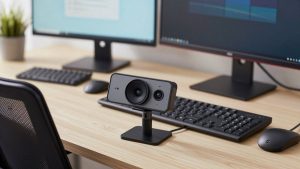
If you have a dedicated 2- to 4-person room with a small table, get a simple fixed wide angle bar-style camera and mount it at eye level on the TV. These wide angle webcams for conference rooms are designed to cover the whole table without adjustment.
What to look for: 1080p at a true 30fps (not interpolated), dual mics with basic echo cancellation, and a 110-degree minimum. 4K is not essential here, but it helps if people sit far back because you retain detail when the conferencing app compresses video.
Failure modes are consistent. Faces at the far edges look stretched. If the room has a window behind the table, auto-exposure blows out faces. And the built-in mics work to about 7-8 feet in a quiet room. Beyond that, voices sound hollow and Teams noise suppression starts clipping words. If your room is larger than 12 x 12 feet, the cheaper option is not fine – you need a separate USB speakerphone.
Who this suits: offices that want one-step meetings. Plug in one USB cable to a room laptop or Mac Mini and go. Who should skip it: solo workers. You will look small and far away every day.
Best hybrid for solo and group: adjustable field of view
Most home offices are hybrid. Monday you are solo, Thursday your partner joins for a client call. An adjustable camera that lets you switch from 78 degrees to 110 degrees solves that without buying two cameras.
In practice, you will leave it at 78-90 degrees 90% of the time. The wide mode is for exceptions. Image quality matters more than the widest number on the box. A good 1080p sensor with large pixels at 90 degrees looks far better than a cheap 4K sensor stretched to 120 degrees with smeary corners.
Mac users need to be picky here. Test whether FOV, autofocus, and white balance settings persist when you unplug the camera. Some cameras reset to widest on every reboot on Mac because there is no background driver. If you switch between a work Windows laptop and a personal MacBook, that gets annoying fast.
This is where the cheaper option is often fine. If you only need wide a few times a month, a midrange 2K camera with 95-100 degrees is enough. You can sit a foot farther back and fit two people in. No need to pay extra for AI tracking.
Best for presenters and 3+ people: AI auto-framing wide camera
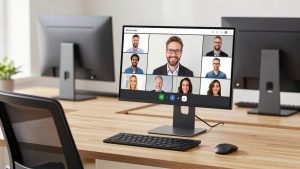
Auto-framing cameras use a very wide sensor, then crop and digitally pan to keep people centered. For teaching, workshops, or stand-up meetings where someone paces, it is genuinely useful. The latest 4K auto-framing wide angle webcams hold 1080p sharpness even after the crop because they start with more pixels.
Trade-off: you are trusting software with your framing. Cheap auto-framing loses track when two people talk over each other, or slowly drifts when someone leaves the frame. On Zoom and Meet it can also fight with the platform’s own smart gallery. Look for cameras with a physical toggle or remote to lock framing. You will use it more than you think.
Audio is the other weak spot. These cameras sit 6-10 feet away, so you must budget for room echo. If the space has hard walls and no rug, even good mics will sound echoey. Plan on a USB boundary mic or speakerphone if voice clarity matters for clients.
Best for desk sharing on laptop or Mac: compact 100-degree camera
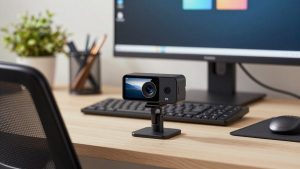
If your “conference room” is just your desk and you occasionally pull a second chair in, don’t buy a conference bar. A small clip-on 100-degree wide angle webcams for laptop and Mac fits better, works for travel, and doesn’t make you look distant on solo calls.
Mounting matters more than specs here. Clip-on cameras sit too low on external monitors and point up your nose when you lean back to fit two people in. A tiny tripod behind your keyboard, raised to eye level, fixes most “why do we look weird” problems instantly.
Failure mode to watch: autofocus. Wide desk cameras with fast f/2.0 lenses often hunt when you lean in and out, especially in low home-office light. If your camera pulses in and out of focus, lock focus in the app (on Windows) or add a cheap desk lamp in front of you. More light solves more webcam problems than more resolution.
Setup mistakes that ruin wide angle
Most bad wide angle video isn’t the camera’s fault. Mount the camera at eye level, not on top of a 55-inch TV two feet above heads – that angle makes the table dominate the frame. Sit within 8 feet if you want to be understood without a separate mic. Turn off overhead fluorescents behind you and put light on faces instead.
Also turn off beauty filters, auto-zoom, and “low light boost” before your first real meeting. Stacked together, they create waxy, laggy video that looks worse than a basic $60 camera with good lighting. Test with a recorded Teams or Zoom preview with the actual seating arrangement, not just you centered at your desk.
FAQ
Is 120 degrees too wide for video conferencing?
For solo calls, yes. You’ll look tiny and reveal the whole room. For 3-4 people around a table 5-7 feet away, 110-120 degrees is about right. If you do both, get adjustable field of view and use 78-90 degrees solo.
Will a wide angle webcam work with Mac and Teams/Zoom?
Basic video works plug-and-play on Mac, Windows, and Chromebook. Field-of-view switching, auto-framing sensitivity, and firmware updates often require Windows software. Check the manual for macOS support if you need to change the viewing angle.
Do I need 4K for a wide conference camera?
Not for clarity alone – most platforms stream at 720p to 1080p anyway. 4K helps when the camera crops in for auto-framing or when people sit far away, because there’s more detail to start with. Good lens and low-light performance matter more.
Why do people at the edges look stretched?
That’s rectilinear distortion from mapping a very wide scene onto a flat rectangle. Sit key speakers nearer the center, move the camera back a foot if you can, or narrow the field of view to 90-100 degrees. Software distortion correction helps but softens corners.