Last Updated: October 18, 2026
If you search Reddit for the best 4K webcam, you get the same pattern in almost every thread: someone buys a cheap 4K webcam for work, looks worse than their old 1080p one, then asks what went wrong. The honest answer from r/WFH, r/MacSetup, and r/videography regulars is that 4K on the box means very little. Sensor size, autofocus, low-light handling, and software matter far more.
For home office and video calls, you are not buying 4K to stream in 4K. Zoom, Teams, and Meet compress you to 720p or 1080p anyway. You are buying a better lens and processor so you look sharper, cleaner, and less noisy after compression. That is why some well-regarded 1080p cameras still beat no-name 4K cameras.
📄 In This Review
What Reddit actually recommends
Across dozens of threads, the same four names come up: Logitech’s Brio line, Elgato Facecam Pro, Insta360 Link / Link 2 series, and OBSBOT Tiny 2 series. Dell’s UltraSharp 4K webcam also gets mentioned for office workers who want excellent color without fiddling with settings. No single winner dominates because they solve different problems.
The general consensus is this: get the Logitech Brio type cameras if you want plug-and-play for office work. Get Elgato if you want natural, unprocessed video and do not mind tuning settings. Get Insta360 or OBSBOT if you present, teach, or move around and want auto-tracking. Get a cheap fixed-focus 4K camera only if your lighting is good and you sit still.
Quick comparison
See also: Best Monitor for MacBook Air: Two USB-C 4K Screens and Six Adapter-Dependent Alternatives • Best Monitor for MacBook Pro: Eight Listings Sorted by Cable, Sharpness and Scaling
Use this to narrow by use case, not by spec sheet. All of these require decent USB bandwidth and a relatively modern laptop or desktop to run full resolution smoothly.
| Category | Best for | Focus / Framing | Low light | Common complaint on Reddit |
|---|---|---|---|---|
| Logitech Brio-style 4K autofocus webcam | Work calls, Mac and Windows laptops | Autofocus, 65-90 degree FOV options | Good with RightLight-type auto correction | Colors can look processed, needs firmware updates |
| Elgato Facecam Pro style | Desk setup, streamers, detail work | Wide 90 degree, manual focus feel, shallow depth look | Very good with large sensor, poor in dark rooms without a lamp | No mic on some versions, needs light to shine |
| Insta360 Link / OBSBOT Tiny PTZ style | Teaching, demos, standing desks | Gimbal tracking, auto-zoom, gesture control | Good, but tracking hunts in low light | Fan noise, privacy concerns, software can be buggy on Mac |
| Budget fixed-focus 4K webcam | Bright home office, occasional calls | Fixed focus, usually 75-80 degrees | Weak, noisy and soft after sunset | Focus wrong if you lean in, harsh sharpening |
Best for most office work: autofocus 4K with good auto-exposure
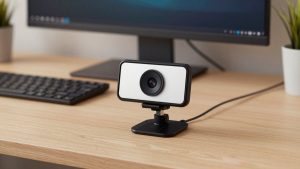
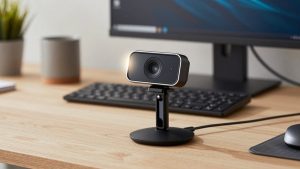
This is the Reddit default for a reason. A mainstream model like the Brio 4K family just works on Mac, Windows laptops, Zoom, Teams, and Slack. You clip it on top of a monitor, plug into USB 3.0 directly, and you get reliable autofocus, auto white balance, and dual noise-reducing mics that are fine for standups.
Trade-offs: the image can look a bit over-sharpened and the background looks busy because everything is in focus. Failure mode we see a lot: people plug into a hub or a long USB 2.0 extension and get 1080p or stuttering, then blame the camera. Use the short cable in the box and a USB 3 port on the laptop. Also turn off digital zoom and background blur at the same time, it taxes older MacBook Airs and causes lag.
Who it suits: HR, sales, managers, anyone taking 4-6 hours of calls per day. If you sit 2-3 feet from the screen in a mixed-light room, this is the safe pick. Browse current options via this 4K webcam with autofocus for work search and filter for USB 3.0 and Mac compatibility in reviews.
Best image quality at a desk: large-sensor 4K
If you care how you look on client calls, YouTube, or Loom, Reddit power users usually point to the Elgato Facecam Pro approach: a bigger sensor, less aggressive noise reduction, and more natural skin tones. In good light it looks noticeably more like a mirrorless camera than a typical webcam. You can crop to 1080p and still look sharp, which is how most people should use 4K.
Trade-offs: it is unforgiving. In a dim bedroom office at 7pm you will look dark unless you add a $25 key light or even a window lamp. Some versions have no microphone, so you need earbuds or a USB mic. The software for exposure and color is powerful but Windows-first, with Mac support improving but still occasionally behind on features.
Failure mode: leaving it on auto with overhead-only lighting creates shiny forehead and dark eyes. Put a soft light behind your monitor at face height. Who it suits: consultants, coaches, creators, and anyone who records as much as they meet. If you will not add light, do not buy this category, get the office workhorse above.
Best for teaching and moving around: gimbal tracking 4K
Insta360 Link and OBSBOT Tiny owners on Reddit are either fans for life or frustrated. When tracking works, it is excellent: you walk to a whiteboard, the camera follows, zooms, and keeps you framed. Desk mode for showing documents is genuinely useful for teachers and sellers. Gesture controls to zoom in and out work better than expected.
Trade-offs are real. These have tiny fans, moving motors, and companion apps that need updates. On Macs, especially with Apple Silicon and strict privacy settings, users report the camera not waking, or the control app losing settings after reboot. Privacy is another issue: it is a camera that can physically follow you, so get one with a clear shutter or dock-down privacy mode if that bothers you.
Failure mode: tracking in a cluttered home office with kids, pets, or a second person behind you. It will hunt. Turn tracking off for normal calls and only enable it for presenting. Who it suits: teachers, trainers, fitness coaches, standing-desk presenters. If you sit in one chair all day, you are paying for motors you do not need. See the current generation in this PTZ tracking 4K webcam search.
When the cheaper 4K option is fine
Reddit is blunt here: most sub-$70 4K webcams use a small sensor and fixed focus set to about 3-6 feet. In daylight, with a window in front of you, they can look perfectly fine for twice-weekly standups. Where they fall apart is evening calls, backlight, and leaning in to read. Faces get waxy from heavy noise reduction, and autofocus hunting is replaced by just being slightly soft all the time.
Buy cheap if your room is bright, your laptop is older, and you use headphones with a mic anyway. Do not buy cheap if you take client-facing calls in a dark room or need Windows Hello or precise color for design review. Also check the field of view. Many cheap models are 90 degrees or wider, which makes a small home office look cavernous and shows everything behind you.
A practical middle ground many office workers like is a well-reviewed 1080p or 1440p camera from a known brand over an unknown 4K badge. Resolution helps less than good exposure. If you want to compare prices, start with this 4K webcam for Mac laptop home office search and read the 3-star reviews first, they describe low-light and Mac issues most honestly.
Laptop and Mac setup notes that matter more than 4K
Most problems blamed on 4K are actually setup. For laptops, always connect directly to USB 3.0 or Thunderbolt via a powered hub rated for 5Gbps. Front-facing windows behind you will silhouette you on any camera, close blinds and put light on your face. On Macs, grant camera and microphone permission in System Settings, then quit and reopen Zoom or Teams, many no-signal reports are just permissions.
For video calls, set the camera to 1080p in the app even if it can do 4K. You will get smoother frame rates, less heat, and less fan noise on a MacBook Air. Save full 4K for recording in OBS, QuickTime, or the vendor app. And if you use a monitor light bar or sit above the camera on a standing desk, tilt the camera down slightly so you are not staring at foreheads.
FAQ
Do I need 4K for Zoom or Teams?
No. Both compress to 1080p or lower for most calls. Buy 4K for a cleaner, less noisy 1080p image and the ability to crop, not because coworkers will see 4K.
Why does my 4K webcam look worse than my old 1080p one?
Usually low light, wrong USB port, or heavy sharpening. Add face light, plug into USB 3.0 directly, turn off beauty filters and digital zoom, and set exposure to auto with a 60Hz anti-flicker setting if lights flicker.
Will a 4K webcam work on a MacBook Air?
Yes for calls at 1080p, but full 4K recording can heat older Airs and drop frames. Close heavy apps, use the vendor Mac app for firmware, and check that tracking features you want are actually supported on macOS.
Is a separate mic still needed?
For internal meetings, built-in dual mics are fine in a quiet room. For clients, interviews, or a noisy home, use earbuds or a USB mic. Large-sensor models sometimes skip a mic entirely, so check specs before you buy.
Related Reviews & Guides
Best Mac Camera for Zoom
Ergonomic Chair Office: Top Picks Compared in 2026