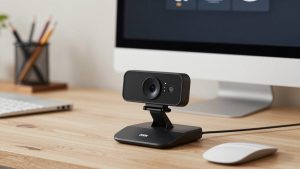
Last Updated: October 18, 2026
If you search Reddit for “webcam with best microphone,” you get the same pattern over and over: someone is tired of sounding hollow, tinny, or far away on Zoom and Teams, and they want one device that handles both video and audio. The honest consensus from r/WFH, r/Zoom, r/macsetups, and r/homeoffice is less exciting than most roundups admit.
Most built-in webcam mics are just okay. A few are genuinely good for work calls. None of them replace a dedicated USB mic or headset if you are on calls all day. The trick is knowing which compromise makes sense for your room, your laptop, and how much you talk versus listen.
📄 In This Review
What Reddit actually recommends
Reddit threads on this topic usually land in the same place. First, dual-microphone webcams with noise reduction beat single-mic models every time, especially in kitchens, shared home offices, and rooms with hard walls. Second, mic placement matters more than 4K resolution. A 1080p webcam placed 2-3 feet away will sound better than a 4K webcam sitting on top of a 32-inch monitor six feet away.
The other common take: Mac users complain more about webcam mics. Not because the mics are worse, but because macOS aggressive noise suppression plus a webcam with its own noise suppression can stack and make you sound robotic or gated. If you are on a MacBook, look for a webcam where you can turn off AI noise removal in its desktop app.
You will also see a lot of “just buy a separate mic” replies. They are not wrong for podcast-style clarity, but for daily standups, interviews, and client calls, most people do not want two devices to plug in. A good webcam mic that picks you up cleanly at desk distance and ignores keyboard clicks is enough.
What to look for in the mic, not just the lens
See also: Best Monitor for MacBook Air: Two USB-C 4K Screens and Six Adapter-Dependent Alternatives • Best Monitor for MacBook Pro: Eight Listings Sorted by Cable, Sharpness and Scaling
Ignore “studio-quality mic” on the box. Look for specifics: two omnidirectional mics or a stereo array, not one pinhole. A pickup range listed as 3-10 feet is more useful than vague “HD audio.” Noise-canceling, noise-reduction, or AI noise removal is essential if you have a fan, HVAC vent, or mechanical keyboard nearby.
Check for a physical privacy shutter that does not muffle the mic when open. Some cheap designs put the mic holes right next to the mount, so your monitor or laptop lid blocks them. Front-facing mic holes on either side of the lens work best.
For work, 1080p at 30fps is fine. What hurts call quality more is bad auto-exposure and bad auto-gain on the mic. A webcam that holds your face bright without blowing out the window behind you, and holds your voice level steady when you lean back, will test better with coworkers than a sharper sensor with jumpy audio.
The three types Reddit keeps coming back to
Instead of chasing a single “best,” it helps to pick by room and work style. These are the three categories that show up most in work-from-home setups:
| Category | Video / Mic setup | Best for | Trade-off / Failure mode |
|---|---|---|---|
| Budget 1080p dual-mic webcam | 1080p, dual mics, basic noise reduction | Laptop workers, students, second workstation | Sounds thin past 4 feet; picks up echo in large rooms |
| Mid-range 2K / 4K business webcam | 2K-4K, dual stereo mics, stronger noise canceling, app controls | Daily Zoom / Teams users, managers, client-facing calls | Needs good light; noise filter can clip first syllable if set too high |
| Premium auto-framing webcam | 4K, larger sensor, beamforming mics, AI framing | Presenters, teachers, people who move around | Costs more; auto-framing and mic tracking can lag or hunt |
If you just need to stop sounding like you are in a tunnel, a budget 1080p webcam with dual microphones is often enough, especially on a laptop at a desk. The cheaper option is fine when your room is quiet and you sit close.
If you are on calls 3-6 hours a day, step up to a business webcam with noise cancelling microphones. You get a wider, cleaner pickup pattern and usually a companion app to adjust mic gain, turn off auto-focus hunting, and update firmware for Mac and Windows. That app control is what prevents the underwater sound people complain about.
Who should buy what
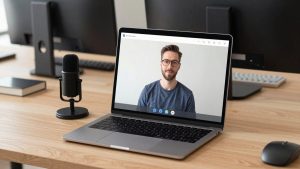
Quiet home office, close to camera: Stay cheap and simple. Mount the webcam at eye level on your monitor, not on top of a tall laptop stand. Turn on “original sound” or turn off extra suppression in Zoom if you sound muffled. Most complaints here are distance and echo, not a bad mic.
Noisy house, dogs, kids, keyboard clatter: Prioritize mic beamforming and noise reduction over resolution. Put the webcam centered and within arm’s reach. A home office webcam with beamforming mics will isolate your voice better than a basic model, but it will still catch loud background shouts. Keep a wired headset nearby for those days. Reddit is blunt about this failure mode: no webcam mic saves you from a blender three feet away.
MacBook docked to a monitor: Pick a model with a Mac app or at least UVC-standard controls that work without drivers. Test in FaceTime and Teams, not just Photo Booth. If friends say you fade in and out, lower the webcam’s noise reduction one notch and turn off “enhance audio” in your meeting app so they do not fight each other.
Presenter who stands or whiteboards: This is the only case where the premium auto-framing category makes sense. The wider field of view and mic array let you step back without disappearing. Expect some panning mistakes and slightly processed audio. If you sit still 90 percent of the time, save your money.
Setup matters more than the model
Even the best-rated webcam mics fail when set up wrong. Keep the mic 2 to 4 feet from your mouth. Hard floors and bare walls cause most “bad mic” reviews. A rug, curtains, or a bookshelf behind you does more for clarity than upgrading from 1080p to 4K.
Plug directly into your laptop or a powered hub. Underpowered USB hubs and long extension cables cause the two most common failure modes: robotic audio and disconnects mid-call. If your company laptop locks down software installs, avoid webcams that require an app to sound decent. You want good default tuning out of the box.
Finally, test before an important call. Record 20 seconds in your meeting app, type while talking, then lean back in your chair. If typing overpowers your voice or your volume drops when you lean back, move the camera closer or lower the noise suppression. When that does not fix it, that is your signal you actually need a separate USB mic.
FAQ
Can a webcam mic sound as good as a headset?
For listening, no. For how you sound to others in a quiet room at desk distance, a good dual-mic webcam is close enough for work. Headsets and USB mics still win in noise, consistency, and all-day talk comfort.
Why do I sound worse on a new 4K webcam?
Usually distance and double noise filtering. You are sitting farther back to fit the wider shot, and both the webcam app and Zoom are trying to remove noise. Move closer and run only one noise filter at a time.
Do I need 4K for better audio?
No. Resolution and mic quality are not linked. Buy 4K for sharper video and cropping, not for sound. For audio, prioritize dual mics and adjustable noise reduction.
When should I just buy a separate mic?
If you present daily, record meetings, work in a noisy or echoey room, or coworkers regularly ask you to repeat yourself. Otherwise a well-placed mid-range webcam mic is fine and simpler to use.