Last Updated: October 18, 2026
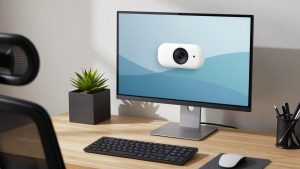
If you use video calls for work all day, your webcam matters more than your laptop specs. Most built-in laptop cameras are still 720p, washed out in warm home-office light, and fixed at a bad angle. A decent external webcam fixes framing, low-light noise, and mic dropouts — but you don’t need to overspend to get there.
We compared for the usual home-office problems: backlight from a window, late-day yellowlamps, soft focus when you lean back, and mics that pick up keyboard clatter. Here are ten types of webcams worth buying, who they suit, and where cheaper is fine.
📄 In This Review
How to choose quickly
Resolution is not the whole story. A good 1080p sensor with large pixels and decent auto-exposure will look better than a cheap 4K sensor that adds noise and stutters. For work, prioritize autofocus that doesn’t hunt, 30fps that stays locked, dual mics with noise reduction, and a shutter or software disable for privacy.
Mounting matters more than people expect. Clip mounts slip on thin MacBook lids and ultrawide monitors. If you move between desk and laptop, get a model with both a clip and a tripod thread. If you use a Mac, check that auto-focus, background effects, and firmware updates work without Windows-only software. Many advanced features are Windows-only.
Comparison: what actually differs
See also: Best Monitor for MacBook Air: Two USB-C 4K Screens and Six Adapter-Dependent Alternatives • Best Monitor for MacBook Pro: Eight Listings Sorted by Cable, Sharpness and Scaling
| Type | Best for | Trade-off | When cheap is fine |
|---|---|---|---|
| Basic 1080p fixed-focus | Daily Zoom / Teams | Soft if you move around | Yes, if you sit still 2-3 ft away |
| 1080p autofocus | Teaching, moving, whiteboard | Can hunt in low light | Mid-range is the sweet spot |
| 2K / QHD | Cropping and framing flexibility | Needs good USB bandwidth | Only if you crop often |
| 4K with auto-framing | Presenters, solo creators | Costs more, heavier CPU load | Overkill for 1:1 calls |
| Webcam with ring light | Dark rooms, night shifts | Harsh light if too close | A $15 lamp often beats it |
| Wide-angle conference cam | Two people in home office | Faces look small solo | Skip if always solo |
Picks 1-5: best for most workers
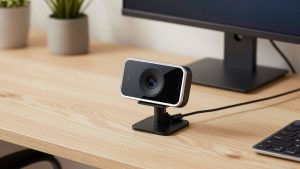
1. Best basic 1080p for laptop workers. A simple 1080p, 30fps fixed-focus camera is enough for 80% of office calls. It looks sharper than any built-in MacBook or ThinkPad camera from 2020-2022, and just works over USB-A without drivers. Failure mode: if you lean back beyond 4 feet you go soft, and low-light gets grainy. Who suits: anyone doing 1:1s at a desk. Start here with a basic 1080p webcam for laptop video calls.
2. Best 1080p autofocus for moving around. If you stand, demo products, or share a whiteboard, autofocus earns its price. Good ones lock in under a second and don’t pulse. Cheap autofocus models hunt constantly under LED lights — face goes in and out. Look for face-priority AF and 78-80 degree field of view so your background isn’t all visible.
3. Best for Macs with no-fuss plug-and-play. Mac users should prioritize UVC-compliant cameras that need no driver. You plug into USB-C via adapter or hub and FaceTime, Zoom, and Teams see it instantly. Avoid models where noise removal, zoom, or shutter control require Windows software. Sweet spot is 1080p/30 with hardware privacy shutter and tripod thread.
4. Best value with dual mics. Single-mic budget cams sound hollow and pick up typing. A dual-mic array with noise reduction makes you intelligible without a headset. It won’t match a dedicated USB mic, and in echoey rooms it still sounds distant. If you already wear earbuds with a mic, don’t pay extra for this.
5. Best small upgrade for low light. Home offices with one overhead light and a window behind you crush cheap sensors. Look for a larger sensor, f/2.0 or brighter lens, and auto low-light correction — not just more pixels. Test: record at 6pm with your normal lamp. If skin looks orange or noisy, this tier helps. Otherwise save money.
Picks 6-10: specialist and premium
6. Best 2K / QHD for cropping. 1440p gives you room to crop to 1080p for better framing without losing sharpness on a 27-inch monitor. Useful if your desk is deep or you want head-and-shoulders framing. Needs a decent USB port and CPU; on older Intel MacBook Airs it can drop to 20fps. If you never crop or zoom, stick to 1080p.
7. Best 4K for presenters. 4K only pays off if you present, record, or use digital zoom and auto-framing. A good 4K webcam with autofocus for home office can follow you and keep slides sharp, but it uses more bandwidth and can make office clutter painfully detailed. For standard Teams grids, no one will see the difference. Don’t buy 4K for a slow laptop or bad upload speed.
8. Best with built-in light for dark rooms. Integrated ring lights help night-shift workers and basement offices, but they are small and close to the lens, so they can blow out glasses and foreheads. A separate $20 desk lamp behind your monitor almost always looks more natural. Buy built-in light only if you travel or have zero desk space.
9. Best wide-angle for two people. If you share a home office or do in-person interviews at a desk, get 90-100 degree field of view. Solo, that same wide lens makes you tiny and shows your whole room. Some models offer 65/78/90 degree switching — worth it. Check edge distortion; cheap wide cams bend bookshelves and faces at the edges.
10. Best desk-setup with tripod for standing desks. Clip mounts wobble when you raise a standing desk. A mini tripod or monitor arm mount with a 1/4-inch thread stays steady and lets you get true eye-level. This is also the best fix for looking down at a laptop camera. Pair any webcam above with a webcam tripod stand for desk mounting if your image shakes when you type.
Across all ten: mount the camera at eye level, face a window or lamp (don’t put it behind you), set Zoom/Teams to 1080p if available, and turn off beauty filters and auto low-light boost if your image pulses. Those free fixes beat spending an extra $80.
FAQ
Is 4K worth it for Zoom and Teams?
Usually no. Most calls are compressed to 720p or 1080p anyway. Buy 4K only if you crop, record locally, or want auto-framing. Otherwise a good 1080p camera with better low-light will look cleaner.
Why does my external webcam look worse than my laptop camera?
Usually backlight, wrong resolution setting, or USB hub bandwidth. Face your light source, select the external camera in the app settings, set to 1080p, and plug directly into the laptop instead of a cheap dock.
Do I need a separate mic?
For 1-2 hours of calls a day, a dual-mic webcam is fine. If you talk 5+ hours, teach, or are in a noisy room, a USB headset or desk mic is a bigger upgrade than any camera.
What works best with MacBooks?
Choose UVC plug-and-play models with hardware shutters and no required Windows app. Bring a good USB-C adapter, and test mic and autofocus in FaceTime and Zoom before you mount everything.
Related Reviews & Guides
Best Budget USB Camera
Ergonomic Chair Herman Miller Aeron: Top Picks Compared in 2026