Last Updated: October 18, 2026
📄 In This Review
What high quality actually means on Mac
On a Mac, image quality is not just resolution. A good 1080p webcam with a larger sensor, decent lens, and clean processing will look better on Zoom, Meet, and Teams than a cheap 4K webcam that over-sharpens everything and falls apart in low light.
For work calls, prioritize three things: exposure handling in mixed office light, color that does not make skin look orange or washed out, and a microphone you can actually use if your headset dies. Autofocus speed matters more than most specs. If it hunts every time you lean forward, people notice.
Mac-specific friction is real. Most USB webcams are plug-and-play with macOS via UVC, so Zoom and FaceTime will see them immediately. The catch is settings. Many brands put exposure, zoom, white balance, and background blur controls only in Windows software. On Mac you often get no app or a stripped-down version. That means you want a camera that looks right with defaults, because you may not be able to tune it.
Your four real options
See also: Best Monitor for MacBook Air: Two USB-C 4K Screens and Six Adapter-Dependent Alternatives • Best Monitor for MacBook Pro: Eight Listings Sorted by Cable, Sharpness and Scaling
First is the built-in camera on a recent MacBook. Apple’s 1080p FaceTime cameras on M-series MacBooks are fine for daily standups if you have good light in front of you. Failure mode is backlight. Sit with a window behind you and you become a silhouette. The lens is also fixed in place, so your angle is whatever your laptop lid gives you.
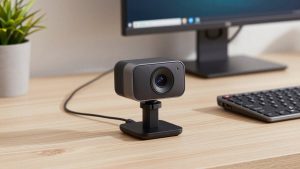
Second is a mid-range 1080p USB webcam. This is the sweet spot for most home office workers. You get better low-light performance than the built-in camera, a wider but still natural field of view, dual mics, and a privacy shutter. Trade-off: many look soft if you crop in or sit far away, and cheaper units have slow auto-exposure that pulses when a cloud passes.
Third is a 4K webcam for Mac. Worth it if you present, teach, record Loom videos, or want to crop to frame yourself tighter without going blurry. Good ones also handle contrast better. Trade-offs are price, heat, and USB bandwidth. Some drop frames on older Macs or hubs unless plugged in directly. And do not expect true cinematic 4K on a live call — Zoom will compress it anyway. You are paying for a cleaner 1080p feed and better recording files.
Fourth is using an iPhone as your Mac webcam with Continuity Camera, or using a mirrorless camera with a capture device. Image quality is excellent, especially in bad light. Failure modes are mounting, battery drain, overheating on long calls, and audio sync quirks. This suits creators and anyone who already owns the gear, not someone who wants to join a 9 a.m. call in one click.
Quick comparison for work use
If you call two to six hours a day, reliability beats specs. Buy the camera you will leave plugged in and keep at eye level.
| Option | Typical image | Strengths on Mac | Common problems | Best for |
|---|---|---|---|---|
| Built-in MacBook camera | 1080p, small sensor | No setup, good integration with FaceTime | Bad backlight handling, fixed angle, noisy in dim rooms | Travel, casual calls, second camera |
| Mid-range 1080p USB webcam | 1080p, better lens | Plug-and-play, usually looks good with defaults | Soft detail, basic mics, Windows-only tuning apps | Most office workers |
| Premium 4K USB webcam | 4K sensor, downscaled to 1080p | Sharper crop, better dynamic range, good for recording | Runs warm, needs direct USB port, costs more | Presenters, coaches, content recording |
| iPhone / mirrorless as webcam | Excellent, large sensor | Best low light and background blur | Mount fuss, battery/heat, more failure points | Creators, studio desks |
What to check before you buy
Field of view is where people buy wrong. For a solo desk setup, 65 to 78 degrees looks natural. Wider than 90 degrees shows your whole room and makes you small in the frame. That is fine for a conference huddle, bad for 1:1s. If the product page brags about 95-degree or 120-degree view, check if you can narrow it. On Mac, you often cannot without the Windows app.
Focus type matters. Fixed focus is actually fine if you sit 60 to 90 cm away and never move. Autofocus is better if you gesture, hold up documents, or lean in. Cheap autofocus is the worst of both — it breathes constantly. Look for reviews that specifically test focus on Mac in Zoom, not just sample stills.
Microphones are a backup, not a plan. Even good webcam mics pick up keyboard clatter and room echo. If you take calls all day, use earbuds or a USB mic. Judge the webcam mic on one question: is it intelligible if your headset dies mid-call? Most mid-range units pass that bar. Do not pay extra for “studio mics” on a webcam.
Mount and shutter are practical details. A heavy 4K camera can tip a thin external monitor. Check that the clip opens wide enough and has a tripod thread. A physical privacy shutter is worth having on Mac because the green indicator light is controlled by the system, but a shutter removes doubt in a shared home office.
Mac setup that matters more than specs
You can make a $70 webcam look better than a $200 one with placement. Put the lens at or slightly above eye level, about arm’s length away. Put a lamp or window in front of you, not behind you. Overhead ceiling lights alone create dark eye sockets on every webcam.
Plug premium cameras directly into the Mac or a powered Thunderbolt dock, not a cheap passive hub. That solves a lot of “camera disconnects on Mac” complaints, especially with 4K. If you use a DisplayLink dock or an old USB 2.0 extension, expect dropped frames.
If you need tuning on Mac, check before buying whether the brand offers a macOS app or browser-based controls. Many do not. A practical workaround is a simple USB webcam with privacy shutter that stores settings on-device after you set them once on another computer, or just choose a model known for good auto-exposure out of the box.
For hybrid workers, a basic 1080p webcam for laptop work calls is often the smarter buy than 4K. It is lighter to pack, less picky about ports and hubs, and looks identical to clients once video compression kicks in. Save the 4K budget for a light and a decent headset, which improve perceived quality more.
Who should buy what
Buy the cheaper 1080p option if: you are on calls under two hours a day, your room has decent daylight, and you use headphones. You will look professional. No one will ask for more resolution.
Buy 4K if: you record training videos, you sit farther from the camera, you crop in to hide a messy room, or you present to clients and want the cleanest image. Just confirm you have a free USB-C/USB-A port with enough bandwidth and that you are okay leaving it mounted.
Use Continuity Camera / mirrorless if: you already own the camera, you control your desk setup, and you do calls from one place. Do not build your whole workday around it if you move between rooms or share the Mac with family.
Skip upgrades entirely if your main complaint is grain or dark video. Add a $25 LED panel at 4000-5000K in front of you first. Light fixes more Mac webcam complaints than any sensor upgrade.
FAQ
Do I need drivers for a webcam on Mac?
Usually no. Most modern webcams use the UVC standard and work in FaceTime, Zoom, Teams, and Meet without drivers. The limitation is settings apps — exposure, field of view, and firmware updates are sometimes Windows-only.
Is 4K worth it if Zoom compresses video?
For live calls alone, often not. You will look slightly cleaner because the camera downsamples to 1080p, but compression erases most of the difference. 4K pays off for recordings, cropping, and difficult lighting.
Why does my webcam look worse on Mac than on Windows?
It is usually auto-exposure and missing tuning software. The same hardware can default to different brightness and white balance. Improve front lighting, plug directly into the Mac, and avoid running the camera through a cheap hub.
Can I just use my iPhone instead of buying a webcam?
Yes, Continuity Camera works well for desk use and looks better than most USB webcams. It is best as a primary camera if you have a solid mount and keep the phone plugged in. For travel or hot-desking, a small USB webcam is more reliable.
Related Reviews & Guides
Best Camera to Use with Elgato Cam Link
Best Logitech Webcam for Mac