

Last Updated: September 29, 2026
- Step 1: Check the weight before you touch any buttons
- Step 2: Look for physical obstructions and clearance issues
- Step 3: Power cycle the control box
- Step 4: Run the reset/sync procedure correctly
- Step 5: Decode the error code on the display
- When to stop troubleshooting and call support
- Quick decision guide
Nine times out of ten, a standing desk that won’t go up is stuck for one of four reasons, in this order of likelihood: it’s overloaded past the motor’s safety cutoff, the legs lost sync and triggered an anti-collision fault, the control box needs a power cycle and reset, or a physical obstruction is blocking the frame. Work through these in order rather than jumping straight to the manual reset, because resetting a desk that’s simply overloaded will just fault again in a few seconds.
📄 In This Review
- Step 1: Check the weight before you touch any buttons
- Step 2: Look for physical obstructions and clearance issues
- Step 3: Power cycle the control box
- Step 4: Run the reset/sync procedure correctly
- Step 5: Decode the error code on the display
- When to stop troubleshooting and call support
- Quick decision guide
Step 1: Check the weight before you touch any buttons
Most single-motor standing desks are rated for 150-220 lb of total load, and dual-motor frames typically top out between 225-350 lb depending on the model. The overload cutoff usually kicks in around 30-35 lb over the rated limit, not right at the limit, which is why a desk that’s worked fine for a year can suddenly refuse to rise after you add a second monitor arm, a monitor light bar, and a stack of books.
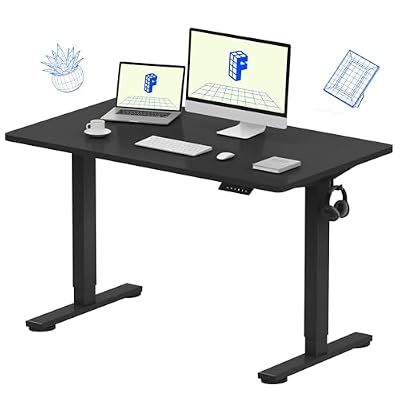
FLEXISPOT EN1 One-Piece Standing Desk, Electric Adjustable with 4 Memory Presets, 176 LBS Capacity, Stable & Quiet, Seamless Desktop for Home Office & Dual Monitors, 48"x24" Black
Included for 'Standing Desk Won't Go Up? 9 Fixes to Try Before You Call Support' because the listing specifies Electric Adjustable with 4 Memory Presets and 176 LBS Capacity, details this guide uses to compare options.
View on Amazon
FLEXISPOT 71 x 63 Reversible L-Shaped Corner Standing Desk, Black
Included for 'Standing Desk Won't Go Up? 9 Fixes to Try Before You Call Support' because the listing specifies Black, details this guide uses to compare options.
View on AmazonClear the desk down to nothing and try to raise it empty. If it moves with nothing on it but stalls once loaded, that confirms overload rather than a mechanical fault. Reload items one at a time and test after each addition to find what pushed it over. Dual monitor arms are the most common culprit because they clamp near the front edge and add 15-25 lb combined, right in the range that tips a borderline load into cutoff territory.
Weight cutoff behavior by frame type
| Frame type | Typical rated capacity | Cutoff usually triggers at | Common overload cause |
|---|---|---|---|
| Single-motor, 2-stage | 150-175 lb | 180-205 lb | Dual monitor arm + full-size keyboard tray |
| Single-motor, 3-stage | 175-220 lb | 205-250 lb | Large monitor + printer + storage bin |
| Dual-motor, standard | 225-275 lb | 260-310 lb | Triple monitor setup or small server rack shelf |
| Dual-motor, heavy-duty | 300-350 lb | 335-385 lb | Standing treadmill base or CNC/lab equipment |
Step 2: Look for physical obstructions and clearance issues
See also: Best 49 Inch Monitor: Eight Super Ultrawides Compared by Bandwidth and Desk Depth • Working Table for Home: Sit-Stand and L-Shaped Setups Compared
Before assuming electronics failure, check the actual physical path. Anti-collision sensors on most frames trigger when they detect roughly 6-8 lb of resistance, which is easy to hit with a power strip caught under the frame, a cable snagged on a leg bracket, or a chair pushed too far under the desktop. Standing desks generally need at least 2 inches of clearance on all sides during travel, and if a wall, shelf, or cabinet is closer than that, the frame will read it as a collision and stop rising rather than push through.
Also check the floor. Carpet with thick padding, or a desk sitting on an uneven floor transition, can cause one leg to bind slightly against the base plate. That small resistance is often enough to register as an obstruction even though nothing visible is in the way.
Step 3: Power cycle the control box
If weight and clearance both check out, cycle power completely. Turn off the power switch on the control box (usually on the underside near the cord), unplug from the wall, and wait a full 30-60 seconds before reconnecting. A quick unplug-replug often doesn’t fully discharge the capacitors in the control board, so the fault code just reappears immediately. The 30-60 second window matters more than people expect; many support scripts fail because users only wait 5-10 seconds.
After reconnecting, don’t press up or down immediately. Let the display settle first, since some handsets show a brief startup flicker that’s normal and not an error.
Step 4: Run the reset/sync procedure correctly
Uneven leg sync is one of the most common causes of a desk that raises a fraction of an inch, jerks, or refuses entirely, and it happens when one leg’s motor encoder drifts out of alignment with the other, usually after an overload event, a power interruption mid-movement, or moving the desk to a new outlet.
The reset sequence varies slightly by brand, but the near-universal pattern is: hold the down button until the desk reaches its lowest point and continues to hold for another 3-5 seconds after it stops moving, release, then hold the up button briefly to confirm sync. The critical detail people get wrong is releasing the down button as soon as the desk stops instead of holding through that extra few seconds, which is what actually re-zeros the encoders. If your handset has a dedicated reset button (often labeled “M” or requiring a two-button combo like up+down held together), that takes priority over the manual hold method.
Reset hold times by handset type
| Handset type | Reset method | Hold duration |
|---|---|---|
| Basic up/down paddle | Hold DOWN past lowest point | 3-5 seconds after stop |
| Digital display, no memory buttons | Hold DOWN, then tap UP once | 5-8 seconds |
| Digital display with memory presets (1/2/3) | Hold UP+DOWN together | 5-10 seconds until display flashes |
| Herman Miller / premium OEM controllers | Hold DOWN to floor, then hold reset combo per included card | 8-10 seconds, sometimes twice |
On a Herman Miller standing desk that won’t go up, the fix is usually the same sequence but the timing tends to run a bit longer than budget frames, closer to 8-10 seconds, and some models require the hold-to-floor step twice in a row before the sync actually takes. If the desk is on a Herman Miller frame paired with a third-party top or added weight like a monitor mount rated past what the frame’s documentation lists, treat it as an overload issue first, since these frames’ cutoffs are less forgiving than generic budget frames.
Step 5: Decode the error code on the display
If the handset shows a letter-number code instead of a height reading, that narrows the problem immediately rather than guessing.
- E01 / E1 — Motor overcurrent, almost always overload-related. Remove weight and retry before doing anything else.
- E02 / E2 — Communication error between control box and one motor, often a loose cable connection at the leg. Check that all cable connectors under the desk are seated fully.
- E03 / E3 or ASR — Anti-collision/anti-shock trigger, meaning the frame detected resistance mid-travel. Clear obstructions and reset.
- E04 / E4 — Height sync error between legs, the classic uneven-legs fault. Run the reset sequence in Step 4.
- E05 / E5 or similar — Sensor or Hall effect fault, usually needs a full power cycle; if it persists after cycling, it’s likely a motor sensor issue that needs a technician.
When to stop troubleshooting and call support
Call in once you’ve confirmed the load is under the rated capacity, cleared at least 2 inches on all sides, done a full 60-second power cycle, and run the reset sequence twice without success. At that point the issue is very likely a failed motor, a cracked control board, or a bad cable harness, none of which are user-serviceable on most frames without voiding the warranty. Most standing desk frames carry a 5-10 year warranty on the motor and frame, so keep your order confirmation or serial number handy since support will ask for it before sending a replacement part.
Quick decision guide
| Symptom | Most likely cause | Try this first |
|---|---|---|
| Won’t move at all, no display response | Power/cable issue | Check outlet, swap power cable if available |
| Moves down but not up | Overload cutoff | Remove weight, retest empty |
| Jerks or stops a few inches up | Leg sync error | Run reset hold sequence |
| Stops immediately near a wall or shelf | Anti-collision sensor | Add clearance, remove obstruction |
| Shows E01-E05 or ASR code | See error code list above | Match code to fix, then reset |
Related Reviews & Guides


Best Electric Standing Desk under 400 Dollars in 2026: Compared and Ranked
Best Large L Shaped Standing Desks for Multiple Monitors in 2026: Compared and Ranked










