Last Updated: October 18, 2026
If you browse Reddit threads about the best webcam for MacBook Pro, the same pattern comes up again and again: most people don’t actually need a fancy webcam, and the ones who do usually buy the wrong one first.
That’s because the MacBook Pro already has a decent 1080p FaceTime camera on M1 Pro models and newer, and macOS has Continuity Camera built in. On r/mac, r/macbookpro, and r/WFH, the top-voted advice is almost always: try what you have first, then spend money only if you have a specific problem like bad low light, wide meetings, or you want to look sharper on client calls.
📄 In This Review
The short answer from Reddit
For office work on Zoom, Teams, and Google Meet, Redditors consistently recommend three paths: stick with the built-in camera if lighting is okay, use your iPhone as a webcam with Continuity Camera if you want a free upgrade, or buy a midrange 1080p Logitech if you want a set-and-forget external camera.
4K webcams get a lot of upvotes in photos but mixed reviews in practice. Many commenters say Zoom and Teams compress video so hard that 4K doesn’t show up on the other end, while poor exposure, autofocus hunting, and bad audio are much more noticeable. If you do client-facing calls every day, better lighting plus a solid 1080p camera usually beats a 4K sensor in a dark room.
What Reddit actually recommends for MacBook Pro
See also: Best Monitor for MacBook Air: Two USB-C 4K Screens and Six Adapter-Dependent Alternatives • Best Monitor for MacBook Pro: Eight Listings Sorted by Cable, Sharpness and Scaling
1. iPhone with Continuity Camera: This is the most common Reddit recommendation for Mac owners, especially since macOS Ventura. If you have an iPhone 11 or newer, you can mount it on top of your MacBook and use it wirelessly or wired. Image quality is clearly better than any sub-$150 webcam, especially for skin tone and low light. The downside is friction: you need a mount, your phone gets hot and drains battery on long calls, and notifications or calls can interrupt video. It is great as a free upgrade, less great as a daily 6-hours-a-day office setup.
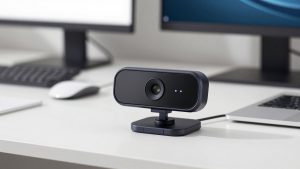
2. Basic 1080p Logitech for work: The C920s / C922 class is mentioned in almost every work-from-home thread. Redditors like them because they just work on Mac over USB, focus is predictable, the 78-degree field of view fits one person at a desk, and the price is low. Trade-off: they need USB-A to USB-C adapters on modern MacBook Pro, the image looks soft next to an iPhone, and low-light performance is only average. For internal standups and remote work, most people say that is fine.
If you want that simple route, look at a current Logitech 1080p webcam for Mac rather than chasing old listings – the exact letter at the end matters less than getting autofocus and a privacy shutter.
3. Logitech Brio 500 / 4K tier for client calls: For people who present, teach, or sell over video, Reddit often points to the Brio 500 as the sweet spot. It does 1080p well, has better auto-exposure than budget cams, works over USB-C, and Logi Tune on Mac lets you turn off the over-sharpened default look. The failure mode people complain about: Windows-style auto settings can make you look waxy, and 4K mode is mostly useless on calls because of bandwidth and cropping. Buy it if you want more consistent exposure, not because 4K will make you look twice as sharp.
That is why many threads suggest browsing Logitech Brio USB-C webcams and sticking to 1080p/30 for work calls.
4. Elgato Facecam and Opal-style premium cams: These get love for sharp daylight image and interchangeable mounts, but Reddit warnings are loud. The Elgato Facecam has no autofocus on the base model – fine if you sit still, annoying if you move or show products. Opal cameras look excellent when they work, but threads report heat, fan noise on older units, and software quirks on macOS updates. These suit streamers and creators who will tune settings. They are overkill for most office workers.
Quick comparison
| Option | Why Redditors like it | Main trade-off | Best for |
|---|---|---|---|
| Built-in MacBook Pro camera | No setup, 1080p on Apple Silicon, fine with good light | Fixed angle, weak in low light, looks flat | Internal meetings, travel |
| iPhone Continuity Camera | Best image for $0, great low light and color | Phone heat, battery drain, need mount | Interviews, occasional important calls |
| Midrange 1080p webcam | Reliable, cheap, good enough for Zoom/Teams | Needs USB-C adapter, soft detail | Daily home office work |
| Brio 500 / 4K class | Better exposure, USB-C, framing modes | 4K rarely visible to others, needs tuning | Client calls, teaching, presenting |
| Elgato / Opal premium | Sharpest daylight image, manual control | Price, heat/software issues, needs light | Creators, streaming, YouTube |
MacBook Pro-specific issues Reddit warns about
First is ports. MacBook Pro is USB-C / Thunderbolt only, so most affordable webcams need a dongle or a USB-C cable that actually carries data. Redditors report dropouts with cheap hubs – plug directly into the Mac for testing if you get freezing.
Second is macOS camera permissions and app conflicts. Only one app can use the camera cleanly at a time. If Teams says no camera found after Zoom, quit the other app completely and check System Settings – Privacy and Security – Camera. Continuity Camera also fails if Wi-Fi/Bluetooth are off or if you are using VPNs and Apple ID mismatches.
Third is autofocus and auto-exposure hunting. Many complaints about pulsing or breathing focus are not broken cameras, it is a webcam trying to expose for a bright window behind you. Face a window or put a $20 LED panel in front of you before you replace the camera. A $60 webcam with decent light beats a $200 webcam backlit by a window.
Who should buy what
Buy nothing if you have an M1 Pro / M2 / M3 MacBook Pro and mostly do internal calls. Clean the lens, turn on Studio Light in Video Effects if you like it, and add a lamp in front of you. That solves 80% of I look bad on camera threads.
Use Continuity Camera if you do job interviews, sales calls, or recordings a few times a week and already own a recent iPhone. Get a proper MagSafe MacBook mount and use wired USB-C for long calls to avoid Wi-Fi stutter and heat.
Buy a midrange 1080p external webcam if you take calls all day and want to leave your phone alone, or you dock to a monitor and the MacBook is closed. Clamshell mode is a big reason to go external – no built-in camera when the lid is shut.
Buy one step up only if people see you for a living: coaches, consultants, teachers, founders fundraising. Even then, prioritize good autofocus behavior and Mac software over 4K on the box. If you are considering premium 4K, search 4K USB-C webcams for MacBook Pro and filter for models that explicitly list macOS support and USB-C in the specs.
The cheaper option is fine when your calls are mostly compressed Zoom tiles, your room light is decent, and audio matters more. Reddit is blunt about this: no one got promoted because of 4K, but plenty of people sound bad because they relied on a webcam mic from three feet away. A basic webcam plus cheap earbuds or a USB mic is a better upgrade than a $250 camera alone.
FAQ
Do I need an external webcam if my MacBook Pro already has 1080p?
Usually no. For M1 Pro and newer, the built-in camera is good enough for work if you face your light source. Get an external only for clamshell dock use, bad angles, or consistently dark rooms.
Why does Reddit recommend iPhone Continuity Camera so much?
Because it is free and visibly better than budget webcams, especially in low light. The catch is convenience – mounts, heat, and battery make it annoying as an all-day office camera.
Is 4K worth it for Zoom and Teams on Mac?
Rarely for normal work. Those apps downscale heavily, so exposure, focus stability, and framing matter more. 4K helps if you record locally, crop in, or stream.
What causes freezing or not detected on MacBook Pro?
Most often cheap USB hubs, another app holding the camera, or macOS privacy settings. Try a direct USB-C port, quit Zoom/Teams/OBS completely, then re-enable permission in System Settings.
Related Reviews & Guides

Cheap High Quality Webcam
8 Best PCs for Working From Home (2026)