Last Updated: September 18, 2026
- Top Pick: YSAGi Leather Desk Protector, Office Mat, Large Mouse Mat, Non-Slip PU Leather Blotter, Laptop Desk Mat, Waterproof Writing Pad for Office and Home (Black, 31.5" x 15.8")
- Best Value: YSAGi Leather Office Desk Pad Protector, Large Mouse Pad, Non-Slip, PU Leather, Laptop Desk Blotter, Waterproof Writing Pad for Office and Home, Black, 23.6" x 13.8"
- Premium Choice: YSAGi Leather Desk Protector, Office Mat, Large Mouse Mat, Non-Slip PU Leather Blotter, Laptop Pad, Waterproof Writing Pad for Office and Home (Light Pink, 23.6" x 13.8")
📄 In This Review
The Short Answer
For most home-office setups, a desk mat measuring 31.5 x 15.8 inches (80 x 40 cm) is the best all-around choice. It is wide enough for a laptop or keyboard, mouse, notebook, and coffee cup without covering an excessive amount of the desktop.
If you have a compact desk, choose a 23.6 x 13.8 inch (60 x 35 cm) mat. This smaller size works well beneath a laptop, on a writing desk, or in a dorm room where surface area is limited. For a full keyboard-and-mouse setup on a desk 48 inches wide or larger, consider an extended mat around 35.4 x 15.8 inches (90 x 40 cm) or 47.2 x 15.8 inches (120 x 40 cm).
As an Amazon Associate we earn from qualifying purchases at no extra cost to you.
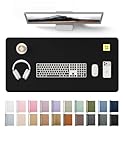



A good rule is to leave at least 2 to 4 inches of exposed desktop around the mat’s edges. Measure the usable surface—not the desk’s overall outside dimensions—and account for monitor stands, desk lamps, docking stations, and anything else that permanently occupies space.
Standard Sizes
See also: Best Racing Style Chairs: Ten Listings Compared by Footrest, Weight Rating and Fit • Wall Mounted Cable Organizer for Home Office: Raceways, Racks, Clips
Desk mats are sold in a broad range of dimensions, but the sizes below cover the most common options for leatherette, cork, felt, and oversized mouse-pad-style mats. Measurements can vary slightly by brand, so always check the listed dimensions before ordering.
| Desk Mat Size | Dimensions in Inches | Dimensions in Centimeters | Best For |
|---|---|---|---|
| Small | 23.6 x 13.8 in. | 60 x 35 cm | Laptops, small writing desks, dorms, and compact workstations |
| Medium | 27.6 x 13.8 in. | 70 x 35 cm | Keyboard and mouse setups with limited desk depth |
| Large | 31.5 x 15.8 in. | 80 x 40 cm | Most home offices, laptop-plus-mouse setups, and writing areas |
| Extra Large | 35.4 x 15.8 in. | 90 x 40 cm | Full-size keyboard, mouse, notebook, and wider work zones |
| Extended | 47.2 x 15.8 in. | 120 x 40 cm | Dual-monitor desks, gaming setups, and wide 55- to 60-inch desks |
| Deep Desk Mat | 31.5 x 23.6 in. | 80 x 60 cm | Deep desks, art tables, drafting, and substantial writing protection |
The two most useful starting points are 23.6 x 13.8 inches and 31.5 x 15.8 inches. For example, a 23.6 x 13.8 inch PU leather desk protector is generally sized for a laptop and everyday writing, while a 31.5 x 15.8 inch version gives a standard keyboard and mouse more room. Basic PU leather mats in these sizes commonly cost about $9 to $13, depending on color, finish, and seller.
How to Measure Your Space
- Clear the working area. Remove loose items from the desktop, but leave permanent pieces in place, including monitor arms, lamps, desktop speakers, charging docks, and pencil organizers.
- Measure usable width. Use a tape measure to find the horizontal space available from left to right. Do not include areas blocked by a monitor base or an object you do not intend to move.
- Measure usable depth. Measure from the front edge of the desk toward the wall or monitor. Many desks are 24 inches deep, but the usable depth may be closer to 16 to 20 inches once a monitor stand is included.
- Mark your keyboard and mouse footprint. A full-size keyboard is usually about 17 to 18 inches wide and 5 to 6 inches deep. Plan for at least 10 to 12 inches of mouse space to the right or left, depending on your dominant hand.
- Add room for how you work. If you write by hand, use a tablet, or keep a notebook open beside the keyboard, add 8 to 12 inches of width. If you only need a laptop surface, a smaller mat may be sufficient.
- Subtract an edge allowance. Leave 2 to 4 inches around one or more sides of the mat. This keeps the desk from looking crowded and prevents a thick mat from hanging over a beveled or rounded edge.
- Check the mat’s orientation. Most desk mats are wider than they are deep. A 31.5 x 15.8 inch mat should normally sit with the 31.5-inch side running across the desk.
As a quick example, if your desk has 40 inches of clear width and 20 inches of clear depth, a 31.5 x 15.8 inch mat will fit comfortably. A 47.2-inch extended mat will not. On a 55-inch-wide, 24-inch-deep desk, either a 35.4 x 15.8 inch or 47.2 x 15.8 inch mat can work, depending on how much exposed wood, laminate, or glass you want to retain.
By Room or Use Case
Small Bedroom Desk or Dorm Room
Choose a 23.6 x 13.8 inch desk mat for desks measuring roughly 30 to 40 inches wide. This size protects the surface below a 13- to 16-inch laptop, supports a mouse, and still leaves room for a lamp or storage tray. Avoid a very deep mat on a shallow desk; it can push your keyboard too close to the front edge and make the setup feel cramped.
Home Office Desk
For a typical 48-inch-wide desk, a 31.5 x 15.8 inch mat is usually the sweet spot. It accommodates a full-size keyboard, mouse, and a small notebook, while leaving visible desk surface at both ends. If your desk is at least 24 inches deep and you regularly write or sketch, move up to a 31.5 x 23.6 inch mat for more front-to-back coverage.
Laptop-Only Workspace
If you work primarily from a laptop, base the size on whether you use an external mouse. A 13-inch laptop is about 12 inches wide, while many 15-inch models are around 14 inches wide. A 23.6 x 13.8 inch mat is enough for the laptop alone or laptop plus a compact mouse. Choose 31.5 x 15.8 inches if you want room for a notebook, phone, or charger beside it.
Desktop Computer or Gaming Setup
For a keyboard-and-mouse station, choose a mat at least 35.4 x 15.8 inches. Low-sensitivity gaming or design work benefits from a wider mousing area, particularly if you use a full-size keyboard. A 47.2 x 15.8 inch extended mat is a practical match for 55- to 60-inch desks. Make sure the mat does not interfere with a keyboard tray, clamp-on monitor arm, or desk-mounted microphone arm.
Writing Desk or Craft Table
A deeper option, such as 31.5 x 23.6 inches, is more useful than an extra-wide mat when writing is your main activity. The additional depth protects the area under your forearms, notebook, and paper pad. On a narrow console or secretary desk, however, a 13.8- to 15.8-inch-deep mat is less likely to overrun the available surface.
Common Sizing Mistakes
- Buying based on desk width alone. A mat can fit across the desk but still be too deep once a monitor stand or desk shelf is in place.
- Forgetting mouse movement. A keyboard may fit on a small mat, but the mouse can end up on bare desk surface or too close to the edge.
- Choosing a mat that reaches every edge. Exact edge-to-edge sizing looks tidy in product photos but can bunch, curl, or hang over a rounded desk edge in real use.
- Ignoring the monitor base. Large monitor stands can occupy 10 to 14 inches of desk depth. Measure around them unless the mat will sit underneath the base.
- Using an oversized mat on a shallow desk. On a 20-inch-deep desk, a 23.6-inch-deep mat may extend beyond the front edge. Select a mat that is slightly shallower than the usable desk depth.
- Assuming all “large” mats are alike. One brand’s large mat may be 31.5 x 15.8 inches, while another may be 35.4 x 15.8 inches. Compare the actual measurements, not just the label.
FAQ
What size desk mat do I need for a 48-inch desk?
A 31.5 x 15.8 inch mat is the safest choice for most 48-inch desks. It provides generous keyboard and mouse coverage without making the desktop feel fully covered. Choose 35.4 x 15.8 inches if your desk has minimal clutter and you want more mouse room.
Should a desk mat go under my monitor?
It can, especially if you want to protect the desktop from a monitor base. However, measure the available depth first. If the stand is heavy or has sharp feet, choose a durable mat with a stable, non-slip backing. If your monitor is mounted on an arm, you can place the mat entirely in front of it for a cleaner work zone.
Is 23.6 x 13.8 inches big enough for a keyboard and mouse?
It can be, but it is best for compact keyboards, laptop setups, or limited mouse use. A standard full-size keyboard takes up much of the width, leaving little room for broad mouse movement. For a full-size keyboard and mouse on one surface, 31.5 x 15.8 inches is more comfortable.
How much of my desk should a desk mat cover?
For most setups, cover about 50% to 75% of the usable work area rather than the entire desk. Leaving a 2- to 4-inch border around the mat gives the arrangement a more intentional look and preserves space for drinks, decor, cable access, and frequently used accessories. In 2026, the most versatile choice remains a medium-to-large mat sized to your actual work zone rather than the full desktop.
Related Reviews & Guides



6 Best Seateds To Standing Desk 2026
6 Best Convert Standing Desks 2026