Last Updated: September 18, 2026
A desk mat protects your work surface from scratches, spills, friction, and hot coffee mugs—but it also collects dust, skin oils, crumbs, ink, and food residue. Cleaning it the wrong way can leave streaks, loosen glued layers, fade the surface, or cause a fabric mat to shrink. Excess water can also seep into seams and create a lingering odor.
The safest method depends on the material. PU leather and vinyl mats usually need only a lightly damp cloth and diluted soap. Fabric mats may tolerate more water, but they need thorough drying. Cork, genuine leather, and mats with printed graphics require a gentler approach. Before you begin, remove your keyboard, monitor stand, and other accessories, then check the manufacturer’s care instructions if they are available.
As an Amazon Associate we earn from qualifying purchases at no extra cost to you.

What You Need
| Item | Why | Optional? |
|---|---|---|
| Microfiber cloths | Lift dust and grime without scratching smooth surfaces | No |
| Soft-bristle brush or vacuum with brush attachment | Removes crumbs, hair, and dust from fabric texture | Yes |
| Clean, lukewarm water | Provides moisture for wiping and rinsing | No |
| Mild dish soap | Breaks down skin oils and light food residue | No |
| Small bowl or spray bottle | Helps you mix and control a diluted cleaning solution | Yes |
| White towel or drying rack | Absorbs moisture and supports even air-drying | Yes |
| Rubbing alcohol | May help with some ink or adhesive marks after a spot test | Yes; use cautiously |
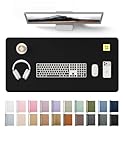
For a smooth PU leather desk mat, products such as the YSAGi Leather Desk Protector in 31.5-by-15.8-inch and 23.6-by-13.8-inch sizes are designed to be wiped clean rather than machine-washed. Comparable versions commonly cost about $9 to $13. Their waterproof writing-pad surface is convenient for routine cleaning, but the edges, backing, and seams still should not be saturated.
Step-by-Step
See also: Best Racing Style Chairs: Ten Listings Compared by Footrest, Weight Rating and Fit • Wall Mounted Cable Organizer for Home Office: Raceways, Racks, Clips
Identify the mat material (1–2 minutes)
Look at the surface, backing, and care label. Smooth PU leather, vinyl, and plastic mats should be cleaned with minimal moisture. Fabric mats have a woven or felt-like top and often a rubber backing. Cork feels slightly textured and may have a natural, porous appearance. Genuine leather needs leather-specific care, while a printed or RGB-equipped mat may have electronics or coatings that cannot be submerged.
If you are unsure, treat the mat as delicate: use a dry cloth first, then test any cleaner on a hidden corner.
Clear and dry-clean the surface (3–5 minutes)
Unplug and remove all desk accessories. Shake loose crumbs into a trash can if the mat is small and flexible. For a large mat, such as one measuring 31.5 by 15.8 inches, use a microfiber cloth or a vacuum brush attachment instead of folding it sharply.
Brush in one direction, especially on fabric, to avoid pushing debris deeper into the fibers. Do not drag a vacuum’s hard plastic nozzle across PU leather, vinyl, or a printed finish.
Mix a mild cleaning solution (2 minutes)
For PU leather, vinyl, plastic, and most fabric mats, mix about 1 teaspoon of mild dish soap with 2 cups of lukewarm water. The solution should feel lightly soapy, not concentrated. Avoid bleach, ammonia, abrasive powders, furniture polish, acetone, and multipurpose sprays containing strong solvents.
For genuine leather or cork, start with plain water and follow the care instructions. Do not assume a product labeled “leather” is genuine leather; many office mats use PU leather, which has different care needs.
Test an inconspicuous spot (5 minutes, including drying time)
Dampen a white microfiber cloth with the solution and wring it until it is only slightly moist. Wipe a corner or the underside, then wait about 5 minutes. Check for color transfer, cloudiness, tackiness, swelling, or changes in texture.
If the finish changes, stop and use only the method approved by the manufacturer. A spot test is especially important for dark mats, printed designs, colored fabric, and older mats with cracked surfaces.
Wipe the top in sections (5–10 minutes)
Work in sections of roughly 6 by 6 inches. Wipe gently with the damp cloth, using straight or overlapping passes rather than aggressive scrubbing. Turn the cloth frequently so you are not spreading grime across the surface.
For a smooth desk pad, pay attention to the area where your forearms rest, the space beneath your mouse, and the front edge. These areas receive the most oil and friction. Use a soft brush with the diluted solution on fabric only, and keep the brush damp rather than wet.
Remove soap residue (2–5 minutes)
Use a second microfiber cloth dampened with plain water. Wring it thoroughly, then wipe the mat once or twice to remove leftover soap. Do not pour water directly onto the mat and do not leave standing moisture around the edges or seams.
On PU leather and vinyl, residue can create a hazy film or make the surface feel sticky. On fabric, excess soap may attract more dirt if it is not rinsed away.
Dry completely before returning equipment (30 minutes to 24 hours)
Blot the mat with a dry towel, then lay it flat in a well-ventilated area away from direct, intense sunlight and radiators. A smooth waterproof mat may dry in about 30 to 60 minutes. A thick fabric mat or rubber-backed mat can take several hours, sometimes overnight.
Never use a high-heat hair dryer, tumble dryer, or space heater. Heat can warp plastic, curl edges, weaken adhesive, and damage rubber backing. If you use a dryer at all, choose cool air and keep it moving at least 12 inches from the surface.
Treat remaining spots carefully (5–10 minutes)
For a fresh spill, blot rather than rub. Repeat the mild-soap treatment once or twice. For ink, adhesive, or permanent-marker marks, check the care instructions before trying rubbing alcohol. If permitted, place a small amount of 70% isopropyl alcohol on a cotton swab and test a hidden area first. Touch the mark lightly, then wipe with a water-damp cloth.
Do not use alcohol on genuine leather, cork, or an untested printed finish. Some stains are safer to leave than to remove at the cost of a damaged coating.
Mistakes to Avoid
- Soaking the mat: Water can reach the backing, adhesive, or stitched edges and cause bubbling, odor, or separation.
- Using harsh chemicals: Bleach, acetone, concentrated alcohol, and abrasive cleaners may strip color or make PU leather brittle.
- Scrubbing with a rough sponge: Scouring pads can create permanent dull patches and visible scratches.
- Machine-washing without approval: A fabric top does not mean the entire mat is washable. Rubber backing may crack, curl, or detach.
- Rolling a damp mat: Trapped moisture encourages mildew and can set creases into the material.
- Replacing equipment too soon: A keyboard, mouse, or monitor stand can trap moisture against the mat.
- Ignoring the underside: Once the top is dry, wipe the backing with a nearly dry cloth and remove dust before putting it back.
How Often
For a typical home office, wipe a smooth desk mat once a week and do a more complete cleaning every one to two months. If you eat at your desk, have pets, or use hand lotion frequently, clean it weekly. Fabric mats may need vacuuming two or three times a week in high-traffic rooms, with a damp wash every one to three months if the care label allows it.
Clean spills immediately, ideally within a few minutes. A quick blot prevents coffee, soda, ink, and oily food from drying into the surface. During a 2026 desk refresh, also clean the underside, keyboard feet, mouse, and the area beneath the mat so grime does not transfer back onto it.
When to Call a Pro or Replace
Professional cleaning is worthwhile for a valuable genuine-leather mat, a specialty textile, or a custom mat with a delicate print. Contact a leather or textile-care professional if the material has deep dye transfer, mildew, widespread discoloration, or water damage.
Replacement is usually more practical when the mat has peeling PU coating, exposed foam, a permanently curled edge, a cracked rubber backing, or a strong odor that remains after complete drying. Replace it as well if it slides enough to affect typing or mouse control. A basic replacement desk pad may cost roughly $9 to $30, depending on size and material; do not keep cleaning a surface that is transferring flakes or residue to your equipment.
FAQ
Can I wash a desk mat in the washing machine?
Only if the manufacturer specifically says it is machine-washable and provides settings. Otherwise, hand-clean it with a lightly damp cloth. Rubber-backed, leather, cork, and electronic mats should not go in a washer.
How do I clean a PU leather desk mat?
Remove dust, then wipe it with a microfiber cloth dampened with a solution of about 1 teaspoon of mild dish soap in 2 cups of lukewarm water. Follow with a plain-water cloth, blot dry, and let it air-dry flat. Avoid soaking and harsh chemicals.
How do I remove coffee from a desk mat?
Blot the spill immediately with a dry cloth. Then use a slightly damp cloth with diluted mild soap, working from the outside of the stain toward the center. Rinse with a water-damp cloth and dry thoroughly. Avoid rubbing, which can spread the stain.
Why is my desk mat still sticky after cleaning?
It may have soap residue, degraded coating, or damage from an incompatible cleaner. Wipe it once with a clean, barely damp microfiber cloth and dry it fully. If the stickiness returns or the surface is peeling, replacement is safer than applying more products.
Related Reviews & Guides

6 Best Foldings Under Desk Treadmill 2026

Quick Picks: Best Cable Raceway Wall Cord Covers