Last Updated: October 4, 2026
The best power strip with USB-C for a desk is one whose USB-C port delivers at least 65W on its own (enough to run a laptop), carries a real surge rating of 1,000 joules or more, and mounts where you can reach it without crawling under the desk. Everything else, from outlet count to cord length, depends on what sits on your desk and how the desk is built.
Many “USB-C power strips” advertise a big total wattage that is shared across ports, so a strip labeled 100W might drop to 45W on the laptop port the moment you plug in a phone. Reading the per-port split is the single most useful thing you can do before buying.
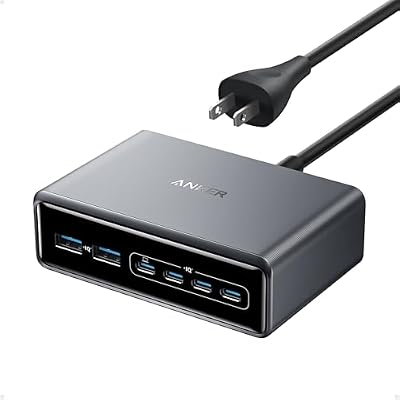
Anker Prime Charging Station, 200W 6-Port GaN Desktop Charger
Included for 'Best Power Strip with USB-C for Your Desk: Port Wattage, Mounting and Picks by Setup' because the listing specifies 200W 6-Port GaN Desktop Charger, details this guide uses to compare options.
View on Amazon
Anker Nano Power Strip, Desk Clamp, 70W Max, 1500J Surge Protector, 2 USB C
Included for 'Best Power Strip with USB-C for Your Desk: Port Wattage, Mounting and Picks by Setup' because the listing specifies Desk Clamp and 70W Max, details this guide uses to compare options.
View on Amazon📄 In This Review
What actually matters on a desk power strip
Per-port USB-C wattage, not total wattage
Check the fine print for the single-port maximum and the split when two or three ports are in use. A 13-inch ultrabook needs 45–65W, a 14–16-inch work laptop 65–100W, and a phone or earbuds 20W or less. If your laptop charges from the strip, the first USB-C port should hold 65W or more even with a second device connected.
Surge protection you can verify
A plain power strip and a surge protector look identical. Look for a UL 1449 listing, a joule rating (1,000–2,000 J is a sensible desk range; 3,000 J+ is for expensive gear), a clamping voltage of 400V or lower, and a “protected” indicator light. When that light goes out, the surge components are spent and the strip is just an extension block.
Outlet spacing and orientation
Monitor bricks and docking station adapters often block neighboring sockets. Rotated or widely spaced outlets (about 1.5 inches apart or more) let you use every socket instead of losing two to one bulky adapter.
Cord length and plug style
Measure from the wall outlet to where the strip will sit, then add 2 feet for routing along a desk leg or cable tray. A flat, right-angle plug lets the desk sit closer to the wall; a standard straight plug needs roughly 2–3 inches of clearance behind furniture.
Desk power strip types compared
See also: Best Ways to Organize Cables Behind a Desk • Best Gaming Desk Pads for Full Desk Coverage
| Type | Typical USB-C output | AC outlets | Surge rating | Usual price range | Best for |
|---|---|---|---|---|---|
| Compact desktop strip with GaN charger | 65–100W single port | 2–4 | 300–1,000 J | usually $35–$70 | Laptop plus phone, small desks |
| Full-size surge protector with USB-C | 20–45W | 6–12 | 1,500–4,000 J | usually $25–$60 | Multi-monitor setups, desktop PCs |
| Clamp-on or desk-edge strip | 20–65W | 2–4 | 0–900 J | usually $30–$80 | Reachable ports on standing desks |
| Under desk power strip (mountable) | 20–65W | 4–8 | 900–2,500 J | usually $25–$55 | Clean look, cable management trays |
| In-desk grommet power module | 18–30W | 1–3 | Often none | usually $30–$90 | Desks with a 2–3 inch grommet hole |
Picks by situation
You charge a laptop from the strip
Choose a compact strip with a built-in GaN charger rated 100W total and at least 65W on one port. Anker, Ugreen and Belkin all sell desktop charging stations in this class. You can then skip the laptop’s original brick and free a socket. Do not pick a strip with only 20–30W USB-C if your laptop is your main device; it will charge slowly or drain under load.
You run two monitors, a desktop PC and speakers
Here outlet count and surge capacity matter more than USB-C speed. A 6–10 outlet surge protector rated 2,000 J or higher with one or two USB-C ports covers the PC, monitors, speakers and a lamp. Keep the laptop on its own dedicated charger. Brands like Tripp Lite, APC and Belkin have offered surge protectors with USB-C ports for years.
You have a standing desk
The cord has to travel with the desktop. Mount an under desk power strip to the underside of the desktop rather than the floor, then run a single cord to the wall with at least 24 inches of slack so the desk can rise from about 28 inches to 48 inches without pulling the plug. A clamp-on strip at the front edge keeps ports within reach at any height.
You want a bare desktop
Mount the strip inside a cable tray or under the back edge with screws or heavy adhesive strips, then use a single short USB-C cable routed up through a grommet. You get the clean look of an in-desk module with better wattage.
Mounting an under desk power strip
- Check the desktop thickness. Most desktops are 0.75–1 inch thick. Use screws of 5/8 inch or shorter so they cannot break through the top surface.
- Use the keyhole slots. Many surge protectors have two keyhole slots on the back; measure their spacing and pre-drill pilot holes.
- Keep it off the floor. Floor strips collect dust, get kicked, and are the first thing a vacuum cleaner hits.
- Avoid daisy-chaining. Plugging one strip into another can overload the wall circuit and usually voids the surge protector’s equipment warranty.
- Leave air around GaN chargers. Charging strips run warm at full output; avoid wrapping them in fabric cable sleeves.
Power budget: a worked example
A typical home office circuit is 15 amps at 120V, or 1,800W, and most strips are rated for the same 15 amps. A common desk load looks like this: two 27-inch monitors at about 30W each, a laptop at up to 100W, a desk lamp at 10W, speakers at 20W and a phone at 20W. That totals roughly 210W, which is well under the limit. A gaming desktop can draw 400–700W under load, which is still fine for the strip, but add a space heater (1,500W) to the same circuit and you will trip the breaker. Heaters and mini fridges should go straight into the wall.
Durability: what wears first
- Surge components: metal oxide varistors degrade with every surge. Replace the strip every 3–5 years, or immediately after a major storm or when the protection light goes dark.
- USB-C ports: loose ports from constant plugging are the most common failure. Leaving a cable plugged in at the strip end reduces wear.
- Cords at the plug: sharp bends behind furniture crack insulation. A flat plug reduces strain.
FAQ
Is a surge protector with USB-C safe for a laptop?
Yes, as long as it uses USB Power Delivery and is certified by a recognized lab. The laptop only draws the wattage it negotiates, so a 100W port will not overpower a 45W laptop.
Can a desk power strip replace my laptop charger?
Only if one USB-C port matches or exceeds your laptop’s charger wattage while your other devices are also connected. Check the multi-port split in the specifications.
How many joules do I need for a home office?
For monitors, a laptop and accessories, 1,000–2,000 J is a reasonable range. If you have a high-end desktop or audio gear, aim for 2,500 J or higher.
Related Reviews & Guides




Best LED Desk Lamp in 2026: Compared and Ranked
6 Best Walkingpads Under Desk Treadmill 2026