Last Updated: September 27, 2026
The Gesture and the Leap V2 are Steelcase’s two most popular premium chairs, and choosing between them confuses many buyers. Both share a flexible back and commercial durability. The key difference is how they support your arms and how they adapt to different devices and postures. This comparison breaks down comfort, adjustability, fit and value.
📄 In This Review
Shared strengths
Both chairs have flexible backs that move with the spine, adjustable lumbar, seat-depth adjustment and long warranties. Both are comfortable across long workdays and widely available refurbished.

Steelcase Leap Office Chair, Ergonomic Back Support, Onyx
Included for 'Steelcase Gesture vs Steelcase Leap V2' because the listing specifies Ergonomic Back Support and Onyx, details this guide uses to compare options.
View on Amazon
CHAIRORAMA Certified Refurbished Leap Black Chair V2 | LiveBack Spine Support, Natural Glide Seat, 4D Arms, Adjustable Lumbar | Honeycomb Fabric, Heavy-Duty 400 lbs Rating, 12Yr Service Warranty
Included for 'Steelcase Gesture vs Steelcase Leap V2' because the listing specifies LiveBack Spine Support and Natural Glide Seat, details this guide uses to compare options.
View on Amazon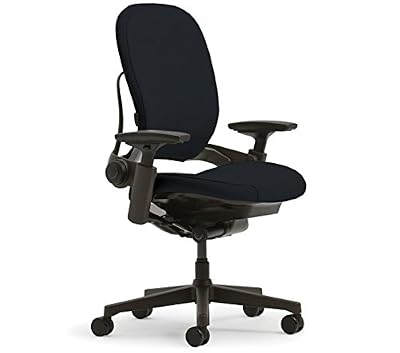
Steelcase Leap Chair V2 In Black Fabric
Included for 'Steelcase Gesture vs Steelcase Leap V2' as a relevant option in this category; details come from the product listing.
View on Amazon
Steelcase Leap Chair Black Base - Hard Floor Casters - Black Fabric V2
Included for 'Steelcase Gesture vs Steelcase Leap V2' because the listing specifies Hard Floor Casters and Black Fabric V2, details this guide uses to compare options.
View on AmazonKey difference: the arms
See also: Best Instant Hot Water Dispensers for a Kitchen Sink • Best Graphics Cards for Ryzen 5 5600G
The Gesture’s arms are designed to move like human arms, pivoting and adjusting in many directions to support forearms whether you type, hold a phone or use a tablet. The Leap V2’s arms adjust in several directions too, but they are more conventional.
If you use multiple devices or often change posture, the Gesture’s arms reduce shoulder and neck strain. If you mostly type, the Leap’s arms are more than adequate.
Gesture vs Leap V2 comparison
Qualitative comparison; check configurations and pricing.
| Feature | Steelcase Gesture | Steelcase Leap V2 |
|---|---|---|
| Arms | Multi-device, highly flexible | Conventional multi-directional |
| Lumbar | Adjustable | Height and firmness adjustable |
| Seat depth | Adjustable | Adjustable |
| Recline | Tracks spine, limiter | Seat glides forward, back stop |
| Best for | Multi-device users, posture changers | Typists, lower-back support |
| Typical price new | Premium, about $1,100 to $1,600 | Premium, about $1,000 to $1,400 |
Back and recline
The Leap V2 includes lower-back firmness adjustment and a recline where the seat glides forward, keeping you close to your work. The Gesture’s back tracks the spine through recline and has adjustable lumbar and recline limiter.
Many users find the Leap slightly more supportive in the lower back because of the firmness control. The Gesture’s seat edge is flexible, reducing thigh pressure.
Fit and footprint
Both fit a wide range of adults. The Gesture’s arms can tuck in close, useful for narrow desks. The Leap is slightly lighter and more compact.
Price and value
The Gesture usually costs more new than the Leap V2. Refurbished Leaps are especially common, often making them the best value premium chair on the market.
Configuration also shifts the math. Adding a headrest, upgraded fabric or a polished base can push either chair up by a few hundred dollars. Decide which features you will actually use before you configure, because the core comfort of both chairs comes from the back and seat rather than the extras.
Which fits your workflow
Writers and developers
If most of your day happens on a keyboard with a mouse, the Leap V2’s lower-back firmness control and forward-gliding recline keep you supported and close to your work. Its arms adjust enough to keep elbows at your sides.
Designers and multi-device workers
Anyone who switches between a drawing tablet, phone, laptop and desktop benefits from the Gesture’s arms, which hold forearms at many heights and angles. That reduces the shoulder lift that builds up when devices sit in awkward positions.
Managers and call-heavy roles
The Gesture’s ability to support arms while holding a phone or leaning back in a meeting makes it comfortable across long call blocks. The Leap is also fine here, especially with the back stop set to a relaxed angle.
Shared chairs
If several people use the same chair, the Leap is quicker to reset because its controls are simple and clearly labeled. The Gesture’s arms can take a moment longer to reposition for each person.
Buying tips
Try both if possible, even for 15 minutes each. If buying refurbished, confirm what parts were replaced, test every control and ask about the seller’s warranty, since manufacturer coverage may not transfer. Measure your desk height and armrest clearance to ensure the arms slide under the desk when needed.
Also consider how long you plan to keep the chair. Both are built to last a decade or more, so the price difference spread across ten years of daily use is modest compared with choosing the one that genuinely suits your posture.
FAQ
Which is better for typing?
The Leap V2 is excellent for typing and offers strong lower-back support. The Gesture is also good, but its arm advantages shine more with phones and tablets.
Is the Gesture worth the extra cost?
Yes if you use multiple devices or change posture often; otherwise, the Leap V2 offers similar core comfort for less.
Bottom line
The Gesture wins for multi-device users and posture changers thanks to its adaptable arms. The Leap V2 wins for typists who want strong lower-back support and better value, especially refurbished. Choose based on how you use your devices.