Last Updated: September 18, 2026
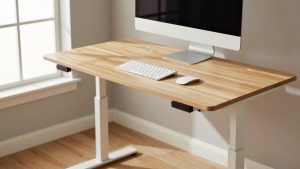
A standing desk that sways, rocks, or shimmies can make typing uncomfortable and turn a monitor into a moving target. More importantly, a desk that is unstable at working height can put expensive equipment at risk. A rushed fix—such as overtightening the wrong screws, stacking soft materials under a leg, or adding weight to an already overloaded desktop—can make the problem worse. The reliable approach is to identify whether the movement comes from the floor, the frame, the desktop, the leveling feet, or the lift columns, then correct that specific issue.
Most wobbling standing desks can be improved in 20 to 60 minutes with basic hand tools. Start with the desk lowered and unplugged, especially if you will inspect the motorized frame or move cables.
As an Amazon Associate we earn from qualifying purchases at no extra cost to you.

What You Need
| Item | Why | Optional? |
|---|---|---|
| Allen key set or hex-bit driver | Most standing-desk frames use metric hex bolts, commonly 4 mm, 5 mm, or 6 mm. | No |
| Screwdriver set | For desktop screws, cable trays, control panels, and some crossbar hardware. | No |
| Adjustable wrench | Useful for leveling feet, lock nuts, and certain frame fasteners. | Usually |
| Bubble level or level app | Helps distinguish a sloped floor from a loose desk frame. | Recommended |
| Furniture shims | Stabilize a desk on an uneven floor when the leveling feet cannot compensate. | Recommended |
| Threadlocker, medium strength | Helps prevent repeatedly loosening metal-to-metal bolts from backing out. | Optional |
| Helper | Useful for safely tipping or moving a desk with a 48- to 72-inch top. | Optional |
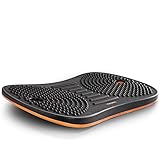
| Anti-fatigue mat or balance board | Improves standing comfort but does not repair desk instability. Examples include FEZIBO balance-board mats priced around $70 to $80. | Optional |
Step-by-Step
See also: Ergotron WorkFit-TL: Desk Depth, Weight Math and Who It Suits • Best 49 Inch Monitor: Eight Super Ultrawides Compared by Bandwidth and Desk Depth
1. Clear the desktop and lower the desk completely (5–10 minutes)
Remove heavy equipment before testing the frame. Take off desktop computers, printers, speakers, monitor arms with large displays, and any storage units sitting on top. Leave only lightweight items if needed. A pair of 27-inch monitors can add 25 to 40 pounds, while a desktop tower may add another 20 to 35 pounds; that load can exaggerate a small frame problem.
Lower the desk to its minimum height and unplug it. At low height, the lifting columns have the least leverage, making it easier to locate looseness without the desk shifting unexpectedly.
2. Identify the direction and source of the wobble (5 minutes)
Place both hands near the center of the desktop and gently push side to side, then front to back. Notice the pattern:
- One corner lifts or taps: The floor is uneven or a leveling foot is not touching.
- The entire top moves while the feet stay planted: Desktop-to-frame screws or frame bolts are likely loose.
- The desk twists side to side at standing height: The frame may need crossbar adjustment, bolt tightening, or a wider stance.
- One lift column visibly shifts or clicks: There may be damaged hardware, a loose leg connection, or an internal column issue.
Check the desk again at a typical standing height, usually 40 to 46 inches for many users. A small amount of movement is normal on a two-leg desk when raised, but pronounced shaking during normal typing is not.
3. Level the feet before tightening anything else (5–10 minutes)
Use a bubble level across the desktop from left to right and front to back. Then look at each foot while gently pressing on opposite corners. If one foot loses contact with the floor, adjust the threaded leveling glides beneath the feet.
Turn the glide clockwise or counterclockwise in small increments—about one-half turn at a time—until all feet contact the floor firmly. If the glide has a lock nut, tighten that nut against the foot after adjustment. On carpet, make sure each foot sits on a similarly firm surface; a foot sinking into thick pile can mimic a loose frame.
If the floor has a larger dip than the feet can correct, use a rigid furniture shim under the low foot. Trim the shim so it is not visible beyond the foot. Avoid folded cardboard, towels, foam pads, or stacked coasters: they compress and create new movement.
4. Tighten the frame hardware in a sensible order (10–15 minutes)
With the desk still low, inspect every bolt connecting the feet, legs, telescoping rails, crossbar, and desktop brackets. Use the correct-size hex key so you do not round the bolt head. Start at the base and work upward:
- Foot-to-leg bolts
- Leg-to-frame or leg-to-crossbar bolts
- Telescoping rail and width-adjustment bolts
- Desktop mounting brackets
- Control-box and cable-tray hardware, if these parts are rattling
Tighten bolts until snug and secure, but do not force them. Excessive torque can strip threads, crack a particleboard desktop, or distort a thin steel bracket. If a metal-to-metal bolt repeatedly loosens, remove it, apply a small drop of medium-strength threadlocker, reinstall it, and allow it to cure as directed on the product label.
5. Check the desktop attachment and overhang (5–10 minutes)
Grab the desktop near each corner and try to move it independently from the frame. If the top shifts while the frame remains still, tighten the mounting screws. Wood screws should bite firmly; if one spins without tightening, the hole may be stripped.
For a stripped hole in a solid-wood top, remove the screw, fill the hole with a hardwood toothpick and wood glue, let it dry, and reinstall the screw. For particleboard or MDF, use a manufacturer-approved wider screw only if it will not penetrate the top surface. Otherwise, move the bracket slightly and drill a properly sized pilot hole where the material is sound.
Also check the desktop size. A top extending more than about 10 to 12 inches beyond the support frame on either side can increase side-to-side flex, especially on a 24-inch-deep desktop. Keep heavy items centered over the legs whenever possible.
6. Reposition heavy equipment and manage cables (5–10 minutes)
Put monitors, computers, and accessories back gradually. Center the heaviest items between the legs rather than placing them at one far corner. If you use a monitor arm, verify that its clamp is tight and that the combined monitor-and-arm weight is within both the arm’s and desktop’s limits.
Check cable slack at the lowest and highest desk positions. A taut power cord, cable bundle, or under-desk PC mount can pull the frame slightly as the desk rises. Secure cables to the underside of the top, leaving a gentle loop near the moving components.
7. Test at sitting and standing heights (5 minutes)
Raise the desk in stages and test it at approximately 30 inches, 40 inches, and your usual standing height. Push lightly from each side and type for a minute. If the wobble is gone at low height but remains excessive when fully raised, verify that the frame is assembled at its intended width and that all crossbar or rail bolts are tight.
An anti-fatigue mat can make standing more comfortable after the desk is stable. A balance-board style mat, such as FEZIBO options typically priced from about $70 to $80, should sit on a flat floor and be used only where it will not interfere with your footing or desk controls. It will not solve a wobbly desk frame.
Mistakes to Avoid
- Tightening only the most visible bolts. A loose foot or rail connection can cause movement that appears to come from the desktop.
- Using soft shims. Foam, fabric, and folded paper compress under load and worsen rocking.
- Overloading one side. A heavy monitor arm, PC tower, and stack of books on one side increase twisting forces.
- Ignoring the floor. Even a perfectly assembled desk will rock on an uneven surface if its feet are not adjusted.
- Overtightening screws in engineered wood. Once the material strips, the connection becomes weaker, not stronger.
- Working on a raised, plugged-in desk. Lowering and unplugging it reduces the chance of pinched fingers, unexpected movement, and cable damage.
How Often
Check the desk’s stability every six months, and inspect it sooner after moving it to a new room, changing the desktop, installing a monitor arm, or rearranging heavy equipment. For desks used daily at maximum height, a quick hardware check every three to four months is sensible. Retighten only bolts that have loosened; repeatedly disassembling the frame can wear threads and mounting holes.
When to Call a Pro or Replace
Contact the manufacturer or a furniture repair professional if a lift column bends, grinds, leaks lubricant, drops unexpectedly, or moves at a different speed from the other leg. Stop using the desk if the frame has cracked welds, visibly bent steel, stripped structural bolt holes, or a damaged power cord.
Replacement is often the better choice when the desk remains unstable after leveling and tightening, particularly if it has a narrow two-leg base supporting a very large top. Consider a frame with a wider foot design, a crossbar, or a four-leg configuration if you need a 60- to 72-inch desktop, multiple monitors, or equipment totaling more than the desk’s stated capacity.
FAQ
Why does my standing desk wobble more when it is raised?
Raising the desk extends the lift columns and increases leverage, so small amounts of looseness become more noticeable. Some movement is expected at maximum height, but loose frame bolts, uneven feet, a narrow base, or an oversized desktop can make it excessive.
Can I fix a wobbling standing desk with a rug?
Usually not. A thin, firm low-pile rug may be fine if all feet sit evenly, but thick carpet or a plush rug can let one foot sink more than another. Adjust the leveling feet first and use rigid shims if the underlying floor is uneven.
Should I add weight to the desk to make it more stable?
No. Extra weight may reduce a minor rattle at low height, but it increases stress on the lifting motors and can worsen side-to-side sway at standing height. Keep heavy equipment centered and stay below the manufacturer’s stated weight limit.
Are monitor arms responsible for desk wobble?
They can amplify it. A monitor arm places weight farther from the frame and makes screen movement more visible. Confirm the arm is correctly rated, tighten its clamp or grommet mount, place it near a frame support when possible, and make sure the desktop mounting screws are secure.
Related Reviews & Guides

Electric vs Manual Standing Desk: Which Is Right for Your Home (2026)

Quick Picks: Best Anti-Fatigue Mats for Standing Desks at…