Last Updated: October 18, 2026
If you search Reddit for the best Logitech webcam, the same few models come up again and again: C920s, C922, C930e, Brio 4K, MX Brio, and StreamCam. That is not because Redditors are sponsored. It is because for office work, Zoom, Teams, and MacBooks, Logitech has owned the reliable middle for a decade.
But Reddit threads also show the failure modes Logitech marketing will not tell you: aggressive autofocus hunting, washed-out color in mixed office light, mics that pick up keyboards, and 4K models that tax older laptops. Here is how those picks actually break down for work.
📄 In This Review
What Reddit actually recommends most
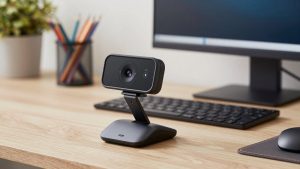
For most desk workers, r/WFH, r/Zoom, r/macsetups, and r/Twitch converge on one answer: get a used or refurbished C920-series camera if you just need to look clear on calls. The Logitech C920s Pro HD shoots 1080p at 30fps, has dual mics and a physical privacy shutter, and works plug-and-play on Windows and macOS without Logi Tune if you do not want it.
Why it wins for work: exposure is predictable, the 78-degree field of view does not warp a small home office, and autofocus is slow but stable. Who it suits: anyone on a laptop docked to a monitor, teachers, therapists, recruiters, and support staff doing 4-6 hours of calls a day. Trade-off: low-light performance is only average. In a dim bedroom at 7pm you will look grainy unless you add a $20 desk lamp in front of you.
The second most cited pick is the C930e for people who want a wider shot. It is 1080p with a 90-degree lens and better right-light correction. Reddit IT admins like it because it can be deployed to 50 desks without driver headaches. Trade-off: that wide angle shows your messy room and makes you look farther away. If you sit 2-3 feet from the screen, the C920s frames you better.
Quick comparison of the Reddit favorites
See also: Best Monitor for MacBook Air: Two USB-C 4K Screens and Six Adapter-Dependent Alternatives • Best Monitor for MacBook Pro: Eight Listings Sorted by Cable, Sharpness and Scaling
| Model | Resolution / FOV | Best for | Watch out for |
|---|---|---|---|
| C920s Pro HD | 1080p30 / 78 degrees | General office calls, best value | Soft in low light, mics pick up typing |
| C922 Pro Stream | 1080p30 / 78 degrees | Occasional streaming + calls | Background replacement is glitchy without good light |
| C930e | 1080p30 / 90 degrees | Small conference rooms, wide desks | Too wide for solo use, slight fisheye at edges |
| MX Brio / Brio 4K | 4K30, 1080p60 / 90 degrees | Presenters, creators who want sharpness | Needs USB 3.0 and good CPU, runs warm |
| StreamCam Plus | 1080p60 / 78 degrees | Smooth motion, vertical video | USB-C only, autofocus hunts on some units |
Best for daily work calls: C920s or C930e
If your day is Zoom and Teams, do not overbuy. Both the C920s and C930e output true 1080p without needing Logi Options+ to be running. That matters on locked-down work laptops where you cannot install software.
Concrete failure mode to know: both use contrast autofocus. If you gesture a lot or lean in and out, you will see a half-second blur pulse every few minutes. Redditors fix this by locking focus in Logi Tune, or by sitting with a plain wall 3-4 feet behind them so the camera stops hunting. The built-in mics are also usable but thin. If you type during meetings, use a headset or a cheap USB mic instead. The webcam mic will broadcast every keystroke.
Be honest about budget here: if you have decent overhead light and a 2020 or newer MacBook or ThinkPad, the cheaper option is fine. A C920s at $60-70 looks 90 percent as good on a compressed Zoom call as a $199 camera. Spend the difference on lighting or ethernet.
When 4K is worth it: MX Brio
The Logitech MX Brio 4K is the current Reddit upgrade pick over the older Brio 4K. It has a larger sensor, much better auto-exposure for backlit windows, and 1080p60 mode that looks smoother when you move. Presenters, coaches, and sellers who record Loom videos notice the difference.
Trade-offs are real. To get 4K you need USB 3.0 direct to the laptop, not through a cheap hub, and Teams/Zoom will still downscale you to 1080p or 720p live. The benefit is mostly for recorded video and cropping. It also runs warm after 90 minutes. On older Intel MacBook Airs and dual-core i3 laptops, Redditors report dropped frames in 4K. If your laptop fan screams on video calls now, stick with 1080p.
Who it suits: people who present to clients, create courses, or sit in front of a window and always look blown out. Who should skip it: shift workers who just need to check in for standup.
C922 and StreamCam: only if you need 60fps
The C922 and StreamCam Plus get recommended in r/Twitch and r/obs because they do 720p60 or 1080p60. For normal office work, 60fps adds little. Your face does not move that fast, and Teams compresses it away.
Get one only if you demo physical products, whiteboard with a marker, or stream on the side. Failure modes: the C922’s automatic background removal needs a green screen or very even light or your hair will flicker. The StreamCam Plus is USB-C only and ships with a stubby monitor mount that does not fit thick curved gaming monitors. Check your mount thickness first.
Mac and laptop notes Reddit gets right
All of these are UVC-compliant, so they work on Mac without drivers for FaceTime, Zoom, and Teams. But Logi Tune on macOS is required to turn off RightLight auto-exposure, enable Show Mode, or update firmware. On Apple Silicon Macs, Rosetta is no longer needed and performance is fine at 1080p.
Two practical tips repeated across threads: plug directly into the laptop or a powered Thunderbolt dock. Unpowered USB hubs cause the classic symptom where the camera connects, then goes black after 30 seconds. And if your internal MacBook camera looks better in low light, that is normal. Apple does heavy noise reduction. Logitech looks more natural in daylight but noisier at night unless you add a key light.
For laptops perched low on a desk, tilt the monitor mount up or put the camera on a small tripod at eye level. Looking down at a wide-angle C930e is what makes people look tired on calls, not the sensor.
FAQ
What is the most recommended Logitech webcam on Reddit for work?
The C920s. It is cheap, sharp enough for Zoom and Teams at 1080p, and works without extra software. Most people do not need more.
Is the Brio 4K overkill for Zoom?
For live calls, usually yes. Zoom compresses to 720p or 1080p anyway. Buy the MX Brio or Brio only if you record video or fight harsh backlight daily.
Why does my Logitech webcam look blurry or focus-hunt?
Low light and busy backgrounds cause it. Add front light, sit 2-3 feet away, and lock autofocus and auto-exposure in Logi Tune. Clean the lens, and use USB 3.0 direct, not a passive hub.
Does Logitech work well with MacBook?
Yes for video and mic at 1080p. Full settings require the free Logi Tune app. On older Intel Airs, avoid 4K mode to prevent dropped frames and heat.
Related Reviews & Guides
High Definition Webcam for Laptop
Best CPUs for Office Work in 2026: Fast, Quiet Options