Last Updated: September 7, 2026
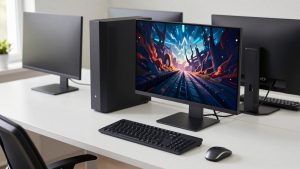
An all-in-one computer folds the entire PC into the back of the display, so a single power cable and a wireless keyboard and mouse are all that sit on your desk. For a home office, a kitchen command center, or a tidy reception counter in 2026, that clean footprint is the whole appeal: no bulky tower under the desk, no tangle of cables, and a large screen ready the moment you plug it in. Modern AIOs have also grown up in the areas that used to hold them back, with faster processors, generous SSD storage, sharp webcams for video calls, and even Copilot+ AI features on the newest models.
The trade-off is that everything is sealed behind the screen, so choosing the right configuration up front matters more than it does with a traditional desktop. This roundup gathers the strongest 2026 all-in-one desktops for everyday home and office work, spanning compact 22-inch budget machines to 27-inch productivity hubs. Below the picks you will find a short buyer’s guide and answers to the questions shoppers ask most before committing.
As an Amazon Associate we earn from qualifying purchases at no extra cost to you.





⚡ Save on Your Next PC — Amazon Prime
Prime members get fast free shipping on the systems above, plus early access to Prime Day & Black Friday PC deals. New members get a 30-day free trial.
📄 In This Review
Watch: Best All-in-One Computer — Video Review
How to Choose an All-in-One PC
See also: Can DDR5 Motherboards Use DDR4? Compatibility Guide • Best Gaming Desktops for Smooth PC Gaming
- Display size and resolution: A 24-inch Full HD panel suits most desks, while a 27-inch screen gives more room for spreadsheets and split windows; check that the resolution is at least 1920×1080 so text stays crisp.
- CPU and RAM: For browsing, email, and office apps, an Intel Core 5/7 or AMD Ryzen 5 with 16GB of RAM keeps things smooth for years; 8GB is workable only for the lightest budget use.
- Touchscreen: Decide whether you actually want touch input, since it adds cost and glare; it shines for kiosks, kitchens, and note-taking but is optional for a keyboard-driven office.
- Ports and connectivity: Confirm there are enough USB-A and USB-C ports plus HDMI (handy for a second monitor), and look for Wi-Fi 6/6E and Bluetooth 5.x for reliable wireless.
- Upgradability limits: Most AIOs let you add RAM or swap the SSD but nothing more, and CPU and screen are fixed for life, so buy the storage and memory you will need rather than planning to upgrade later.
The Best All-in-One Computers
Dell 27″ Core 7 All-in-One
This is the flagship pick for anyone who wants a spacious 27-inch Full HD workspace backed by a capable Intel Core 7 150U and 16GB of RAM. It handles heavy multitasking, large spreadsheets, and back-to-back video calls without hesitation, and the larger screen makes it a genuine productivity hub rather than just a tidy computer. It is the priciest Dell here, but the balance of screen size, performance, and build quality justifies the premium for a primary home-office machine.
Lenovo IdeaCentre 24″ FHD
The best all-round value in this lineup, the 24-inch IdeaCentre pairs 16GB of RAM with a fast 512GB SSD at a mainstream price. That combination means quick boot times, roomy storage for documents and photos, and enough memory to keep dozens of browser tabs open. For a family desk or a small business that needs several identical, dependable machines, this is the easy recommendation and the sweet spot of the roundup.
HP 27″ Touchscreen Ryzen 5
If you want touch input on a big canvas, this 27-inch HP delivers a Full HD touchscreen driven by an AMD Ryzen 5 7520U, 16GB of RAM, and a large 1TB SSD. The generous storage suits users who keep sizable photo or document libraries locally, and Windows 11 Pro adds business features like BitLocker. The touchscreen makes it a natural fit for a shared kitchen or reception surface where people tap more than they type.
Dell 23.8″ Copilot+ AIO
For a future-facing choice, this Dell is a Copilot+ PC built on an Intel Core Ultra 7 processor with a dedicated NPU for on-device AI, plus 16GB of DDR5 RAM and a fast 1TB SSD. It also brings the newest connectivity in the group with Wi-Fi 6E and Bluetooth 5.3, and a Full HD touchscreen. It is the most forward-looking pick for anyone who wants the latest AI features and expects to keep the machine for many years.
HP 22″ Compact FHD
The most affordable and space-saving option, this 22-inch HP is aimed at simple everyday tasks: web browsing, email, streaming, and light office work. DDR5 memory and a USB-C port keep it modern despite the entry price, and the small footprint fits a dorm desk, a kitchen nook, or a secondary workstation. Just note the 8GB of RAM and modest storage mean it is best kept to light duty rather than heavy multitasking.
Frequently Asked Questions
Are all-in-one computers good for working from home?
Yes. For typical home-office work such as documents, spreadsheets, email, and video calls, a mid-range AIO with 16GB of RAM handles the load easily while keeping your desk clear. The built-in webcam and speakers also mean you are ready for meetings with nothing extra to buy.
Can I upgrade an all-in-one PC later?
Usually only in limited ways. Many models allow a RAM increase or an SSD swap, but the CPU, GPU, and display are fixed. Because upgrades are constrained, it is smarter to buy enough memory and storage at purchase rather than counting on adding it down the road.
Do I need a touchscreen?
Only if your workflow benefits from it. Touch is great for kiosks, kitchens, quick sketching, and casual tapping, but for a keyboard-and-mouse office setup it adds cost and can introduce screen glare without much daily payoff. A non-touch panel is perfectly capable for most work.
What screen size should I get?
A 24-inch Full HD display is the comfortable default for most desks and workloads. Step up to 27 inches if you regularly work with multiple windows or large spreadsheets, or drop to 22 inches when space is tight and the tasks are light.
Final Thoughts
The right all-in-one comes down to matching screen size, performance, and features to how you actually work: the Lenovo IdeaCentre 24″ is the value sweet spot for most homes and offices, the Dell 27″ and HP 27″ touchscreen serve those who want a larger productivity canvas, the Dell Copilot+ model future-proofs your setup with on-device AI, and the compact HP 22″ keeps costs and clutter down for lighter use. Whichever you choose in 2026, prioritize 16GB of RAM and a roomy SSD, since those are the specs you cannot easily add later.
Related Reviews & Guides


Best Desktop File Organizer in 2026: Buying Guide
Best CPUs for Office Work in 2026: Fast, Quiet Options