Last Updated: October 8, 2026
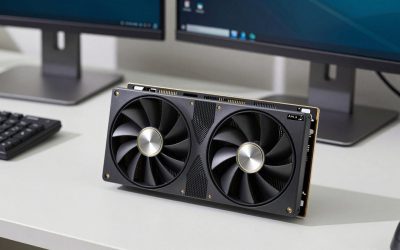
The best RTX 5060 graphics cards in 2026 are the MSI Ventus 2X, ASUS Dual, and Gigabyte WindForce for compact builds, while the MSI Gaming Trio, ASUS TUF Gaming, and Gigabyte Aorus Master suit mid-towers where cooler acoustics justify the extra slot space. The right pick depends almost entirely on three things: your case’s GPU clearance, your PSU’s wattage and connectors, and how much fan noise you will tolerate under load.
📄 In This Review
What every RTX 5060 card shares
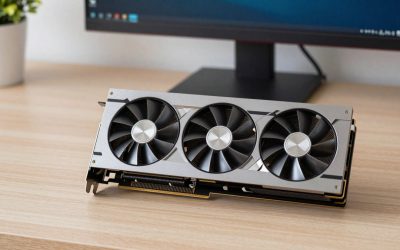
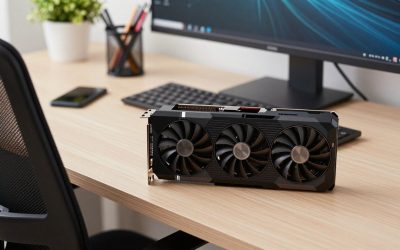
Regardless of brand, every RTX 5060 runs the same GB206 chip with 8 GB of GDDR7 memory, a ~145 W total board power, and a PCIe 5.0 x8 interface. Real-world gaming differences between a budget dual-fan card and a premium triple-fan card are usually 2–4% — factory overclocks are modest at this tier. What actually differs is cooling noise, physical size, power connector choice, and port count. That means your decision is a fit-and-acoustics problem, not a performance one.
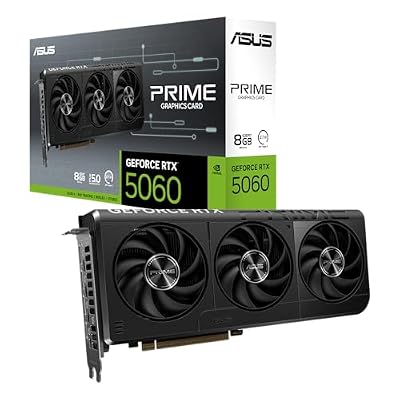
ASUS Prime GeForce RTX 5060 8GB GDDR7 Gaming Graphics Card
Included for 'Best RTX 5060 Graphics Cards for Gaming in 2026' as a relevant option in this category; details come from the product listing.
View on Amazon
GIGABYTE GeForce RTX 5060 WINDFORCE OC 8G Graphics Card, Cooling System, 8GB 128-bit GDDR7, PCIe 5.0, Manufactured by NVIDIA, DisplayPort & HDMI - Video Output Interface, GV-N5060WF2OC-8GD Video Card
Included for 'Best RTX 5060 Graphics Cards for Gaming in 2026' because the listing specifies Cooling System and 8GB 128-bit GDDR7, details this guide uses to compare options.
View on Amazon
ASUS Dual GeForce RTX 5060 Ti 16GB GDDR7 OC Edition Gaming Graphics Card
Included for 'Best RTX 5060 Graphics Cards for Gaming in 2026' as a relevant option in this category; details come from the product listing.
View on Amazon
PNY NVIDIA GeForce RTX™ 5060 Ti 8GB OC Dual-Fan Graphics Card
Included for 'Best RTX 5060 Graphics Cards for Gaming in 2026' as a relevant option in this category; details come from the product listing.
View on AmazonThe standard port layout across the range is three DisplayPort 2.1b and one HDMI 2.1b. A few budget models keep DisplayPort 1.4a — check the spec sheet if you run a high-refresh 1440p or 4K monitor.
Dimensions and case clearance: measure before you buy
See also: Can DDR5 Motherboards Use DDR4? Compatibility Guide • Best Gaming Desktops for Smooth PC Gaming
Card length is the single most common reason builders return a GPU. Add at least 20–30 mm beyond the card’s listed length for cable bend radius at the front, and 10 mm of breathing room at the rear.
| Card (2026 lineup) | Fans | Length | Thickness | Fits in |
|---|---|---|---|---|
| Zotac Gaming Twin Edge | 2 | ~220 mm | 2 slot | Most mini-ITX cases |
| ASUS Dual RTX 5060 | 2 | ~228 mm | 2.1 slot | Mini-ITX and compact mATX |
| MSI Ventus 2X | 2 | ~199–212 mm | 2 slot | Tightest clearance builds |
| Gigabyte WindForce OC | 2 | ~208 mm | 2 slot | Small-form-factor cases |
| PNY / Palit dual-fan models | 2 | ~240–250 mm | 2.5 slot | Standard mATX |
| ASUS TUF Gaming | 3 | ~300 mm | 2.5 slot | Mid-towers only |
| MSI Gaming Trio | 3 | ~300–316 mm | 2.5–3 slot | Full-length mid-towers |
| Gigabyte Aorus / Gaming OC | 3 | ~281–340 mm | 2.5–3 slot | Large cases; check front radiator space |
Two easy mistakes to avoid:
- Forgetting the front fan/radiator. A case rated for 330 mm GPU clearance loses 27 mm if you mount a front radiator, and more with a thick push-pull setup.
- Ignoring slot thickness. A “2.5-slot” card blocks the PCIe slot directly below the x16 slot — relevant if you run a Wi-Fi or capture card on an mATX board.
Power draw and PSU limits
At ~145 W, the RTX 5060 is forgiving. NVIDIA recommends a 550 W PSU, and a quality 450–500 W unit handles it comfortably in a standard gaming build. The real variable is the connector:
| Connector type | Typical on | PSU requirement |
|---|---|---|
| Single 8-pin PCIe | Dual-fan budget models (Ventus 2X, WindForce, Zotac Twin Edge) | Any PSU with one PCIe 8-pin — no adapter needed |
| 16-pin 12V-2×6 | Premium triple-fan models (Gaming Trio, Aorus, some TUF) | ATX 3.x PSU with native cable, or the included 8-pin adapter |
If you have an older PSU without a native 12V-2×6 cable, a single-8-pin card is genuinely simpler — adapter cables need 30+ mm of straight clearance before bending, which matters in cases with narrow side panels. For a desk-side setup where the case sits on a shallow desk (under 60 cm deep), adapter cable bend can also push the card closer to the front panel than the spec suggests.
Cooling design: what dual vs. triple fan actually buys you
A 145 W card is easy to cool, so both designs keep temperatures safe. The difference is acoustic:
| Design | Typical load temp | Noise character | Trade-off |
|---|---|---|---|
| Dual-fan (Ventus, Dual, WindForce, Twin Edge) | 68–74 °C | Audible but not harsh; fans spin up in open-world games | Smallest footprint, lowest price |
| Triple-fan (Gaming Trio, TUF, Aorus) | 58–65 °C | Near-silent at moderate load; fans may stop entirely at idle | Adds 60–100 mm length and ~$20–50 to price |
Zero-RPM idle fan stop is now standard on nearly all 5060 models, so any card is silent while browsing or streaming video. The triple-fan advantage only matters if your PC sits on the desk next to you and you play for hours; in a case under the desk, a dual-fan card’s noise is masked by ambient room noise anyway.
One construction detail worth knowing: triple-fan cards use metal backplates and often a rigid anti-sag bracket, while budget dual-fan cards use lighter shrouds. At 700 g–1 kg, dual-fan cards rarely sag; triple-fan cards at 1.2 kg+ benefit from a support bracket in a vertical-tower setup, especially if the PC gets moved between rooms or to LAN events.
Picks by situation
| Your situation | Best type | Why |
|---|---|---|
| Mini-ITX case, clearance under 240 mm | MSI Ventus 2X, Gigabyte WindForce, Zotac Twin Edge | Sub-215 mm lengths, single 8-pin, easiest fit |
| Older 450–500 W PSU, no new cables | Any single 8-pin dual-fan model | No adapter, no ATX 3.x requirement |
| PC sits on the desk, quiet matters | MSI Gaming Trio or ASUS TUF | Lowest fan speeds and load noise |
| Budget-first 1080p/1440p build | Cheapest dual-fan card available (~$300–$330 range) | Same GPU performance; skip premium coolers |
| Multi-monitor or high-refresh 1440p+ | Model with 3x DP 2.1b + HDMI 2.1b | Full bandwidth for modern monitors |
Price-wise, expect the 5060 range to sit roughly between $300 and $400 in 2026 — entry dual-fan cards at the low end, flagship triple-fan models near the top. Paying more than ~10% over the base price rarely returns meaningful performance.
Installation realities
- Box weight: Retail boxes run 1.5–2 kg. The card itself needs the rear I/O shield removed and two slot covers out on the case.
- Slot pressure: On mATX boards, a 2.5-slot card can press against front-panel USB headers at the board’s bottom edge — route those cables first.
- What wears first: Fans are the wear item. Ball-bearing fans (TUF, Gaming Trio) typically outlast sleeve-bearing fans on the cheapest cards if you game heavily for 4–5 years.
- Moving the PC: If the tower travels in a car, support or temporarily remove a heavy triple-fan card — GPU weight plus road bumps is how PCIe slots crack.
FAQ
Is the RTX 5060 enough for 1440p gaming in 2026?
Yes for most titles at high settings, especially with DLSS. The 8 GB VRAM is the limiting factor in newer open-world games at max textures — drop texture quality one notch rather than resolution.
Do I need a PCIe 5.0 motherboard?
No. The card works in any modern PCIe x16 slot (3.0, 4.0, or 5.0). On PCIe 3.0 boards the x8 lane count costs a few percent in some games; PCIe 4.0 shows no meaningful loss.
Dual-fan or triple-fan — is the premium version faster?
Only 2–4% at most. You are paying for lower noise and lower temperatures, not frames.
Will a single 8-pin connector limit the card?
No. At 145 W, a single 8-pin plus the PCIe slot supplies more than enough power; the 16-pin connectors on premium models are a standardization choice, not a power need.
Related Reviews & Guides

Best Gaming Desktops for Smooth PC Gaming
8 Best All-sin-One Computer (2026)