Last Updated: October 7, 2026
- The best AMD CPU for an RTX 4070 Ti Super depends on your resolution: choose the Ryzen 7 9800X3D for top-end gaming, the Ryzen 7 7800X3D for excellent value, or a Ryzen 5 7600 for a lower-cost 1440p build.
- Quick picks by situation
- How the resolution changes the choice
- CPU comparison for the RTX 4070 Ti Super
- Which CPU should you buy?
- Platform cost matters as much as CPU price
- Cooling, power, and case fit
- Bottom line
📄 In This Review
- The best AMD CPU for an RTX 4070 Ti Super depends on your resolution: choose the Ryzen 7 9800X3D for top-end gaming, the Ryzen 7 7800X3D for excellent value, or a Ryzen 5 7600 for a lower-cost 1440p build.
- Quick picks by situation
- How the resolution changes the choice
- CPU comparison for the RTX 4070 Ti Super
- Which CPU should you buy?
- Platform cost matters as much as CPU price
- Cooling, power, and case fit
- Bottom line
The best AMD CPU for an RTX 4070 Ti Super depends on your resolution: choose the Ryzen 7 9800X3D for top-end gaming, the Ryzen 7 7800X3D for excellent value, or a Ryzen 5 7600 for a lower-cost 1440p build.
The RTX 4070 Ti Super is a powerful 16GB graphics card aimed mainly at 1440p high-refresh gaming and 4K gaming. At 1440p, the CPU can still affect frame rates in demanding games, especially when targeting very high refresh rates. At 4K, the graphics card usually does more of the work, so a less expensive processor can deliver a similar experience. The right pairing is therefore about your resolution, target frame rate, and total platform budget—not simply buying the most expensive CPU.
Quick picks by situation
See also: Can DDR5 Motherboards Use DDR4? Compatibility Guide • Best Gaming Desktops for Smooth PC Gaming
- Best overall for gaming: AMD Ryzen 7 9800X3D, if you want top gaming performance and have room in the budget.
- Best gaming value: AMD Ryzen 7 7800X3D, particularly if it is substantially cheaper than the 9800X3D.
- Best budget-conscious choice: AMD Ryzen 5 7600, especially for 4K or a 1440p build with a sensible frame-rate target.
- Best for gaming plus heavy productivity: AMD Ryzen 9 9950X3D, if your workload benefits from many cores and you can justify its cost and power requirements.
How the resolution changes the choice
At 1440p: A fast gaming CPU matters more when you play competitive titles, use low settings for high frame rates, or own a 240Hz-plus display. The 9800X3D is the strongest fit among these picks when the goal is to keep frame rates high and reduce CPU-related dips. The 7800X3D can get close in many games for less money, while the Ryzen 5 7600 is a reasonable pairing if you are not trying to maximize every frame.
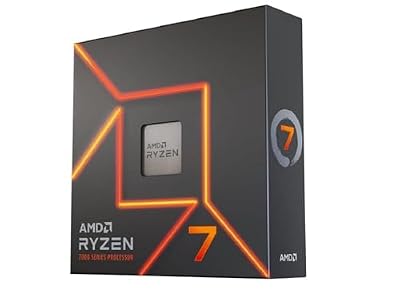
AMD Ryzen 7 7700X 8-Core, 16-Thread Unlocked Desktop Processor
Included for 'Best AMD CPUs for the RTX 4070 Ti Super' because the listing specifies 16-Thread Unlocked Desktop Processor, details this guide uses to compare options.
View on AmazonAt 4K: The graphics card is more often the limiting component. In many graphically demanding games, moving from a 7600 to an X3D processor will make less difference to average frame rates than it would at 1440p. A 7600 can therefore be a practical choice if it frees budget for a better monitor, storage, or a future GPU upgrade. CPU-heavy games and high-refresh 4K play are exceptions; check benchmarks for the games you actually play.
Upscaling and frame generation can alter what you see on screen, but they do not make CPU performance irrelevant. In particular, a high displayed frame rate does not guarantee equally high native performance or smooth frame pacing.
CPU comparison for the RTX 4070 Ti Super
| Processor | Cores / threads | Rated TDP | Best fit | Typical trade-off |
|---|---|---|---|---|
| Ryzen 5 7600 | 6 / 12 | 65 W | Budget builds and 4K gaming | Less headroom for very high-refresh gaming and demanding background workloads |
| Ryzen 7 7800X3D | 8 / 16 | 120 W | 1440p gaming and strong gaming value | Its value depends on how its price compares with the newer 9800X3D |
| Ryzen 7 9800X3D | 8 / 16 | 120 W | High-refresh gaming and a premium gaming build | Costs more than a midrange CPU, with diminishing returns at 4K |
| Ryzen 9 9950X3D | 16 / 32 | 170 W | Gaming alongside substantial multicore work | Higher CPU, cooling, and potentially motherboard costs than a gaming-only build needs |
Core counts and rated thermal design power are useful planning figures, not direct measures of gaming speed or guaranteed maximum power consumption. Actual power draw varies by workload, motherboard settings, and cooling. Check the processor’s current specifications and your motherboard’s support list before buying.
Which CPU should you buy?
Choose the Ryzen 7 9800X3D for a premium 1440p gaming PC
The 9800X3D is the best AMD CPU for a 4070 Ti Super when your priority is gaming performance, particularly in CPU-sensitive titles and high-refresh 1440p play. Its eight cores are ample for gaming and everyday multitasking. It is harder to justify if you mostly play graphically demanding games at 4K, where the GPU often sets the pace. Compare its current market price with the 7800X3D before paying a premium.
Choose the Ryzen 7 7800X3D when the price makes sense
The 7800X3D remains a compelling gaming-oriented eight-core option. It suits a 1440p system where you want strong frame rates without automatically paying for the newest model. If the 9800X3D is only a little more expensive, the newer chip may be the better buy; if the price gap is large, the 7800X3D can leave more money for other components.
Choose the Ryzen 5 7600 for a value-focused 4K build
The six-core 7600 is a sensible way to control the CPU and platform budget while pairing with a high-end graphics card. It is particularly appealing for 4K gaming, where the GPU is commonly the main constraint. It also works for 1440p, but players chasing exceptionally high frame rates or running demanding applications alongside games may benefit from an eight-core upgrade.
Choose the Ryzen 9 9950X3D only if you will use its extra cores
The 9950X3D is for people who game and also regularly render, compile code, create content, or run other heavily threaded workloads. It is not automatically a better gaming purchase just because it has more cores. For a PC used mostly for games, a Ryzen 7 X3D processor is typically a more targeted way to spend the budget.
Platform cost matters as much as CPU price
These processors use AMD’s AM5 platform, but the complete upgrade cost includes a compatible AM5 motherboard, DDR5 memory, and a cooler where one is not included or appropriate for your build. AM5 boards vary in connectivity and features: a lower-cost board can be enough for a gaming system, while additional M.2 slots, USB ports, or expansion options may justify spending more.
Compare complete platform totals rather than CPU prices alone. As broad market guidance, budget several hundred dollars for a motherboard and DDR5 memory together, with the exact amount depending on capacity, speed, features, and sales. A more expensive CPU can also push you toward a stronger cooler or better airflow. Prices vary over time, so treat general ranges as planning estimates rather than fixed quotes.
Cooling, power, and case fit
The Ryzen 5 7600 is the easiest of these choices to cool: a decent compatible air cooler and a case with unobstructed airflow are generally sufficient. The 7800X3D and 9800X3D need a capable cooler and sensible case ventilation, but do not require an extravagant liquid-cooling setup just because they are high-performance gaming CPUs. The 9950X3D has a higher rated TDP and benefits from more cooling headroom, especially during sustained multicore work.
Check cooler clearance before ordering: compare the cooler’s height with the case’s maximum CPU-cooler height, and confirm that a front-mounted radiator will not interfere with the graphics card. Also verify motherboard BIOS support for the selected CPU. For the power supply, size the whole system—not just the processor—and follow the graphics card manufacturer’s guidance for the specific 4070 Ti Super model. A quality PSU with suitable GPU power connections matters more than choosing a large wattage number without checking the rest of the build.
Bottom line
For the strongest gaming-focused pairing, buy the Ryzen 7 9800X3D. For a more price-conscious 1440p gaming build, choose the Ryzen 7 7800X3D when its price is attractive. For a 4K system where the GPU does most of the work, the Ryzen 5 7600 is often the better-value match. Step up to the Ryzen 9 9950X3D only when your gaming PC also needs to handle substantial multicore tasks.
Related Reviews & Guides

Best RTX 5060 Graphics Cards for Gaming in 2026

Best Computer Glasses for Reducing Eye Strain in 2026: Compared and Ranked