Last Updated: October 7, 2026
- Best Budget Gaming Graphics Cards (GPUs)
- Quick picks by gaming target
- 1. Radeon RX 9060 XT 16GB: the best all-round budget choice
- 2. GeForce RTX 5060: best for efficient 1080p and ray tracing
- 3. Intel Arc B580: the value pick with useful VRAM
- 4. Radeon RX 7600: choose it when the discount is real
- Fit, power, and case checks before buying
- Decision matrix for common budget builds
- Which budget GPU should you buy?
- Related Guides
📄 In This Review
- Best Budget Gaming Graphics Cards (GPUs)
- Quick picks by gaming target
- 1. Radeon RX 9060 XT 16GB: the best all-round budget choice
- 2. GeForce RTX 5060: best for efficient 1080p and ray tracing
- 3. Intel Arc B580: the value pick with useful VRAM
- 4. Radeon RX 7600: choose it when the discount is real
- Fit, power, and case checks before buying
- Decision matrix for common budget builds
- Which budget GPU should you buy?
- Related Guides
Best Budget Gaming Graphics Cards (GPUs)
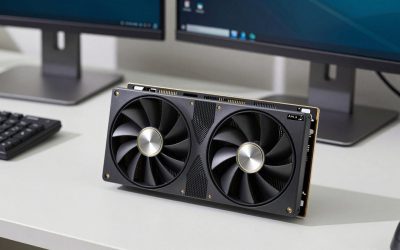
The best budget gaming graphics cards and GPUs in 2026 are the Radeon RX 9060 XT 16GB for long-term 1440p value, the GeForce RTX 5060 for efficient 1080p gaming and ray tracing, and the Intel Arc B580 for buyers who want strong memory capacity at a low price.
Quick picks by gaming target
See also: Can DDR5 Motherboards Use DDR4? Compatibility Guide • Best Gaming Desktops for Smooth PC Gaming
| Best for | Recommended GPU | Practical target | Typical board length | Power and PSU guidance | Usual market range |
|---|---|---|---|---|---|
| High-refresh 1080p | GeForce RTX 5060 8GB | 100–180 fps in competitive games; 60–100 fps in demanding games | Approximately 215–250 mm | About 145W; a quality 550W PSU is generally sufficient | Usually $300–$380 |
| 1080p with extra VRAM | Radeon RX 9060 XT 16GB | 90–160 fps at 1080p; 70–110 fps at 1440p | Approximately 230–280 mm | About 160W; plan for a quality 550W PSU | Usually $350–$450 |
| Affordable 1440p | Radeon RX 9060 XT 16GB | 60–100 fps at high settings in many modern games | Approximately 230–300 mm | One 8-pin connection is common; allow headroom for transient loads | Usually $350–$450 |
| Lowest-cost new build | Intel Arc B580 12GB | 60–100 fps at 1080p; roughly 50–80 fps at 1440p | Approximately 225–270 mm | About 190W; use a quality 600W PSU | Usually $250–$330 |
| Small or older PC upgrade | Radeon RX 7600 8GB | 60–100 fps at 1080p | Approximately 200–250 mm | About 165W; a quality 550W PSU is a sensible minimum | Usually $240–$320 |
Frame rates vary with the processor, game version, graphics preset, and upscaling mode. These are useful planning targets rather than guarantees. At this price level, a card that can sustain 70–90 fps at high settings is often a better choice than one that briefly reaches a higher peak but runs out of VRAM in newer games.
1. Radeon RX 9060 XT 16GB: the best all-round budget choice
The RX 9060 XT with 16GB of memory is the strongest fit for a new gaming PC that may move from 1080p to 1440p. Its large VRAM capacity helps with high-resolution textures, open-world games, and future releases, while its performance is suited to roughly 70–110 fps at 1440p in many rasterized titles using high settings.
Choose it when your monitor is 1440p, when you keep graphics cards for several years, or when you prefer not to reduce texture quality to avoid stuttering. It is also a good match for a mainstream six-core or eight-core processor. Radeon’s ray-tracing performance and upscaling ecosystem may be less attractive than Nvidia’s for a ray-tracing-focused build, so compare the actual games you play rather than relying only on average frame rate.
Check the specific model carefully. Some versions approach 300 mm long and occupy nearly three expansion slots. In a compact case, a shorter dual-fan card may be worth choosing even if a larger cooler runs slightly quieter.
2. GeForce RTX 5060: best for efficient 1080p and ray tracing
The RTX 5060 is a practical 1080p choice for players who want Nvidia’s ray-tracing features, frame-generation support, and broad software compatibility. It can target 100 fps or more in esports games and approximately 60–100 fps in demanding single-player games, depending on settings and upscaling.
Its main limitation is 8GB of VRAM. That is adequate for 1080p today, but it leaves less room for ultra-quality textures and future games than a 12GB or 16GB card. Avoid paying a large premium for the RTX 5060 if you expect to buy a 1440p monitor soon; the RX 9060 XT 16GB is usually the more flexible investment.
Power consumption is modest, and many RTX 5060 models are short enough for compact mid-tower or small-form-factor cases. Confirm whether the card uses a conventional eight-pin connector or a newer compact power connector, and follow the manufacturer’s cable guidance.
3. Intel Arc B580: the value pick with useful VRAM
The Arc B580 offers 12GB of VRAM and can deliver strong value at 1080p, with playable 1440p performance when settings are chosen sensibly. It is particularly appealing when its price is clearly below competing cards with similar performance.
Intel’s drivers have improved substantially, but game-by-game behavior still matters more than it does with the most established alternatives. A system with Resizable BAR enabled, modern firmware, and a reasonably current processor is important. Older PCs may not provide the same results, so it is not automatically the best upgrade for a five-year-old system.
With power use near 190W, the B580 deserves better airflow than an entry-level card. A case with at least two intake fans and one rear exhaust fan is preferable, especially if the card is installed in a desk enclosure with limited ventilation.
4. Radeon RX 7600: choose it when the discount is real
The RX 7600 remains a sensible 1080p card when it is substantially cheaper than newer alternatives. It can deliver around 60–100 fps at high settings in many games and works well in a mainstream gaming PC with a 1080p, 144Hz monitor.
Its 8GB memory and weaker 1440p headroom make it less attractive at similar pricing to the RTX 5060 or RX 9060 XT. It is most compelling for a first gaming PC, a replacement for an aging entry-level card, or a build where the saved money can fund a faster processor, a larger SSD, or a better power supply.
Fit, power, and case checks before buying
- Measure GPU clearance: remove the quoted drive-cage allowance from the case specification. A “300 mm maximum” may become 270 mm when a front radiator or drive cage is installed.
- Allow cable space: reserve about 35–45 mm beside the card for power cables, particularly with side-panel cases and compact connectors.
- Check thickness: a 2.5- or three-slot GPU can cover neighboring expansion slots and may block a capture card, wireless adapter, or bottom intake.
- Match the PSU to the whole PC: use a reputable 550W unit for most RTX 5060, RX 7600, and RX 9060 XT systems, and consider 600W for an Arc B580 or a higher-power processor. A very old “600W” supply is not automatically safe.
- Consider monitor resolution: do not buy a 1440p-oriented card for a 60Hz 1080p display unless you plan to upgrade the monitor.
For a compact case, prioritize a card under 250 mm long and no more than two slots thick. For a conventional mid-tower, a 270–300 mm card is usually easier to accommodate, but verify the front-fan and radiator clearance. GPU weight is rarely a problem for the case itself, although a long, heavy cooler benefits from a support bracket during transport.
Decision matrix for common budget builds
| Your situation | Best fit | Why | What to avoid |
|---|---|---|---|
| 1080p, competitive games, 144Hz or faster | RTX 5060 | Efficient performance and strong software features | Paying 1440p-card money for a large cooler |
| 1440p monitor, modern single-player games | RX 9060 XT 16GB | More VRAM and better long-term texture headroom | 8GB cards at nearly the same price |
| Lowest possible new-build cost | Arc B580 | 12GB memory and competitive performance per dollar | Pairing it with an old platform without checking Resizable BAR |
| Existing 1080p PC with a modest PSU | RTX 5060 | Lower power draw and compact options | High-power cards in a poorly ventilated case |
| Upgrade only if heavily discounted | RX 7600 | Still competent for standard 1080p gaming | Buying it when a newer 12GB or 16GB card costs only slightly more |
Which budget GPU should you buy?
Buy the Radeon RX 9060 XT 16GB if you want the most balanced choice for 1080p and 1440p, especially for a PC you will keep for several years. Choose the GeForce RTX 5060 for an efficient, compact 1080p system or if ray tracing and Nvidia-specific features are central to your games. Pick the Intel Arc B580 when its lower price is the deciding factor and your system supports modern firmware features. Select the Radeon RX 7600 only when it is clearly discounted and your target is conventional 1080p gaming.
Before ordering, compare the exact card’s length, slot thickness, connector type, and warranty with your case and power supply. Those physical details often determine whether a budget GPU becomes a smooth upgrade or an expensive compatibility problem.
Related Reviews & Guides
Best Desktop Organizer in 2026: How the Top Models Compare

Best Computer Mat in 2026: Compared and Ranked