Last Updated: September 9, 2026
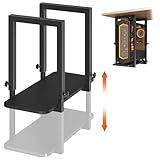
- Top Pick: TOPSKY Under Desk PC Mount No Drill CPU Holder 50 lb Capacity
- Best Value: Under Desk PC Mount, No Drill CPU Holder for Standing Desk, Heavy Duty No-Drilling Computer Tower Holder with Upgraded Non-Slip Gaskets Fits Towers 5.9" to 10.4" Wide, 44-50 lbs (BK-80X50mm)
- Premium Choice: VIVO Heavy Duty Adjustable Under-Desk PC Mount, Home and Office Computer CPU Holder with Secure Locking, Supports up to 66 lbs, Black, MOUNT-PC04B
A PC desk mount solves a deceptively simple problem: your computer tower sits on the floor, collects dust and pet hair, blocks your feet, and gets kicked every time you shift in your chair. Lifting it under the desk clears your floor space, keeps intake fans out of carpet fibers, and makes the entire workstation feel more intentional. The catch is that a bad mount fails quietly. It strips screws over time, sags under weight, or refuses to accommodate a case wider than the listing promised.
What separates a good mount from a mediocre one comes down to three things: honest weight capacity with a margin of safety, real adjustability for different desk depths and case sizes, and mounting hardware that does not require drilling into a finished desk surface unless you want it to. In 2026, the market has matured enough that budget options and premium options are closer than they used to be, but build quality still varies wildly. Below is our ranking of eight popular models based on published specifications, pricing, and consistent patterns in owner feedback.
As an Amazon Associate we earn from qualifying purchases at no extra cost to you.



📄 In This Review
Quick Picks
| Product | Best for | Price |
|---|---|---|
| TOPSKY Under Desk PC Mount | Most desk setups without drilling | $41.99 |
| BK-80X50mm No-Drill CPU Holder | Standing desk users on a tight budget | $19.99 |
| VIVO MOUNT-PC04B | Heavier towers needing secure locking | $59.99 |
| JOY worker Clamp-On Mount | Dorm rooms and rental desks | $39.99 |
| VIVO MOUNT-PC07G | Gaming towers and desk-edge setups | $44.99 |
| monTEK Under Desk PC Mount | Large ATX and E-ATX cases | $79.99 |
| Heavy Duty Under Desk PC Holder (77 lb) | Maximum load capacity on a budget | $49.90 |
| Heavy Duty Height-Adjustable Mount | Varied desk heights and case depths | $49.98 |
How We Picked
See also: Best Ways to Organize Cables Behind a Desk • Best Gaming Desk Pads for Full Desk Coverage
We narrowed this list using four criteria. First, rated weight capacity with a realistic safety margin—most towers and their peripherals now sit between thirty and fifty pounds, so a mount rated at forty-four or above is the baseline. Second, mounting flexibility: the best designs offer at least one no-drill option, whether clamp-on, screwless bracket, or dual-mode. Third, case-width or case-size compatibility, because a mount that only fits narrow towers limits your upgrade path. Fourth, consistent owner satisfaction over time, with particular attention to long-term comments about sagging, stripped fasteners, and gasket wear.
The 8 Best Pc Desk Mount in 2026
TOPSKY Under Desk PC Mount No Drill CPU Holder
For anyone with a standard desk who wants under-mount support without a power drill, the TOPSKY hits a practical middle ground at fifty pounds rated capacity and a no-drill installation. Owners consistently praise how straightforward the bracket slides under the desktop lip, and the fifty-pound rating comfortably covers most mid-tower setups. Two advantages stand out in reviews: the clamp mechanism grips without marring laminate surfaces, and the open-frame design keeps airflow around the case unobstructed. The main drawback is limited vertical adjustability once installed, which can be an issue if your desk has an unusual apron or crossbar. Skip this one if you run a full-tower or water-cooled rig pushing past fifty pounds.
BK-80X50mm No-Drill CPU Holder
At just under twenty dollars, this mount undercuts nearly everything else while still supporting forty-four to fifty pounds across tower widths from 5.9 to 10.4 inches. It is aimed squarely at standing-desk owners who need a second tower mount for a lower-positioned desk without committing premium budget. Pros include the upgraded non-slip gaskets that resist sliding during height transitions and genuinely wide case tolerance for the price. The con is build material: several owners note the steel gauge feels thinner than pricier rivals, which matters if you plan to keep the same mount across multiple case upgrades. Skip it if your tower sits at the very top of the weight range and you value long-term rigidity.
VIVO Heavy Duty Adjustable Under-Desk PC Mount (MOUNT-PC04B)
VIVO’s MOUNT-PC04B targets the buyer who wants the highest confidence rating in a conventional under-desk format. Sixty-six pounds of supported weight with a positive locking mechanism makes it suitable for heavy full-towers and multi-drive setups. Owners highlight the secure locking latch that prevents accidental release and the adjustable arm that accommodates varying desk depths. On the downside, installation does require drilling into the underside of your desk, which eliminates it for renters or anyone who values a clean desktop underside. Skip this model if no-drill installation is non-negotiable for you.
JOY worker Under Desk PC Mount for Standing Desk
This clamp-on design is built for people who cannot or will not modify their furniture. It attaches directly to the desk leg, which means it works on standing desks, folding tables, and any surface with a flat edge to grip. At fifty pounds capacity and under forty dollars, it covers typical mid-tower weight comfortably. Two things owners appreciate: the tool-free clamp installs in minutes and the leg-mounting keeps the under-desk channel clear for cable management trays. The con is aesthetic—some find the leg-mounted bracket visually intrusive, and it can interfere with adjustable footpads on certain standing desk models. Skip it if your desk legs are tapered or have integrated cable channels.
VIVO Clamp-on Desk Extender PC Desk Mount (MOUNT-PC07G)
The MOUNT-PC07G serves a specific niche: desks without usable underside clearance, or setups where you want the tower visible and accessible from the side. It clamps to the desk edge and functions as an extender platform, with a wall-mount option for semi-permanent installations. It handles both standard and large gaming cases. Pros include genuine versatility in mounting orientation and VIVO’s locking hardware that holds firm. The con is footprint—on narrow desks, the extender platform reduces available work surface noticeably. Skip this one if you need every inch of desktop and prefer the tower hidden beneath.
monTEK Under Desk PC Mount
Priced at the top of this group, the monTEK earns its spot through pure size accommodation. It fits cases from 16.1 to 25.6 inches tall, which means it handles E-ATX full towers and triple-fan setups that smaller brackets simply cannot. Sixty-six pounds rated capacity matches VIVO’s offering. Owners praise the compatibility range and solid steel construction. The obvious con is price, and a secondary complaint involves the depth requirement: the under-desk space needed to accept this bracket exceeds what some compact or standing desks provide. Skip it if your case falls in the standard mid-tower range and you can find a cheaper mount that fits.
Heavy Duty Under Desk PC Holder (77 lb Capacity)
This mount leads the group on raw load rating at seventy-seven pounds, which puts it in a class of its own for builders running custom water loops, multiple GPU mounts, or full tower cases loaded with hard drives. Adjustable arm design helps it accommodate various desk geometries. Pros include the highest rated capacity at a sub-fifty-dollar price and a straightforward black finish that matches most hardware. The con is limited brand visibility and fewer owner reviews compared to established names, which makes long-term durability harder to predict from available feedback. Skip it if you want a mount with a large community and verified multi-year track record.
Heavy Duty Under Desk PC Mount, Height Adjustable
At just under fifty dollars, this mount combines sixty-six pound capacity with height adjustability, making it a strong contender for users who switch between a fixed and a standing desk or who want to fine-tune tower position for airflow. Pros include the adjustable height range that lets you clear under-desk obstructions and the locking mechanism that holds position once set. The con is that the adjustable joint introduces a potential stress point over years of micro-vibration, and a small number of owners report needing to re-tighten the adjustment bolt after extended use. Skip it if your setup has a single fixed height and you prefer a static, one-bolt-and-forget mount.
Buying Guide
Weight Capacity and Safety Margin
Published weight ratings on PC desk mounts typically describe the maximum load before structural failure, not the load at which the mount stays rigid over years of use. A tower with drives, a GPU, and a water cooling loop can exceed forty pounds easily. Look for a mount rated at least fifty percent above your system’s actual weight. If your rig is thirty-five pounds, anything rated below fifty should be treated with skepticism regardless of price.
Mounting Method: Drill vs. Clamp vs. Hybrid
Drilling into the underside of a desk provides the most rigid and permanent hold, which is why many heavy-duty mounts require it. Clamp-on designs sacrifice a degree of rigidity for reversibility, making them ideal for rentals or shared workspaces. Some mounts offer a hybrid option, letting you start with a clamp and drill later if needed. Decide based on your furniture situation first, then filter by capacity. A clamp mount rated at seventy pounds is still limited by the grip force of the clamp, not the bracket itself.
Case Compatibility and Physical Clearance
A mount that fits your current case may not accommodate the next one. Before purchasing, measure your tower’s width, height, and the depth of your desk’s underside clearance. Most standard mounts support cases between five and ten inches wide, but full-tower and E-ATX builds push past that. If you plan to upgrade within the next two years, buy a mount whose listed compatibility range leaves headroom.
Our Verdict
Our top pick for most buyers is the TOPSKY Under Desk PC Mount. Its fifty-pound capacity covers the majority of mid-tower builds, the no-drill installation removes the most common barrier to buying one, and the price sits in a comfortable range without feeling compromised. For budget-focused standing-desk users, the BK-80X50mm at just under twenty dollars delivers a genuinely useful feature set that outperforms its cost. However, if your system includes custom water cooling, multiple hard drives, or a full-tower chassis and you can drill, the VIVO MOUNT-PC04B with its sixty-six pound rating and positive locking latch is the mount that will hold steady for the long haul.
FAQ
Will a PC desk mount damage my desk?
Clamp-on and no-drill mounts grip the desk edge or underside with rubber or plastic contact pads, so they do not mark finished surfaces. Screw-mounted designs require pilot holes in the desk underside, which is a permanent modification—worth considering if the desk is hollow-core particleboard rather than solid wood.
Can I use a PC desk mount on a standing desk?
Yes, but confirm the mount’s listed compatibility with your desk’s apron clearance and edge geometry. Standing desks with thin tops or motor housings along the underside may block bracket access. Leg-clamp designs like the JOY worker sidestep the issue by mounting below the desktop entirely.
Do under-desk mounts block airflow or dust filters?
Most open-frame designs leave all four sides accessible, and bottom intake fans still draw air from below. The real risk is placing a mount so close to the floor that carpet fibers reach the filters. Mounting the tower under the desk actually raises it several inches compared to sitting on the floor, which helps.
How do I know if my case fits a specific mount?
Measure your tower’s width and height, then compare against the mount’s published compatibility range. Width matters most for clamp-style mounts, while height determines whether an under-desk bracket clears the desktop apron. If your case falls within one inch of a mount’s listed maximum, expect a tight or failed fit.
Related Reviews & Guides


6 Best Foldables Under Desk Treadmill 2026

6 Best Redliros Under Desk Treadmill 2026