Last Updated: September 18, 2026
📄 In This Review
The Short Answer
Yes—if your desk surface needs protection or you want one smooth area for your keyboard, mouse, and writing. A desk mat is worth it when it solves a specific problem: scratches, spills, noisy peripherals, a wandering mouse, or an untidy-looking workstation. If your desk is already durable, comfortable, and easy to clean, it is more of a convenience than a necessity.
For most people, the decision comes down to price and size. A basic PU leather mat can cost about $9 to $20, while premium leather, wool, cork, and large-format mats can cost $30 to $100 or more. At the low end, a mat is one of the least expensive ways to change how a desk feels and looks.
As an Amazon Associate we earn from qualifying purchases at no extra cost to you.

What You Actually Get
See also: Best Racing Style Chairs: Ten Listings Compared by Footrest, Weight Rating and Fit • Wall Mounted Cable Organizer for Home Office: Raceways, Racks, Clips
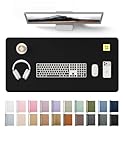
A desk mat is a broad, flat surface placed under some or all of your desk accessories. Depending on its dimensions, it may hold a keyboard, mouse, laptop, monitor stand, notebook, and drink. Unlike a traditional mouse pad, it is designed to organize a work zone rather than just improve mouse movement.
Most affordable options use PU leather, fabric, rubber, cork, or a combination of these materials. PU leather is common because it is relatively inexpensive, water-resistant, smooth, and easy to wipe clean. It can also make a basic desk look more finished. Fabric mats may offer a softer feel and better grip, but they can absorb spills and collect dust. Cork is warm and lightweight, although it may show wear faster around frequently used edges.
Size matters more than many buyers expect. A 23.6-by-13.8-inch mat is usually large enough for a keyboard and mouse, but it may leave little room for a notebook or laptop. A 31.5-by-15.8-inch mat gives you a wider working area and is a better fit for a full-size keyboard, mouse, and everyday writing. Before ordering, measure the usable section of your desk, including any monitor stand feet, desk grommets, or raised edges.
As a price reference, the YSAGi PU leather desk protector in a 23.6-by-13.8-inch size is listed at $8.99, while the larger 31.5-by-15.8-inch version is listed at $12.59. Those dimensions and prices illustrate the basic value proposition: a few extra dollars can provide substantially more coverage. Actual prices can change, and neither size is automatically right for every desk.
Pros
- Protects the desktop. A mat creates a barrier against keyboard movement, pen marks, drink rings, crumbs, and minor scratches. This is especially useful on painted, veneered, or soft-wood surfaces.
- Combines several accessories. One mat can replace a separate mouse pad and desk protector, reducing visual clutter and keeping your main tools in one defined area.
- Improves mouse consistency. A mouse can track more predictably across a uniform surface than it does across glossy wood, textured laminate, or a desktop with seams.
- Makes typing and writing feel more comfortable. The slight cushioning can soften contact between your wrists and the desk. It also reduces the hard, hollow sound of a keyboard on some surfaces.
- Provides a quick style upgrade. A black, brown, or neutral mat can make mismatched office equipment look more coordinated without replacing the desk.
- Costs less than repairing or refinishing a desk. Even a $10 to $20 mat can be sensible protection for a desk that cost hundreds of dollars.
- Helps define a workspace. On a shared table or compact home office, a mat visually marks where the computer setup belongs and can make cleanup easier.
Cons
- It takes up valuable space. A large mat can interfere with monitor stands, desk shelves, cable clips, or a laptop dock. Measure first rather than assuming more coverage is better.
- Edges may curl or shift. Thin mats can arrive rolled, and some need time to flatten. Smooth desktops can also allow movement unless the backing has enough grip.
- Some materials show wear. PU leather can develop creases, surface peeling, or shiny areas over time, particularly under a frequently used wrist position.
- It is not completely spillproof protection. A waterproof top may stop a small spill from reaching the desk, but liquid can still run off the edge or underneath the mat.
- Cleaning requirements vary. Fabric mats may need more careful cleaning, while textured surfaces can hold crumbs. Some materials should not be soaked or exposed to harsh cleaners.
- It can trap grit underneath. Dust or sand between the mat and desktop may cause fine scratches when the mat moves. Lift and clean beneath it periodically.
- It will not fix an uncomfortable workstation. A mat cannot compensate for a keyboard that is too high, an improperly positioned monitor, or a chair that lacks support.
Who Should Buy It
A desk mat is a smart purchase for anyone who uses a keyboard and mouse for several hours most days. It is particularly useful if your desktop is valuable, delicate, or difficult to refinish. Renters and people using dining tables or temporary home-office furniture may also appreciate an inexpensive protective layer.
Buy one if your mouse regularly reaches the edge of its current pad, your keyboard slides during use, or you want room for a notebook beside the computer. It is also worthwhile for people who eat or drink near their desk, provided they still clean spills promptly.
Gamers and creative professionals should focus on dimensions and surface feel. A mat at least 31 inches wide may be more practical for a full-size keyboard and broad mouse movement, while a smaller 23.6-inch mat can suit a compact keyboard and limited desk. If precise mouse movement is important, prioritize a smooth, consistent top over decorative stitching or an attractive color.
Who Should Skip It
Skip a desk mat if your workspace is already cramped and a larger surface would force your keyboard or monitor stand into an awkward position. You may also do without one if you use a trackpad, rarely write at the desk, and have a surface that is already comfortable and resistant to marks.
People who prefer a completely bare desk may find the mat more annoying than useful. It can also be a poor choice for a desk with a heavily textured, uneven, or curved surface, where the mat may not lie flat. If you need maximum durability, consider a rigid desk protector or a high-quality natural material instead of the cheapest thin option.
Cheaper Alternatives
| Option | Cost | Trade-off |
|---|---|---|
| Large sheet of felt or craft fabric | $5–$15 | Soft and easy to cut, but absorbs spills and may fray or slide. |
| Clear vinyl table protector | $10–$25 | Strong spill protection, but can feel sticky, look glossy, or show fingerprints. |
| Oversized mouse pad | $10–$30 | Good for keyboard and mouse coverage, but usually offers less writing space and desktop protection. |
| Placemat or washable table mat | $3–$12 | Inexpensive and available in many materials, but may be too small or lack a reliable non-slip backing. |
| Nothing—use the desktop directly | $0 | Best for simplicity, but provides no extra cushioning, spill barrier, or scratch protection. |
FAQ
Does a desk mat protect against coffee spills?
It can protect the area directly underneath it from a small spill, especially if the top is water-resistant. However, it is not a tray or waterproof containment system. Liquid can flow over the edges and underneath, so wipe up spills quickly and lift the mat afterward if liquid may have reached the desk.
What size desk mat should I buy?
Measure the width and depth of the clear desk area first. For a compact keyboard-and-mouse setup, roughly 23.6 by 13.8 inches may be enough. For a keyboard, mouse, laptop, and notebook, a size around 31.5 by 15.8 inches is more flexible. Leave enough room for monitor stand feet and avoid covering desk controls or cable ports.
Are leather desk mats better than fabric ones?
Neither is universally better. PU leather is easier to wipe clean and often resists small spills, while fabric usually feels softer and may provide a more secure mouse surface. Leather-look materials can crease or peel, whereas fabric can stain and fray. Choose based on cleaning habits, appearance, and how much wrist comfort you want.
Is a desk mat worth it for a standing desk?
Often, yes. A mat can make a standing desk feel less stark and provide a consistent surface as you alternate between sitting and standing. It will not replace an anti-fatigue floor mat, however. A desktop mat protects the work surface; an anti-fatigue mat supports your feet on the floor. For a 2026 home office, they solve two different problems and should not be confused.
Related Reviews & Guides





6 Best Yaguds Under Desk Treadmill 2026

Quick Picks: Best Portable Document Scanners for Travel