Last Updated: September 29, 2026
An l shaped desk sit stand lifts the entire corner surface as one level unit, but how it does that depends on whether the frame uses three legs, four legs, or two linked two-leg frames, and that choice determines how much weight the return can hold and how much it will wobble at standing height.
📄 In This Review
The 3 Corner Lift Designs That Make an L-Shape Stand Up
Unlike a standard rectangular sit-stand desk with two legs, an L-shape has to support a long return that sticks out 48 to 72 inches from the corner. The motor and leg placement solves that problem in three distinct ways:

FLEXISPOT 71 x 63 Reversible L-Shaped Corner Standing Desk, Black
Included for 'L Shaped Sit Stand Desks: How the Corner Lift Actually Works' because the listing specifies Black, details this guide uses to compare options.
View on Amazon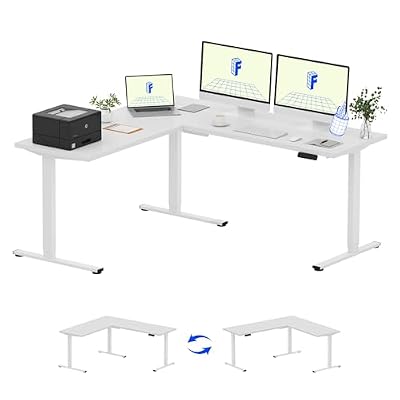
FLEXISPOT 71 x 63 Reversible L-Shaped Corner Standing Desk, White
Included for 'L Shaped Sit Stand Desks: How the Corner Lift Actually Works' because the listing specifies White, details this guide uses to compare options.
View on Amazon
FLEXISPOT 4-Leg L-Shaped Standing Desk, 71 x 43 Inches, Black
Included for 'L Shaped Sit Stand Desks: How the Corner Lift Actually Works' because the listing specifies 71 x 43 Inches and Black, details this guide uses to compare options.
View on Amazon
FLEXISPOT Reversible L-Shaped Corner Standing Desk with Monitor Shelf
Included for 'L Shaped Sit Stand Desks: How the Corner Lift Actually Works' as a relevant option in this category; details come from the product listing.
View on Amazon1. Three-Leg Frame: The True Corner Design
This is the most common purpose-built design. It has one leg at each end of the L and one leg directly under the corner joint where the two desktops meet. A single control box synchronizes all three lifting columns. The desktops are bolted together with a steel corner bracket underneath, so the whole surface moves as one piece.
How it handles the load: The corner leg carries 40-50% of the total weight, which prevents the joint from sagging. Because the load is shared by three points in a triangle, it is very efficient and leaves more open leg space. The trade-off is that any uneven load on the far end of the return has more leverage against the corner.
2. Four-Leg Frame: The Maximum Stability Design
A four-leg frame puts two legs on the main desk and two legs on the return, with no leg directly in the corner itself. Instead, a heavy steel crossbar and corner gusset connect the two sides. It requires a control box that syncs four motors at once.
How it handles the load: This is the strongest design for heavy, uneven setups. The weight capacity is often 300 to 350 lbs total, distributed across four columns. It resists sagging on the return better than a three-leg frame, but it has one clear downside: you lose knee space in the corner because of the extra leg and crossbar.
3. Twin-Frame Linked: Two Desks Bolted Together
This is not a single L-frame. It is two separate two-leg sit-stand desks placed at a 90-degree angle, with their desktops touching in the corner. Sometimes they are linked with a small corner connector piece and a single controller, but often they operate with two separate up/down controls.
How it handles the load: Each side lifts independently and only supports its own desktop. This is the cheapest and easiest way to create an L, and you get two separate weight limits (typically 220-270 lbs per side). The problem is height sync. If the controllers are not perfectly linked, one side can drift 0.25 to 0.5 inches higher than the other, creating a lip in the corner and straining the connector.
How Each Design Handles Wobble and Reach at Standing Height
See also: Best 49 Inch Monitor: Eight Super Ultrawides Compared by Bandwidth and Desk Depth • Working Table for Home: Sit-Stand and L-Shaped Setups Compared
Wobble gets worse the higher you stand. At sitting height (28-30 inches), all three designs feel solid. At 42-47 inches, the physics change. The longer the leg columns extend, the more any side force at the far end of the return is amplified at the base.
The far end of a 60-inch return is the wobble test point. Pushing or leaning on it at standing height creates the most deflection.
| Frame Type | Total Lift Capacity | Wobble at 45″ Height (Return End) | Lift Speed (Unloaded) | Best For |
|---|---|---|---|---|
| Three-Leg | 265 – 330 lbs | 0.6 – 1.1 inches lateral deflection with firm push | 1.4 – 1.6 inches/sec | Balanced setups, open corner, gaming + work |
| Four-Leg | 300 – 355 lbs | 0.3 – 0.7 inches lateral deflection | 1.2 – 1.5 inches/sec (slower due to 4 motors) | Heavy returns, multiple monitors on return, no sag |
| Twin-Frame Linked | 220 – 270 lbs per side | 0.8 – 1.5 inches (most wobble, plus uneven height risk) | 1.5 – 1.7 inches/sec but often out of sync | Budget builds, renters who may split desks later |
Reach is the other trade-off. At standing height, you need to roll or step to reach the far end of the return. With a three-leg or four-leg design, the corner itself lifts, so you can keep your primary monitors in the corner and secondary items on the return. With a twin-frame linked setup, many users offset their standing mat toward the main desk and use the return as static storage because reaching across a misaligned seam is awkward.
Clearance, Room Fit, and Ergonomic Heights
An L-shape dominates a room if you don’t plan clearance. Measure this before you buy:
- Standing clearance behind you: Leave at least 36 inches from the back edge of the desk to the wall or furniture behind you. You need space for the chair when sitting and for your body when standing and stepping back.
- Return clearance: If the return faces a wall, leave 30 inches minimum between the end of the return and that wall so the desk can rise without hitting shelves or artwork, and so you can walk around it.
- 10×12 ft room fit: A common 60″ x 60″ L-shape needs a footprint of 62″ x 62″ to allow for cable slack and wobble. In a 10×12 ft room (120″ x 144″), placing it in the corner leaves about 58″ on the long wall and 82″ on the short wall for a bookcase, filing cabinet, or walking path. A 72″ x 72″ model will feel cramped in a 10×10 ft room and leave only 48″ of walkway.
- Correct standing height: Elbows at 90 degrees is the baseline. For most adults, keyboard height at standing is 38 to 43 inches for users 5’4″ to 6’0″. Users over 6’2″ often need a frame that extends to 49-50 inches, which many budget three-leg frames do not.
- Assembly realities: An L-shaped sit-stand desk ships in two to three boxes totaling 150 to 210 lbs. The desktop sections are 55 to 75 lbs each. Doorway width is rarely the issue, but a narrow 28-inch apartment doorway can make carrying a 60-inch desktop section difficult without turning it vertically.
What About Drawers and U-Shaped Setups?
A lot of shoppers looking for an l shaped sit stand desk with drawers hit the same problem: you cannot hang a deep drawer where the lift mechanism lives.
On a sit-stand L, the only safe place for a drawer is under the outer third of the main desk or return, away from the lifting columns and control box. A drawer unit that is more than 16 to 18 inches wide will often collide with a leg when the desk is lowered. The practical options are:
- A shallow under-desk drawer (3-4 inches deep) mounted on the desktop itself, which lifts with the desk and holds office supplies.
- A rolling pedestal that sits on the floor under the return and does not move with the desk. This is the most stable choice and usually costs $150-$350 for a metal file pedestal.
- A fixed apron drawer built into the front edge of the desktop. This reduces knee clearance by about 4 inches, so check that your seated knee height plus 2 inches of clearance still fits.
Avoid side-mounted fabric drawers that strap to the frame; they swing and snag when the desk moves.
A u shaped sit stand desk is simply an L-shape with a third section added, usually a credenza or return on the opposite side. It almost always uses a four-leg L-frame plus a separate two-leg frame for the third side, or three linked frames. They require a minimum 10×12 ft room and a control box that can sync the slowest motor. The key downside is that the user is boxed in. At standing height you have to shuffle out of the U rather than roll away, so U-shapes work best for dedicated offices where you stay in one place for long periods, not for rooms where you need to get up frequently.
Which L-Shaped Sit Stand Desk Should You Choose?
Match the frame to your situation, not just to the price:
| Your Situation | Best Frame Choice | Why |
|---|---|---|
| Small apartment or bedroom office, need open floor space | Three-Leg | Smallest footprint, most leg room, easiest to place in a corner without blocking a closet door. |
| Heavy setup: 2-3 monitors on return + PC on desk | Four-Leg | Prevents return sag and has the highest distributed weight limit. Look for models with a stated 300+ lb capacity. |
| Renter who may move or want two separate desks later | Twin-Frame Linked | You can split it into two standing desks for a future apartment without buying a new frame. |
| Back pain and frequent sit-stand switching (6+ times per day) | Three-Leg or Four-Leg with programmable presets | One-touch presets avoid holding the button and re-adjusting an uneven twin-frame seam every time. |
| Kids and pets around the desk | Four-Leg with anti-collision | Most stable at height and anti-collision stops the return before it hits a toy, pet bed, or chair. |
Durability note: What wears first is not the motor. It is usually the corner joint hardware and the cable management. After 18-24 months of daily standing use, check that the corner bracket bolts are still torqued tight and that the motor cables under the return have enough slack loop to reach full height without pulling.
FAQ
Can I put my PC tower on the return of a three-leg desk?
Yes, if the total load on that side stays under about 80 lbs including monitors. Place the tower near the corner leg, not at the far end, where leverage is highest. If your tower is over 45 lbs, a four-leg frame is safer.
Do I need a special chair mat for an L-shaped sit-stand desk?
Use a low-pile or hard-floor mat that extends into the corner so you can roll between the main desk and return while seated. A standard 36×48 inch rectangular mat leaves the corner uncovered; a 45×45 inch L-shaped or beveled mat works better.
How level does the floor need to be?
Within 0.25 inches across the entire L footprint. Adjustable foot glides can compensate for more, but if the floor slopes more than 0.5 inches from one leg to the far return leg, the frame will rack and one motor will work harder, leading to height drift.
Related Reviews & Guides
Mind Reader Mobile Sitting Standing Desk: Size, Rolling Base, and Real Uses
Siducal Mobile Stand Up Desk: Rolling Cart Sizing and Stability