Last Updated: September 18, 2026
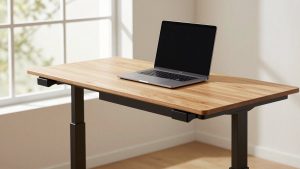
A standing desk frame is the mechanism beneath a tabletop, and it determines far more than how high your desk can go. It affects stability, noise, lifting capacity, cable management, assembly time and whether the desk feels comfortable after hours of alternating between sitting and standing. The biggest mistake is buying by motor count or maximum weight alone. A frame can advertise a 330-pound capacity yet wobble with a wide, heavy top, while a lower-priced model may work perfectly for a modest 48-inch surface.
Other common mistakes include measuring only the tabletop and ignoring the frame’s minimum and maximum width, overlooking the weight of the top, assuming “dual motor” automatically means quiet operation, and failing to check whether the control panel stores preset heights. Before comparing brands, use the following process to decide how to choose a standing desk frame that fits your room, equipment and daily routine.
As an Amazon Associate we earn from qualifying purchases at no extra cost to you.



📄 In This Review
Decide These 3 Things First
- Choose your tabletop size. Measure the top you have or the space available. Most home-office setups use a 48- to 60-inch-wide surface, while two-monitor arrangements may need 63 to 72 inches.
- Add up the working load. Include the tabletop, monitors, monitor arms, computer, speakers, lighting and anything that will remain on the desk. A 60-pound setup should not be paired with a frame rated for only 88 pounds.
- Set a realistic budget. Basic electric frames generally cost about $90 to $140, more capable dual-motor models run roughly $140 to $220, and premium frames can exceed $250. Reserve money for a suitable top if you are not reusing one.
These three decisions eliminate most unsuitable frames before you compare finer details such as keypad design or motor noise.
Size and Compatibility
See also: Ergotron WorkFit-TL: Desk Depth, Weight Math and Who It Suits • Best 49 Inch Monitor: Eight Super Ultrawides Compared by Bandwidth and Desk Depth
Frame width must match both the tabletop and the room. Look for a frame with a width range that leaves the mounting feet comfortably inside the top’s edges. A frame listed for 39.4- to 63.3-inch desktops, for example, is suited to compact and standard home-office tops, but it is not the right choice for a 72-inch surface. A model specified for 44- to 90-inch desktops offers more flexibility for large workstations.
Check the tabletop depth as carefully as the width. Many frames support tops around 23 to 31 inches deep, while some accommodate depths up to 35 inches. A deep top can improve monitor distance and usable workspace, but it also increases leverage and may make wobble more noticeable at standing height.
Also check the frame’s height range. A useful electric frame often adjusts from approximately 27 to 47 inches without the desktop. Add the tabletop thickness—typically 1 to 1.5 inches—to estimate the final working height. Taller users may need a maximum of at least 48 or 49 inches; shorter users should confirm that the minimum height is low enough for relaxed shoulders and level forearms.
Material and Weight Capacity
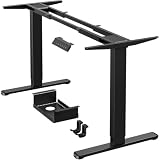
Steel is the usual choice for the columns, feet and crossbar because it resists bending and supports heavy equipment. Look for powder-coated steel with clearly stated tubing dimensions or a manufacturer-specified thickness. Aluminum can reduce weight, but a lightweight frame is not automatically less stable; the design of the columns and feet matters more than the label alone.
Capacity ratings commonly range from about 154 to 176 pounds on budget frames, 200 to 264 pounds on stronger dual-motor models, and 300 to 330 pounds on heavy-duty designs. Treat these figures as maximum rated loads, not recommended everyday loads. Aim to keep your normal setup below roughly 70% to 80% of the stated limit, particularly if the desk is wide or frequently raised while fully loaded.
Calculate the total honestly. A 35-pound tabletop, two 12-pound monitors, a 15-pound computer, a 10-pound monitor arm and 8 pounds of accessories already total 92 pounds. Choose a frame rated well above that figure, with additional margin for movement and future equipment.
Construction and Stability
Construction details separate a merely functional frame from one that feels solid. Two-stage legs usually provide a shorter overall height range and can be adequate for seated work. Three-stage legs use overlapping sections to offer greater adjustment range, which is helpful for households sharing a desk or for taller users.
A crossbar can improve rigidity by connecting the legs, although it may limit under-desk legroom. Some frames use a wider support structure or reinforced feet instead. Look for feet that are long enough to resist front-to-back rocking—approximately 23 to 28 inches is common—and adjustable leveling glides for uneven floors.
Pay attention to the attachment area under the top. Long, sturdy mounting brackets distribute force better than small connection points. Pre-drilled holes can simplify installation, but verify that they match your tabletop. If you are drilling into a solid-wood top, confirm that the included screws will not penetrate the surface.
Comfort and Performance
Electric adjustment is usually more practical than a hand crank for regular sit-stand use. A two-motor frame generally distributes lifting force more evenly than a single-motor design, especially with a wide or heavily loaded top. Dual motors are not a guarantee of silence or stability, but they are often the better choice above 60 inches or around 100 pounds of equipment.
Adjustment speed typically falls between 0.7 and 1.5 inches per second. Faster movement is convenient, but smooth starts and stops matter more than saving a few seconds. Noise ratings in product listings may fall around 45 to 55 decibels, though manufacturers may measure them under different conditions, so do not treat small differences as laboratory comparisons.
A good control panel should include up and down buttons, at least three memory presets and an anti-collision feature. Presets make it easy to save sitting, standing and shared-user heights. Anti-collision sensors can pause or reverse movement when the desk meets an obstacle, but they are not a substitute for keeping cords clear and watching the desk during adjustment.
For comfort, set the seated position so your elbows are near 90 degrees and your shoulders are relaxed. At standing height, your monitor should remain near eye level, and your keyboard should not force your wrists upward. A frame cannot correct an incorrectly positioned monitor or chair, so plan the whole workstation rather than focusing only on the lifting column.
Price Tiers: What You Actually Get
Budget: $90 to $140. These frames are appropriate for a 39- to 63-inch top, one or two lighter monitors and a total load of roughly 150 to 200 pounds. Expect basic steel construction, two motors or a simpler drive system, three memory presets and fewer refinements in cable management. A $99.99 frame can be a sensible choice when the top is compact and the equipment load is modest.
Midrange: $140 to $220. This is the strongest value tier for many home offices. Frames often support 44- to 90-inch tops, carry about 220 to 264 pounds and use dual motors, stronger feet and more robust control systems. A model priced near $169.99 may be preferable to a cheaper option if you use a large top, multiple monitors or a heavy desktop computer.
Premium: $220 to $350 or more. Premium frames may offer quieter operation, better synchronization, three-stage columns, improved anti-collision controls, sturdier brackets and longer warranties. Consider this tier for a shared desk, a 72-inch-plus workstation, frequent height changes or a load approaching 200 pounds. Do not pay for a 300- or 330-pound rating if your actual setup weighs 70 pounds and your top is 48 inches wide.
Warranty and Long-Term Support
Check the warranty separately for the frame, motor, electronics and tabletop. Budget products may provide about one to three years of coverage, while stronger midrange and premium frames may offer five years or more on the frame and columns. Electronics sometimes receive shorter coverage than the metal components.
Read the exclusions. A warranty may not cover damage from exceeding the weight limit, incorrect installation, commercial use or drilling into the wrong part of the top. Confirm whether replacement parts are available individually. A failed control box should not require replacing the entire frame.
Also look for a clearly identified seller and a return period long enough to assemble and test the desk. A frame can meet every published specification and still feel too shaky for your room or too tall for your chair.
Delivery and Assembly
Expect a frame to weigh roughly 35 to 65 pounds, with heavy-duty models sometimes exceeding that range. Confirm that the package includes the legs, feet, crossbar or support brackets, control box, handset, power cable, screws and any required drill bit or Allen keys.
Assembly commonly takes 45 to 120 minutes for one person. A second person is useful when attaching the frame to a wide tabletop or turning the completed desk upright. Before drilling, place the frame upside down on the top and verify that the feet, control box and cable ports will not interfere with drawers or a rear cable tray.
After assembly, tighten every fastener evenly, level the feet and test the desk unloaded before adding equipment. Keep at least 2 inches of slack in cables across the full height range, and route power cords so they cannot catch on the frame.
Spec Checklist
| Spec | Budget | Mid | Premium |
|---|---|---|---|
| Typical price | $90-$140 | $140-$220 | $220-$350+ |
| Recommended top width | 39-63 inches | 44-72 inches | 60-90 inches |
| Recommended top depth | 23-30 inches | 24-35 inches | 27-36 inches |
| Rated capacity | 150-200 pounds | 220-264 pounds | 300-330 pounds |
| Motor setup | Single or basic dual motor | Dual motor | Dual motor with synchronized control |
| Height range | 27-46 inches | 27-48 inches | 24-50 inches |
| Controls | Up/down; 2-3 presets | 3-4 presets; anti-collision | 4+ presets; refined anti-collision |
| Warranty target | 1-3 years | 3-5 years | 5-10 years on frame |
Red Flags
- A capacity rating without a recommended desktop size or explanation of how the load is measured.
- A “dual motor” claim with no stated height range, speed, noise information or warranty.
- A frame that is too narrow for the tabletop, forcing the mounting brackets close to the edges.
- Very short feet on a deep or heavy desktop, which can contribute to front-to-back rocking.
- No anti-collision feature, no memory presets or a handset with only basic up and down controls.
- Reviews or instructions that mention missing hardware, stripped screws, uneven columns or difficult synchronization.
- A price that excludes the control box, handset, feet or power supply.
- A warranty that covers only the steel frame while excluding motors and electronics.
FAQ
Is a dual-motor standing desk frame worth it?
Usually, yes, when the tabletop is wider than 60 inches, the loaded desk weighs more than about 100 pounds or several people will use it. For a compact 48-inch desk with one monitor, a good single-motor frame may be sufficient, but dual motors generally provide more even lifting and greater capacity.
How much weight should a standing desk frame support?
Choose a rating at least 25% to 30% higher than your fully loaded desk. If the top and equipment total 120 pounds, look for at least 160 pounds of rated capacity. Use a larger margin for wide desktops, uneven loading or frequent height changes.
Can I use my existing tabletop?
Yes, if it is structurally sound, within the frame’s width and depth range, and thick enough for secure screws. A top around 1 inch thick is common, but always follow the frame’s mounting instructions. Check for cracks, weak particleboard and existing holes before installation.
What is the best way to reduce wobble?
Use a frame sized appropriately for the top, keep heavy equipment centered, tighten all bolts after a week of use and level the feet. A shorter standing height also reduces leverage. If wobble remains on a wide desk, a sturdier dual-motor frame with longer feet, a crossbar or three-stage columns is the better solution.
Related Reviews & Guides

Working Table for Home: Sit-Stand and L-Shaped Setups Compared
60-Inch Standing Desks With Drawers: What Fits Underneath Without Blocking Your Knees