Last Updated: September 18, 2026
📄 In This Review
The Short Answer
Yes—if you stand at your desk for more than about 30 minutes at a time and your floor is hard, cold, or unforgiving. A standing desk mat can reduce pressure on your feet and make it easier to shift positions, but it will not fix poor desk height, unsupportive shoes, or standing too long without breaks.
If you alternate between sitting and standing for short periods, wear comfortable shoes, and already use carpet or a cushioned floor, you may not need one. The right answer depends on one condition: how much time you spend standing on a hard surface.
As an Amazon Associate we earn from qualifying purchases at no extra cost to you.

What You Actually Get
See also: Ergotron WorkFit-TL: Desk Depth, Weight Math and Who It Suits • Best 49 Inch Monitor: Eight Super Ultrawides Compared by Bandwidth and Desk Depth
A standing desk mat is a layer of resilient foam or rubber placed under your desk. Its job is not to make standing effortless. Instead, it slightly compresses under your feet, spreading pressure and encouraging small movements in your ankles, knees, and hips.
That cushioning can matter because ordinary floors—especially concrete, tile, laminate, and hardwood—provide no give. After an hour or two, the discomfort often shows up as sore heels, tired arches, aching calves, or a general urge to lean against the desk.
Most desk mats are between about 20 and 36 inches wide and 30 to 60 inches long. A compact mat may work for a narrow desk, while a larger mat gives you room to step forward, backward, and side to side. Thickness commonly ranges from roughly 0.4 to 1 inch. Thicker is not automatically better: a soft, unstable mat can make your ankles work harder and create a tripping hazard.
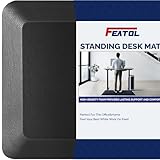
There are two broad designs. Flat anti-fatigue mats look like kitchen mats and are usually less expensive. Contoured mats add raised edges, ridges, or a small mound so you can move your feet instead of standing in one fixed position. The Topo by Ergodriven, listed at about $109, is an example of the premium contoured approach. A basic flat mat such as the FEATOL Anti Fatigue Mat, listed around $44.99, focuses more on cushioning and floor coverage.
A mat also affects how your standing desk feels. If your desk has a minimum height that is already borderline tall, adding a mat under your feet can make the keyboard and monitor feel slightly low by comparison. You may need to raise the desk by roughly half an inch to 1 inch, depending on the mat and your footwear.
Pros
- Less pressure on hard floors: Cushioning can make long standing sessions more tolerable, particularly for your heels and the balls of your feet.
- Encourages movement: A contoured surface gives you somewhere to shift your weight, stretch a foot, or rest one foot at a time.
- Useful in more than one room: Many mats can also work at a kitchen counter, workshop bench, laundry area, or checkout-style workstation.
- Easy to add to an existing setup: Unlike an anti-fatigue floor installation, a mat requires no tools and can be moved when you switch from sitting to standing.
- Can improve comfort without special shoes: It will not replace supportive footwear, but it can make flat office shoes or socks-only standing less punishing.
- Protects the floor: A dense mat can reduce scuffs from desk-chair casters and protect a small area of hardwood or laminate.
Cons
- It does not correct ergonomics: If your screen is too low, your elbows are bent awkwardly, or your desk is too high, a mat will not solve those problems.
- It can become a tripping point: Curling edges, beveled edges that are too short, or a mat that slides are safety problems. Look for a stable underside and a gradual edge.
- Some mats are too soft: Excessive squish may feel comfortable at first but can make standing unstable, especially if you have ankle or balance concerns.
- It takes up floor space: A 24-by-36-inch mat may be fine at a compact workstation; a larger 30-by-60-inch model can crowd a small room.
- It needs cleaning: Foam and textured surfaces collect dust, crumbs, and pet hair. Check whether the manufacturer recommends wiping only or allows mild soap and water.
- Premium designs cost more: Spending $80 to $120 can be reasonable for frequent standing, but it is difficult to justify if you stand for only 10 minutes per day.
Who Should Buy It
Buy a standing desk mat if you use your desk in standing mode for at least 30 to 60 minutes per session, several days a week, on a hard surface. It is especially worth considering if you notice foot fatigue before you feel tired elsewhere, or if you keep shifting onto one leg to get comfortable.
It is also a sensible purchase for people with a fixed-height counter or workbench. In that situation, you cannot easily change the desk height, so adding cushioning may be one of the simplest comfort improvements available.
Choose a flat mat when you want broad, predictable cushioning and a lower price. Choose a contoured mat when you like to move your feet and have enough clearance around the desk. For example, the approximately $109 Topo is aimed at buyers who want a more active, shaped surface. The roughly $44.99 FEATOL is closer to a conventional cushioned floor mat and may be the better value for occasional use.
Before buying, measure the available floor area. Leave enough room to pull your chair forward and step off the mat safely. Also check the mat’s thickness against your desk’s height range and the clearance beneath any drawer or keyboard tray.
Who Should Skip It
Skip the mat if you stand only briefly, use a thick carpet, or already have a cushioned anti-fatigue surface built into your workspace. It may also be unnecessary if your main issue is back pain caused by standing too long. In that case, the better solution may be shorter standing intervals, more sitting breaks, improved footwear, or an ergonomic assessment.
You should also think twice if you have limited balance or a tendency to catch your toes on floor transitions. A firm, low-profile mat may be safer than a thick, highly textured one, but no mat is worth adding if it makes your workspace harder to navigate.
Cheaper Alternatives
| Option | Cost | Trade-off |
|---|---|---|
| Basic flat anti-fatigue mat | $25–$50 | Good cushioning for less money, but usually no terrain or foot-movement features. |
| Kitchen or laundry anti-fatigue mat | $20–$45 | Often easy to find and clean, though the size, edge design, and underside may be less desk-friendly. |
| Low-pile carpet remnant | $10–$30 | Soft and inexpensive, but can slide, fray, or interfere with a rolling chair. |
| Rubber utility mat | $15–$40 | Durable and stable, but may smell initially and can feel firm rather than cushioned. |
| Supportive shoes plus scheduled breaks | $0–$100+ | May solve comfort more effectively, but does not cushion the floor for barefoot or sock-only standing. |
A folded blanket or yoga mat can work as a short-term test, but neither is an ideal permanent solution. A blanket can bunch up, while a thin yoga mat may slide or compress unevenly. Use these options to answer a practical question—whether cushioning helps you—before spending more.
FAQ
How long should I stand on a standing desk mat?
Start with 15 to 30 minutes, then switch positions or sit before your feet and back become uncomfortable. Many people prefer alternating every 30 to 60 minutes rather than standing for several hours continuously. The mat improves the surface beneath you; it does not make uninterrupted standing advisable.
Is a thicker standing desk mat better?
Not necessarily. A mat around 0.5 to 1 inch thick can provide useful cushioning, but density and stability matter as much as thickness. If the surface feels unstable, sinks dramatically under your weight, or makes you feel as though you are standing on a mattress, it may be too soft. A beveled edge is also important because it reduces the chance of catching a toe.
Can I use a standing desk mat with an office chair?
Yes, but it may not be ideal for rolling. Soft foam can create resistance for casters, and chair wheels may leave dents. If you frequently alternate between sitting and standing, choose a mat with enough width to stand comfortably but keep the chair on the uncovered floor, or use a chair-compatible floor protector designed for rolling.
Do standing desk mats improve posture?
They may make it easier to change positions, but they do not automatically improve posture. Set the desk so your elbows are near a 90-degree angle, keep the monitor near eye level, and avoid locking your knees. A footrest, occasional walking, and regular sitting breaks can be just as important as the mat itself.
Bottom line: A standing desk mat is worthwhile when you regularly stand on a hard floor and foot fatigue is limiting your work. For occasional standing, test a low-cost flat mat first. For daily use and frequent movement, a stable, well-sized mat is one of the more practical upgrades you can make to a sit-stand setup in 2026.
Related Reviews & Guides

Standing Desks That Aren’t Ugly: Design Details That Hide the Machinery

FlexiSpot EC1 Standing Desk Honest Review 2026