Last Updated: September 29, 2026
A 60 inch standing desk with drawers will typically reduce your under-desk knee clearance by 3.5 to 5.5 inches and raise the minimum sitting height to 28.5 to 30.5 inches, so a 60×30 top is the safer choice if you want drawers and full ergonomic legroom without hitting your knees when you sit.
📄 In This Review
How Drawer Depth Eats Into Knee Space on a 60-Inch Top
On a standard standing desk without drawers, you have nearly the full underside open. Once you add a suspended drawer box, the usable depth in front of your knees shrinks. The difference between a 60×24 and a 60×30 desktop matters more than the overall width.

FLEXISPOT 60" Executive Standing Desk with Drawers & CPU Cabinet
Included for '60-Inch Standing Desks With Drawers: What Fits Underneath Without Blocking Your Knees' as a relevant option in this category; details come from the product listing.
View on Amazon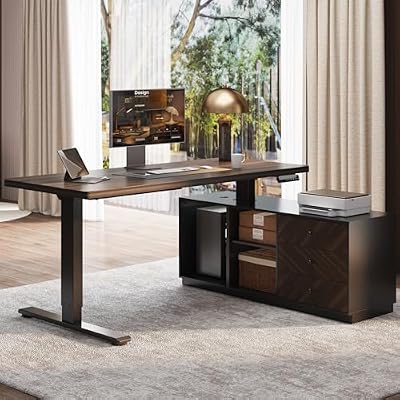
FLEXISPOT 60" Executive Standing Desk with File Cabinet, Black Walnut
Included for '60-Inch Standing Desks With Drawers: What Fits Underneath Without Blocking Your Knees' because the listing specifies Black Walnut, details this guide uses to compare options.
View on Amazon| Measurement | 60×24 Inch Top with Center Drawer | 60×30 Inch Top with Center Drawer |
|---|---|---|
| Desktop depth (total) | 24″ | 30″ |
| Typical drawer box depth (front to back) | 16″ to 18″ | 16″ to 18″ |
| Drawer box height (thickness) | 3.5″ to 5.5″ | 3.5″ to 5.5″ |
| Remaining knee depth (front edge to drawer back) | 6″ to 8″ | 12″ to 14″ |
| Side clearance if drawer is centered (per side) | 20″ to 22″ open on each side | 20″ to 22″ open on each side |
| Usable thigh clearance at lowest position | Often 23.5″ to 24.5″ from floor to drawer bottom | Often 23.5″ to 24.5″ from floor to drawer bottom |
With a 60×24 top, a common 17-inch deep drawer leaves you only 7 inches of depth where your knees can actually go under the drawer. If you sit centered, your knees and the front edge of an office chair will often contact the drawer box. With a 60×30 top, you gain an extra 6 inches of depth, which lets you push your chair in fully and keep your thighs parallel without angling your legs around the box. For anyone over 5’10” or using a chair with a deep seat pan (18″+), the 60×30 is functionally required with a center drawer.
What About Side-Mounted or Two-Drawer Layouts?
Some 60-inch models place one or two shallow drawers on the left and right instead of a single center box. This preserves center knee clearance entirely. The trade-off is drawer size: side drawers on a 60-inch frame are usually 12″ to 14″ wide and 15″ to 16″ deep, good for supplies but not for a laptop or large files. A center drawer is typically 28″ to 32″ wide and offers the most usable storage on a 60-inch desk, but blocks the exact spot where you sit.
Why a Drawer Raises Your Minimum Sitting Height
See also: Best 49 Inch Monitor: Eight Super Ultrawides Compared by Bandwidth and Desk Depth • Working Table for Home: Sit-Stand and L-Shaped Setups Compared
A suspended drawer box hangs 1.5 to 2 inches below the desktop frame and slide mechanism. Most dual-motor standing frames can lower to about 24.5″ to 25.5″ to the desktop surface. Add a 4-inch drawer and the bottom of the drawer becomes the lowest point.
For comfortable sitting, you need 4 to 6 inches of clearance between the top of your thighs and the bottom of the lowest obstruction. Standard ergonomic sitting height for the desktop is 26″ to 29″ for people 5’4″ to 6’0″. Here is how the drawer changes that:
- Frame without drawer: Desktop can sit at 27″ to 28″ for a 5’9″ person, with full thigh clearance underneath.
- Frame with 3.5″ slim drawer: Minimum comfortable desktop height becomes 28.5″ to 29″. Works for most adults 5’6″ and taller with an adjustable chair that rises to 19″ to 20″ seat height.
- Frame with 5″ to 5.5″ deep drawer: Minimum comfortable desktop height becomes 29.5″ to 30.5″. If you are 5’4″ or shorter, or your chair seat only goes to 17″ to 18″, your feet may dangle or your thighs will press the drawer. You will need a footrest and a higher chair cylinder.
This is why many 60 inch standing desks with drawers list a low height of 29″ or higher in the specs, even though the same frame without the drawer could go to 25″. If you need a true low sitting position for a petite user or for use with a low task chair, look for a drawer that is 3.5 inches tall or less, or choose a bolt-on unit you can offset to the side.
Fixed Built-In Drawers vs. Bolt-On Under-Desk Units
Not all drawers are integrated the same way. Understanding the construction difference helps you predict weight capacity, travel range, and long-term stability.
| Feature | Fixed Built-In Drawer (Factory Integrated) | Bolt-On Under-Desk Drawer Unit |
|---|---|---|
| How it attaches | Mounted to desktop and crossbar with pre-drilled inserts | Clamped or screwed to desktop underside after assembly |
| Typical drawer weight (empty) | 12 to 18 lbs | 7 to 15 lbs (steel) / 9 to 14 lbs (engineered wood) |
| Weight capacity per drawer | 15 to 25 lbs | 8 to 15 lbs |
| Effect on desk lift capacity | Reduces total lift rating by drawer weight + contents | Same, but can be removed if you need full capacity |
| Travel range impact | Permanently raises minimum height by 3.5″ to 5.5″ | Raises minimum height only where installed; can be offset to side to preserve center |
| Stability and sag risk | Very stable, load spread across frame | Can flex desktop if mounted to thin particleboard; requires 0.75″+ top or reinforcement plate |
| Best for | Clean look, daily use, heavier supplies | Renters, existing desks, preserving low sitting height |
For lifting performance, check the frame rating. Most 60-inch dual-motor frames are rated for 220 to 310 lbs total. A desktop weighs 45 to 65 lbs, a drawer adds another 12 to 18 lbs, and if you load 20 lbs of supplies, you have already used 77 to 103 lbs before monitors and computers. Keep total load under 70% of the rated capacity for smooth, quiet travel and longer motor life. Bolt-on steel drawers from brands like VIVO and FlexiSpot are usually lighter and can be removed without leaving large visible holes, while factory integrated wood drawers from lines like Vari, UPLIFT Desk, and ApexDesk tend to support more weight and slide more smoothly.
Room Fit and Clearance Around a 60-Inch Desk With Drawers
A 60-inch desk needs more than a 60-inch wall. Plan for chair movement and drawer operation:
- Footprint with chair: A 60×30 desk needs a 72″ to 78″ deep zone to allow a chair to roll back 24″ to 30″ and to fully extend a center drawer (which needs 16″ to 18″ in front).
- In a 10×12 ft room: A 60-inch desk fits well on the 10-foot wall with 24″ to 36″ of clearance on each side for a bookshelf or file cabinet. On the 12-foot wall, you can center it and still have room for a 20″ deep credenza behind you if you keep 42″ between desk back and wall for standing movement.
- Standing range: At standing height (41″ to 45″ desktop height for most adults), the bottom of a 4-inch drawer will be at 37″ to 41″ off the floor. Make sure pendant lights, wall shelves, or window sills above 40″ will not interfere.
- Doorway and assembly: 60-inch tops ship in boxes 62″ to 65″ long weighing 70 to 110 lbs. Measure doorways (standard 30″ to 32″) and stair turns before delivery. Drawers come pre-assembled on integrated models or as a separate 10 to 18 lb box for bolt-on types.
Decision Matrix: Which Drawer Setup Fits Your Situation
| Your Situation | Best Choice on a 60-Inch Frame | Why |
|---|---|---|
| Small apartment / need legroom | 60×30 top with slim 3.5″ side-mounted bolt-on drawer | Preserves full center knee depth and keeps minimum height low |
| Tall user (6’0″+) with deep chair | 60×30 with center built-in drawer | Extra 6″ of desktop depth compensates for deep drawer, no knee contact |
| Petite user (5’4″ and under) | 60×30 with no center drawer, or offset bolt-on unit | Avoids raising sitting height above your ergonomic 26″ to 27″ range |
| Need to store files and supplies daily | 60×30 with fixed double drawer (left/right) or wide center drawer 30″+ | Higher weight limit and smoother slides for frequent use |
| Renter / may move within a year | Bolt-on steel under-desk unit on a standard 60×30 frame | Remove without damage, lighter to move, frame keeps full resale value |
| Back pain / alternate sit-stand often | 60×30 with slim drawer mounted off-center | Keeps full sit-stand range (low 28″ to high 47″) without thigh pressure |
Assembly and Durability Realities
60 inch standing desks with drawers usually take 45 to 75 minutes to assemble with two people. The heaviest single step is flipping the desk after attaching legs; a 60-inch top with pre-installed drawer can weigh 75 to 90 lbs at that stage. Have a second person support the center to avoid twisting the drawer slides.
What wears first is not the motor but the drawer slides and the desktop screw inserts. Ball-bearing slides rated for 30,000 cycles will outlast friction slides by years if you open the drawer 10+ times per day. On engineered wood tops (MDF with laminate), over-tightening drawer screws can strip the insert. On solid wood or bamboo tops, the same screws hold more securely and handle repeated disassembly better. Metal drawer boxes also tolerate more weight over time without sagging at the center span of a 60-inch top.
For long-term care, avoid loading more than 20 lbs in a single wood drawer and more than 12 lbs in a clamp-on unit. Distribute weight evenly and keep liquids away from the drawer front seam, especially on laminate fronts where swelling starts.
What to Check Before You Buy
- Measure your seated thigh height (floor to top of thigh) and add 5 inches – that is the minimum clearance you need to the bottom of the drawer. Compare it to the listed “minimum height to drawer bottom” or ask the seller for it.
- Confirm the low height is the desktop height, not the drawer bottom height. Many listings show the lower number to look more ergonomic.
- Check if the drawer locks at standing height or can slide open when raised. Soft-close slides with a detent prevent accidental opening.
- For bolt-on units, verify desktop thickness and whether the unit needs drilling. Clamp-on types need at least 0.75″ of overhang beyond the frame.
Related Reviews & Guides


Quick Picks: Best Anti-Fatigue Mats for Standing Desks at…

Best Standing Desks Under $500: Fit and Complete Cost