Last Updated: October 4, 2026
The Canon imageFORMULA R30 is worth buying if you want a small, simple sheet-fed document scanner for a home office or a single desk at a small business. Canon rates it at up to 30 pages per minute, it scans both sides of a page in one pass, and its automatic document feeder takes a stack of up to 60 sheets, which covers most bill-paying, tax-season, and receipt-filing jobs without babysitting the machine.
It is not the best choice for a busy shared office that scans thousands of pages a day, for anyone who needs to scan bound books or fragile photos, or for users who want a standalone scanner that sends files over Wi-Fi without a computer. For those jobs, a faster networked workgroup scanner or a flatbed is a better match. For one person digitizing paperwork, the R30 hits a sensible balance of size, speed, and price.
Availability note: new R30 units are hard to find in 2026. The closest current alternatives from the same Canon imageFORMULA family are the R40II (the step-up office model with a larger feeder) and the compact R10 (a USB-powered portable). Both are shown below.
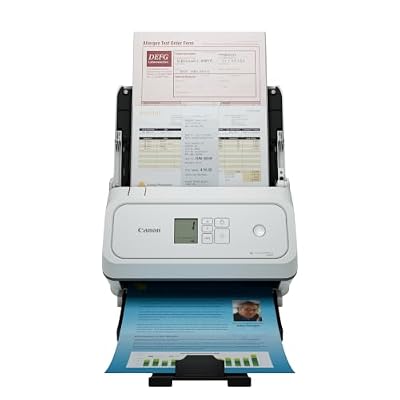
Canon imageFORMULA R40II Office Document Scanner - Duplex Scanning, Easy Setup, Scans a Wide Variety of Documents, Scans to Cloud
Included for 'Canon Imageformula R30 Review (2026): Is It Worth Buying?' as a representative home product in this roundup; selection reflects the product set returned for this topic.
View on Amazon
Canon imageFORMULA R10 - Portable Document Scanner, USB Powered, Duplex Scanning, Document Feeder, Easy Setup, Convenient, Perfect for Mobile Users, White
Included for 'Canon Imageformula R30 Review (2026): Is It Worth Buying?' as a representative home product in this roundup; selection reflects the product set returned for this topic.
View on Amazon📄 In This Review
Canon imageFORMULA R30 Key Specs
| Spec | Canon imageFORMULA R30 |
|---|---|
| Scanner type | Compact sheet-fed document scanner |
| Rated speed | Up to 30 pages per minute |
| Duplex | Yes, single-pass two-sided |
| Feeder capacity | Up to 60 sheets |
| Connection | USB to a computer |
| Intended workload | Personal and small-office use |
| Typical price | Usually around $300–$400 |
Rated speeds assume letter-size pages at standard document resolution. Higher resolutions, color scanning, and mixed paper sizes slow real throughput, which is true for every scanner in this class.
Who the R30 Is For
See also: Best Monitor for MacBook Air: Two USB-C 4K Screens and Six Adapter-Dependent Alternatives • Best Monitor for MacBook Pro: Eight Listings Sorted by Cable, Sharpness and Scaling
- Home offices going paperless: scanning mail, bills, medical paperwork, and statements as they arrive.
- Freelancers and sole proprietors: invoices, receipts, contracts, and tax documents.
- Small professional offices: a front-desk scanner for intake forms and ID cards.
- Anyone clearing a backlog: the 60-sheet feeder makes boxes of old files manageable over a few evenings.
Who Should Look Elsewhere
- Teams that share one scanner across many users and need network scanning to email or cloud folders.
- Offices scanning several thousand pages per day, where a higher-duty workgroup model will last longer.
- Photo archivists and book scanners, who need a flatbed or a dedicated photo scanner.
What Stands Out
Small footprint
The R30 belongs to Canon’s compact desktop line, so it fits beside a monitor rather than taking over a side table. When the trays are folded, it is easy to store in a drawer or on a shelf.
Duplex in one pass
Two-sided scanning in a single pass is the feature that matters most for real paperwork. Bank statements, forms, and contracts often have content on the back, and scanning both sides at once halves the handling time compared with flipping pages.
A real automatic feeder
A 60-sheet feeder is generous for a compact scanner. Many portable scanners accept one page at a time, which is fine for receipts but painful for a 40-page lease.
Canon’s document scanning pedigree
Canon’s imageFORMULA line is widely used in offices, and its scanning software handles the basics well: automatic page size detection, blank page removal, deskewing crooked pages, and saving to searchable PDF.
Trade-offs and Limits
Computer required
The R30 is a USB scanner. It does not scan directly to a phone or cloud service on its own, so plan on keeping a computer nearby.
Speed is good, not great
Thirty pages per minute is quick for personal use, but larger models run 40 to 60 pages per minute and handle bigger daily volumes. If scanning is a core part of your job, the step up can pay for itself in time saved.
Not for every paper type
Sheet-fed scanners pull paper through rollers. Very thin receipts, folded documents, staples, and torn pages can jam. Photos and delicate originals are safer on a flatbed.
How It Compares
| Scanner class | Typical speed | Feeder | Best for |
|---|---|---|---|
| Canon imageFORMULA R30 | Up to 30 ppm | Up to 60 sheets | Personal desk and small office |
| Portable one-page scanners | About 5–15 ppm | Single sheet | Travel and occasional receipts |
| Workgroup network scanners | 40–60 ppm or more | 80–100 sheets | Shared offices, high daily volume |
| Flatbed scanners | Slow, one page at a time | None | Photos, books, fragile originals |
Setup and Workflow Tips
- Install Canon’s scanning software before connecting, then create presets for common jobs such as “bills to PDF” and “receipts to folder”.
- Scan text documents at 300 dpi. It keeps files small and gives OCR enough detail for searchable text.
- Turn on blank page skipping when scanning duplex, so one-sided pages do not create empty sheets in your PDF.
- Remove staples and paper clips and fan the stack before loading to reduce double-feeds.
- Clean the rollers and glass every few thousand pages with a lint-free cloth to prevent streaks and misfeeds.
- Use a consistent naming pattern, such as date plus document type, so files stay findable years later.
Is It Worth Buying in 2026?
For a single user or small office that wants dependable two-sided scanning in a compact body, yes. The R30 removes most of the friction from going paperless: load a stack, press scan, and get searchable PDFs. Buyers who need network scanning, heavy daily volume, or photo-quality capture should budget for a different class of scanner instead.
FAQ
Does the R30 work with Mac and Windows?
Canon supports its imageFORMULA desktop scanners on both platforms; check the current driver page for your OS version before buying.
Can it scan receipts and ID cards?
Yes, small documents and cards can be fed, though very long or crumpled receipts are more reliable when scanned one at a time.
Does it create searchable PDFs?
With Canon’s bundled software, scans can be saved as searchable PDFs using OCR.